Translation Providers
The AI Localization Automator supports five different AI providers, each with unique strengths and configuration options. Choose the provider that best fits your project's needs, budget, and quality requirements.
Ollama (Local AI)
Best for: Privacy-sensitive projects, offline translation, unlimited usage
Ollama runs AI models locally on your machine, providing complete privacy and control without API costs or internet requirements.
Popular Models
- translategemma:12b (Specialized translation model based on Gemma 3)
- llama3.2 (Recommended general purpose)
- mistral (Efficient alternative)
- codellama (Code-aware translations)
- And many more community models
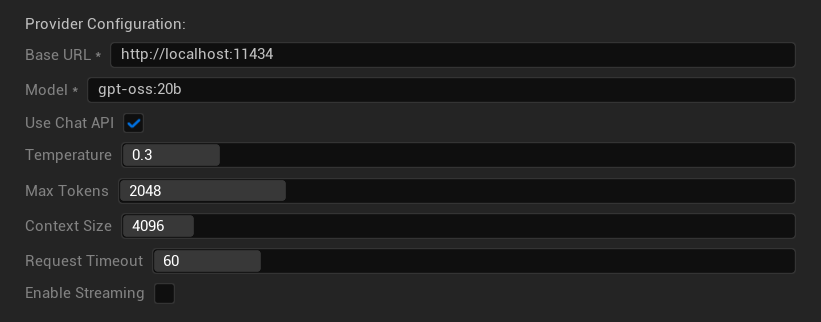
Configuration Options
- Base URL: Local Ollama server (default:
http://localhost:11434) - Model: Name of locally installed model (required)
- Use Chat API: Enable for better conversation handling
- Temperature: 0.0-2.0 (0.3 recommended)
- Max Tokens: 1-8,192 tokens
- Context Size: 512-32,768 tokens
- Request Timeout: 10-300 seconds (local models can be slower)
- Enable Streaming: For real-time response processing
Strengths
- ✅ Complete privacy (no data leaves your machine)
- ✅ No API costs or usage limits
- ✅ Works offline
- ✅ Full control over model parameters
- ✅ Wide variety of community models
- ✅ No vendor lock-in
Considerations
- 💻 Requires local setup and capable hardware
- ⚡ Generally slower than cloud providers
- 🔧 More technical setup required
- 📊 Translation quality varies significantly by model (some can exceed cloud providers)
- 💾 Large storage requirements for models
Setting Up Ollama
- Install Ollama: Download from ollama.ai and install on your system
- Download Models: Use
ollama pull translategemma:12bto download your chosen model - Start Server: Ollama runs automatically, or start with
ollama serve - Configure Plugin: Set base URL and model name in the plugin settings
- Test Connection: The plugin will verify connectivity when you apply configuration
OpenAI
Best for: Highest overall translation quality, extensive model selection
OpenAI provides industry-leading language models through their Chat Completions API, including the latest GPT models, reasoning models, and web search-enabled models.
Available Models
GPT-5 Family (Flagship models)
- gpt-5, gpt-5-mini, gpt-5-nano
- gpt-5.1, gpt-5.2, gpt-5.3-chat-latest
- gpt-5.4, gpt-5.4-mini, gpt-5.4-nano
- gpt-5.5, gpt-5.6-sol, gpt-5.6-luna
GPT-4.1 Family (High-performance)
- gpt-4.1, gpt-4.1-mini, gpt-4.1-nano
GPT-4o Family (Multimodal)
- gpt-4o, gpt-4o-mini, chatgpt-4o-latest
O-Series (Reasoning models — temperature/top_p not supported)
- o1, o1-pro, o3, o3-mini, o4-mini
Web Search Models (Temperature/top_p not supported)
- gpt-5-search-api, gpt-4o-search-preview, gpt-4o-mini-search-preview
Legacy / Preview
- gpt-4.5-preview, gpt-4, gpt-4-32k, gpt-4-turbo, gpt-3.5-turbo, gpt-3.5-turbo-16k
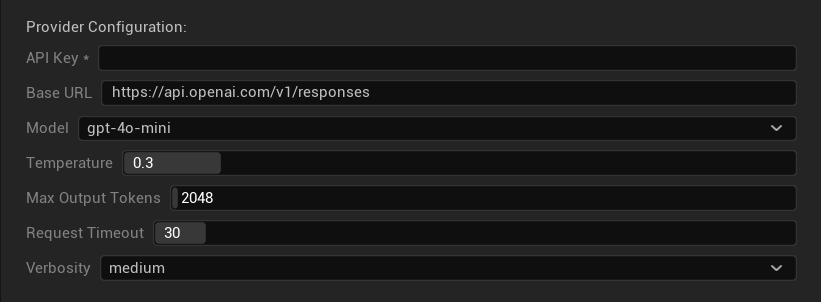
Configuration Options
- API Key: Your OpenAI API key (required)
- Base URL: API endpoint (default:
https://api.openai.com/v1/chat/completions) - Model: Choose from available models listed above
- Use Temperature: Toggle temperature parameter on/off (automatically ignored for o-series reasoning and web search models)
- Temperature: 0.0–2.0 (0.3 recommended for translation consistency)
- Top P: 0.0–1.0 nucleus sampling parameter (ignored for o-series reasoning and web search models)
- Max Completion Tokens: 1–128,000 tokens (includes both output and reasoning tokens)
- Request Timeout: 5–300 seconds
Strengths
- ✅ Consistently high-quality translations
- ✅ Excellent context understanding
- ✅ Strong format preservation
- ✅ Wide language support
- ✅ Reliable API uptime
Considerations
- 💰 Higher cost per request
- 🌐 Requires internet connection
- ⏱️ Usage limits based on tier
Anthropic Claude
Best for: Nuanced translations, creative content, safety-focused applications
Claude models excel at understanding context and nuance, making them ideal for narrative-heavy games and complex localization scenarios.
Available Models
Claude 5 Family
- claude-opus-5, claude-sonnet-5, claude-fable-5
Claude 4.8 Family
- claude-opus-4-8
Claude 4.7 Family
- claude-opus-4-7
Claude 4.6 Family
- claude-opus-4-6, claude-sonnet-4-6
Claude 4.5 Family
- claude-haiku-4-5 (Fast and efficient)
- claude-sonnet-4-5, claude-opus-4-5
Claude 4.x Family
- claude-sonnet-4-0, claude-opus-4-1, claude-opus-4-0
Claude 3.x Family (Legacy)
- claude-3-7-sonnet-latest, claude-3-5-haiku-latest, claude-3-opus-latest
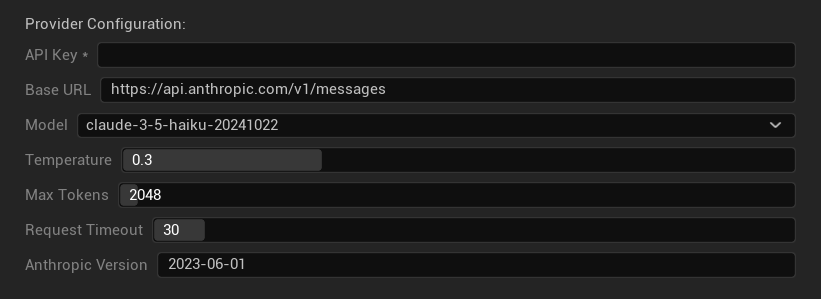
Configuration Options
- API Key: Your Anthropic API key (required)
- Base URL: Claude API endpoint
- Model: Select from Claude model family
- Temperature: 0.0–1.0 (0.3 recommended)
- Top K: Top-K sampling parameter (0 = not set)
- Max Tokens: 1–64,000 tokens
- Request Timeout: 5–300 seconds
- Anthropic Version: API version header
Strengths
- ✅ Exceptional context awareness
- ✅ Great for creative/narrative content
- ✅ Strong safety features
- ✅ Detailed reasoning capabilities (extended thinking on 3.7+ models)
- ✅ Excellent instruction following
Considerations
- 💰 Premium pricing model
- 🌐 Internet connection required
- 📏 Token limits vary by model
DeepSeek
Best for: Cost-effective translation, high throughput, budget-conscious projects
DeepSeek offers competitive translation quality at a fraction of the cost of other providers, making it ideal for large-scale localization projects.
Available Models
- deepseek-v4-pro
- deepseek-v4-flash
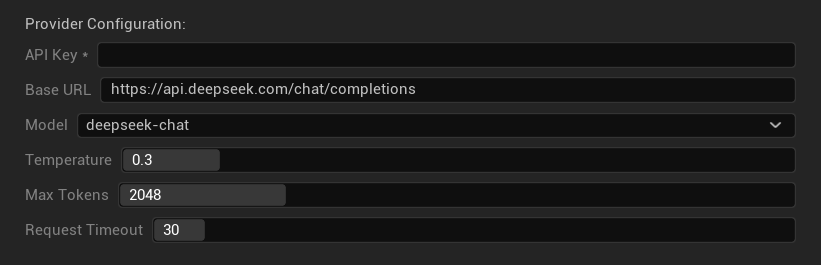
Configuration Options
- API Key: Your DeepSeek API key (required)
- Base URL: DeepSeek API endpoint
- Model: Choose between chat and reasoner models
- Temperature: 0.0-2.0 (0.3 recommended)
- Max Tokens: 1-8,192 tokens
- Request Timeout: 5-300 seconds
Strengths
- ✅ Very cost-effective
- ✅ Good translation quality
- ✅ Fast response times
- ✅ Simple configuration
- ✅ High rate limits
Considerations
- 📏 Lower token limits
- 🆕 Newer provider (less track record)
- 🌐 Requires internet connection
Google Gemini
Best for: Multilingual projects, cost-effective translation, Google ecosystem integration
Gemini models offer strong multilingual capabilities with competitive pricing and unique features like thinking mode for enhanced reasoning.
Available Models
Gemini 3.x Family (Preview)
- gemini-3.1-pro, gemini-3.1-flash-light, gemini-3.5-flash, gemini-3.6-flash
Gemini 2.5 Family (With thinking support)
- gemini-2.5-pro (Flagship with thinking)
- gemini-2.5-flash (Fast, with thinking support)
- gemini-2.5-flash-lite (Lightweight variant)
Gemini 2.0 Family
- gemini-2.0-flash, gemini-2.0-flash-lite
Latest Aliases
- gemini-flash-latest, gemini-flash-lite-latest
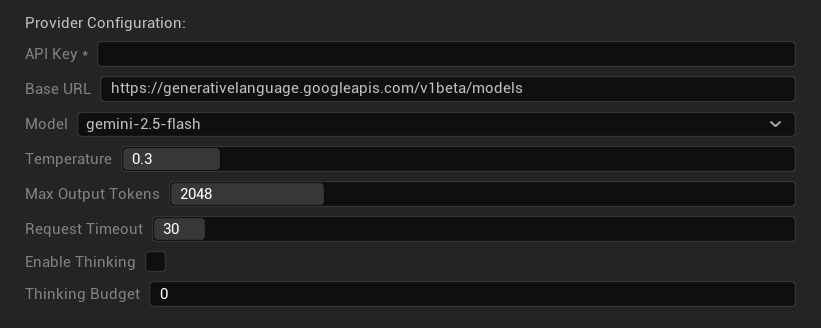
Configuration Options
- API Key: Your Google AI API key (required)
- Base URL: Gemini API endpoint
- Model: Select from Gemini model family
- Temperature: 0.0–2.0 (0.3 recommended)
- Max Output Tokens: 1–8,192 tokens
- Request Timeout: 5–300 seconds
- Enable Thinking: Activate enhanced reasoning for 2.5+ models
- Thinking Budget: Control thinking token allocation (0 = no thinking)
Strengths
- ✅ Strong multilingual support
- ✅ Competitive pricing
- ✅ Advanced reasoning (thinking mode)
- ✅ Google ecosystem integration
- ✅ Regular model updates with preview access to newest models
Considerations
- 🧠 Thinking mode increases token usage
- 📏 Variable token limits by model
- 🌐 Internet connection required
Choosing the Right Provider
| Provider | Best For | Quality | Cost | Setup | Privacy |
|---|---|---|---|---|---|
| Ollama | Privacy/offline | Variable* | Free | Advanced | Local |
| OpenAI | Highest quality | ⭐⭐⭐⭐⭐ | 💰💰💰 | Easy | Cloud |
| Claude | Creative content | ⭐⭐⭐⭐⭐ | 💰💰💰💰 | Easy | Cloud |
| DeepSeek | Budget projects | ⭐⭐⭐⭐ | 💰 | Easy | Cloud |
| Gemini | Multilingual | ⭐⭐⭐⭐ | 💰 | Easy | Cloud |
*Quality for Ollama varies significantly based on the local model used - some modern local models can match or exceed cloud providers.
Provider Configuration Tips
For All Cloud Providers:
- Store API keys securely and don't commit them to version control
- Start with conservative temperature settings (0.3) for consistent translations
- Monitor your API usage and costs
- Test with small batches before large translation runs
For Ollama:
- Ensure adequate RAM (8GB+ recommended for larger models)
- Use SSD storage for better model loading performance
- Consider GPU acceleration for faster inference
- Test locally before relying on it for production translations