So verwenden Sie das Plugin
Dieser Leitfaden behandelt die vollständige Runtime-API: Erstellen einer LLM-Instanz, Laden von Modellen, Senden von Nachrichten, Herunterladen von Modellen zur Laufzeit, Verwalten des Zustands und Hilfsfunktionen.
Erstellen Sie eine LLM-Instanz
Erstellen Sie zunächst ein Runtime Local LLM-Objekt. Behalten Sie eine Referenz darauf (z. B. als Variable in Blueprints oder als UPROPERTY in C++), um eine vorzeitige Speicherbereinigung zu verhindern.
- Blueprint
- C++
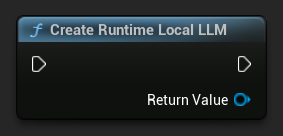
UPROPERTY()
URuntimeLocalLLM* LLM;

LLM = URuntimeLocalLLM::CreateRuntimeLocalLLM();
Modell laden
Sie müssen ein Modell laden, bevor Sie Nachrichten senden. Das Plugin bietet mehrere Lademethoden, abhängig von Ihrem Arbeitsablauf.
Nach Namen laden
Wenn Sie Modelle über das Einstellungsfenster des Editors verwalten, verwenden Sie Load Model (By Name).
- Blueprint
- C++
- UE 5.3 und früher
- UE 5.4+
In UE 5.3 und früher erscheint das Dropdown nicht, daher müssen Sie die verfügbaren Modelle manuell abrufen. Verwenden Sie Get All Downloaded Model Metadata, holen Sie das Element bei Index 0 (oder das gewünschte Modell), übergeben Sie es an Get Model File Name, um die Namenszeichenfolge abzurufen, und übergeben Sie diese dann an Load Model (By Name).
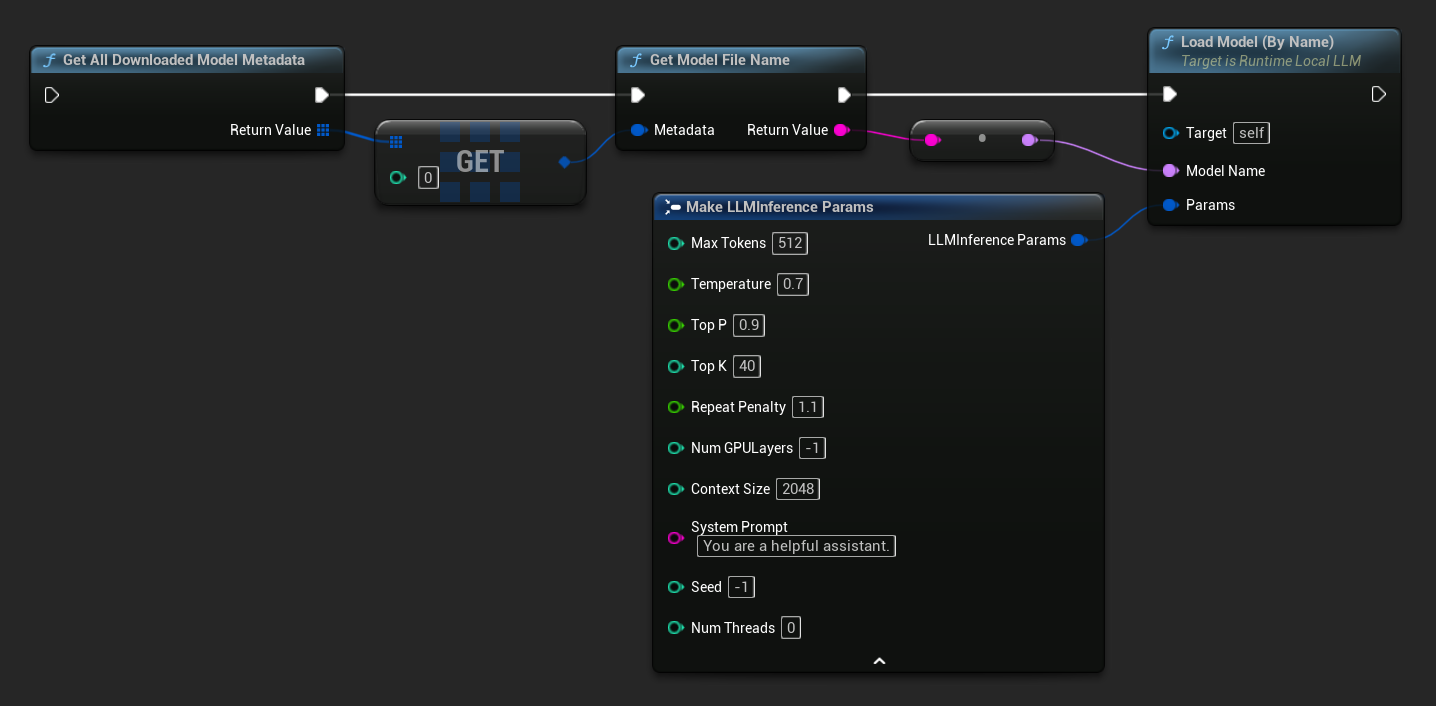
In UE 5.4 und später zeigt Load Model (By Name) ein Dropdown aller Modelle auf der Festplatte an – wählen Sie einfach das Modell aus, das Sie laden möchten.
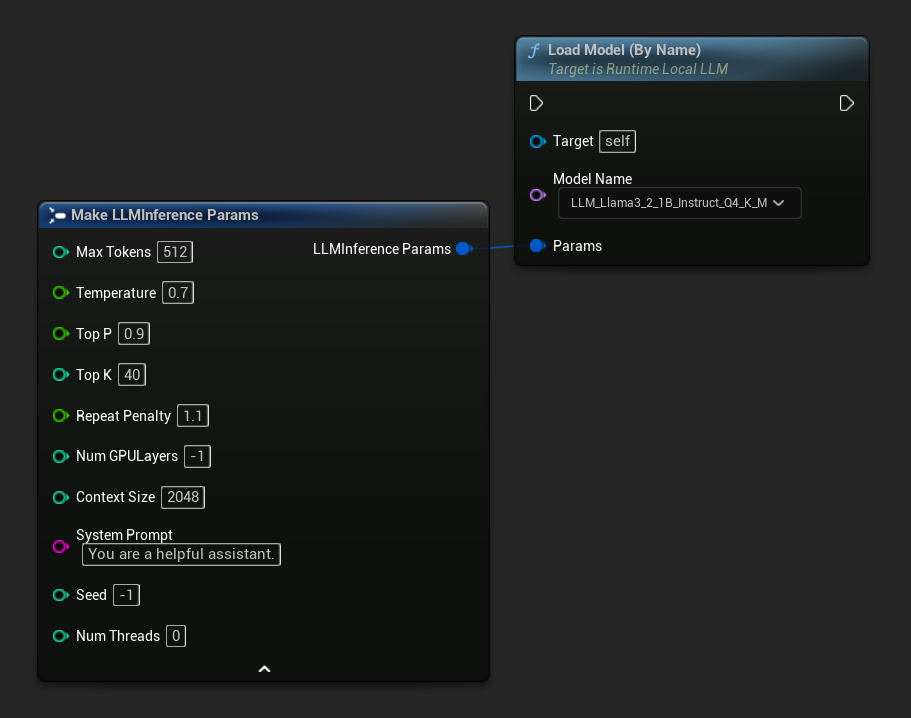
In C++ verwenden Sie GetAllDownloadedModelMetadata, um verfügbare Modelle abzurufen, und GetModelFileName, um den Namen zu erhalten, der an LoadModelByName übergeben werden soll:
FLLMInferenceParams Params;
Params.MaxTokens = 512;
Params.Temperature = 0.7f;
Params.SystemPrompt = TEXT("You are a helpful assistant.");

TArray<FLLMModelMetadata> DownloadedModels = URuntimeLLMLibrary::GetAllDownloadedModelMetadata();

if (DownloadedModels.Num() > 0)
{
    const FLLMModelMetadata& Model = DownloadedModels[0]; // Select the first available model
    FString ModelFileName = URuntimeLLMLibrary::GetModelFileName(Model);
    LLM->LoadModelByName(FName(*ModelFileName), Params);
}
Aus Dateipfad laden
Laden Sie ein Modell direkt von einem absoluten Dateipfad zu einer .gguf-Datei:
- Blueprint
- C++
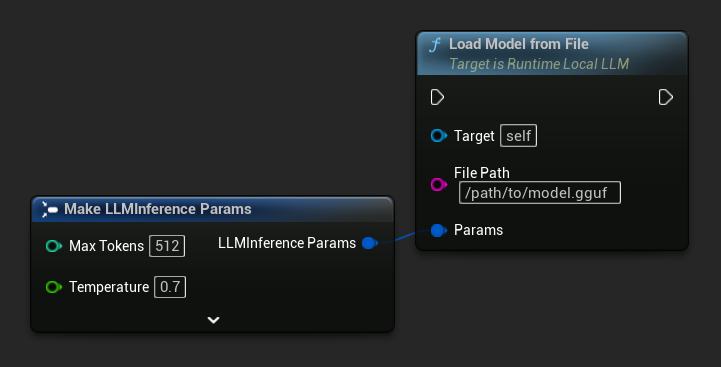
FLLMInferenceParams Params;
LLM->LoadModelFromFile(TEXT("/path/to/model.gguf"), Params);
Von URL laden (Herunterladen und Laden)
Lade ein Modell von einer URL herunter (falls nicht bereits auf der Festplatte vorhanden) und lade es automatisch. Wenn die Datei bereits lokal existiert, wird der Download übersprungen.
- Blueprint
- C++
Die einfachste Variante benötigt nur eine URL – die Metadaten werden aus dem Dateinamen abgeleitet:
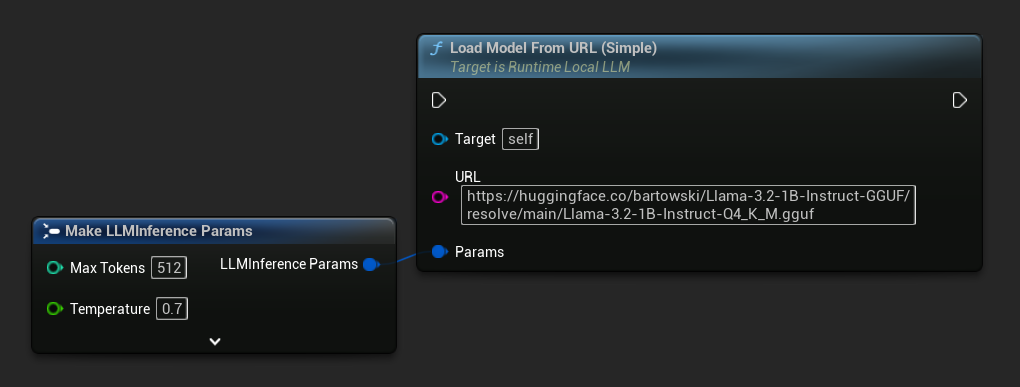
Sie können auch Load Model From URL mit vollständigen Modell-Metadaten für umfangreichere Modellinformationen verwenden:
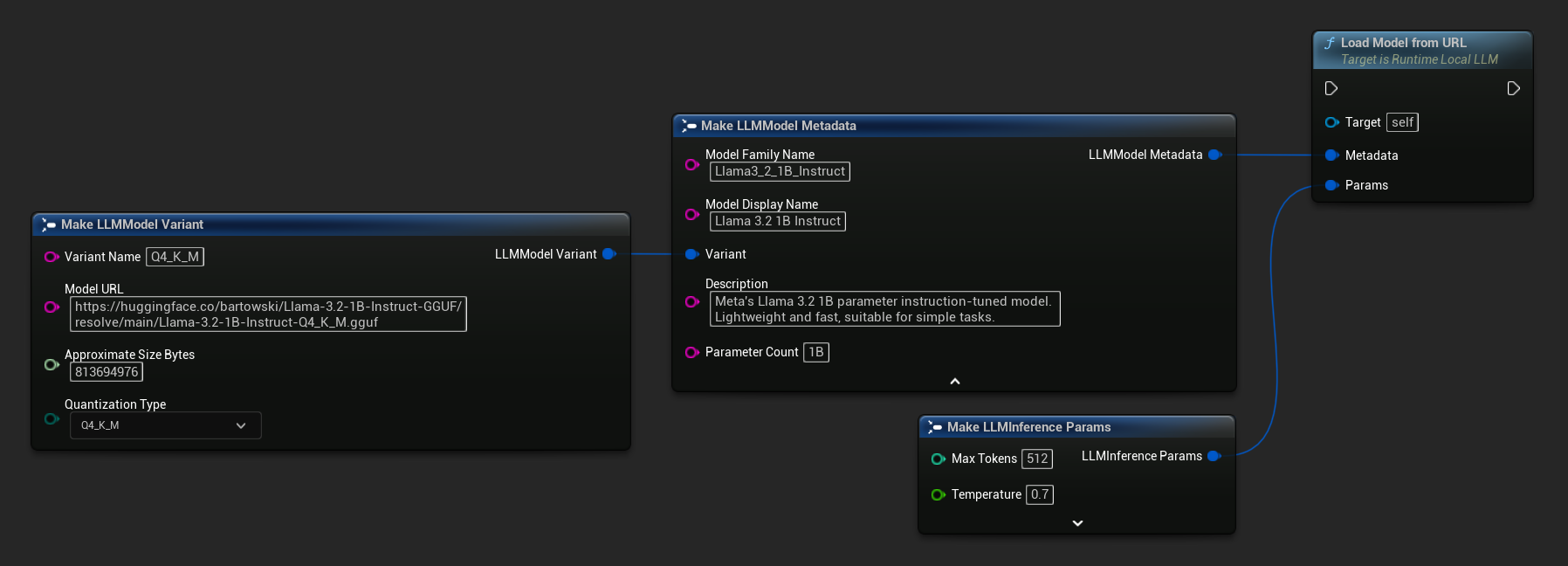
FLLMInferenceParams Params;

// Simple: URL only - metadata is derived from the filename
LLM->LoadModelFromURLSimple(
    TEXT("https://huggingface.co/bartowski/Llama-3.2-1B-Instruct-GGUF/resolve/main/Llama-3.2-1B-Instruct-Q4_K_M.gguf"), Params);

// With full metadata
FLLMModelMetadata Metadata;
Metadata.ModelFamilyName = TEXT("Llama3_2_1B_Instruct");
Metadata.ModelDisplayName = TEXT("Llama 3.2 1B Instruct");
Metadata.Description = TEXT("Meta's Llama 3.2 1B parameter instruction-tuned model. Lightweight and fast, suitable for simple tasks.");
Metadata.ParameterCount = TEXT("1B");
Metadata.Variant.VariantName = TEXT("Q4_K_M");
Metadata.Variant.ModelURL = TEXT("https://huggingface.co/bartowski/Llama-3.2-1B-Instruct-GGUF/resolve/main/Llama-3.2-1B-Instruct-Q4_K_M.gguf");
Metadata.Variant.ApproximateSizeBytes = 776LL * 1024 * 1024;
Metadata.Variant.QuantizationType = ELLMQuantizationType::Q4_K_M;
LLM->LoadModelFromURL(Metadata, Params);
Asynchrones Laden (Blueprint)
Um die Lastabschlüsse und Fehler über Ausgangspins zu behandeln, anstatt Delegaten manuell zu binden, stehen zwei asynchrone Knoten zur Verfügung.
Load Model By Name (Async) spiegelt Load Model (By Name) wider – in UE 5.4+ zeigt es ein Dropdown aller Modelle auf der Festplatte an:
- UE 5.4+
- UE 5.3 und früher
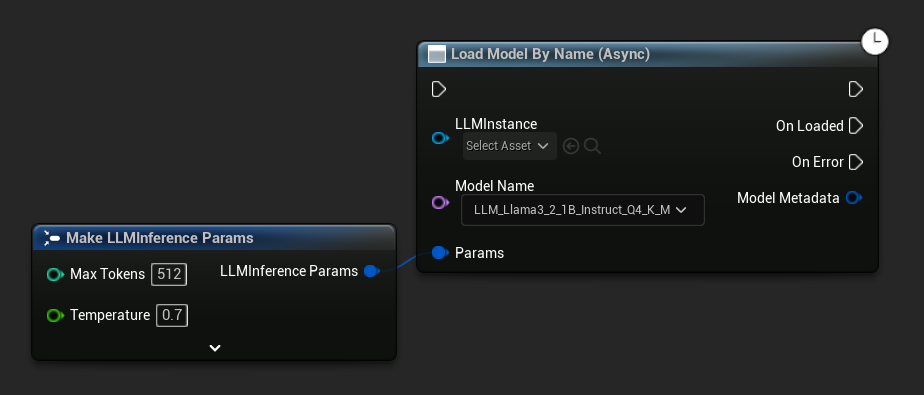
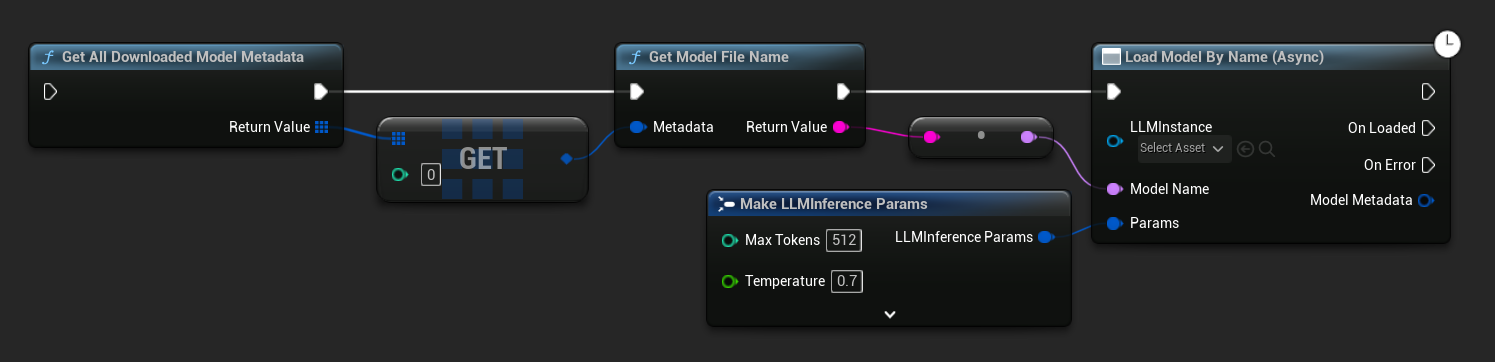
In UE 5.3 und früher erscheint das Dropdown nicht. Verwenden Sie Get All Downloaded Model Metadata, rufen Sie das Element an Index 0 (oder das gewünschte Modell) ab, übergeben Sie es an Get Model File Name, und übergeben Sie das Ergebnis an Load Model By Name (Async).
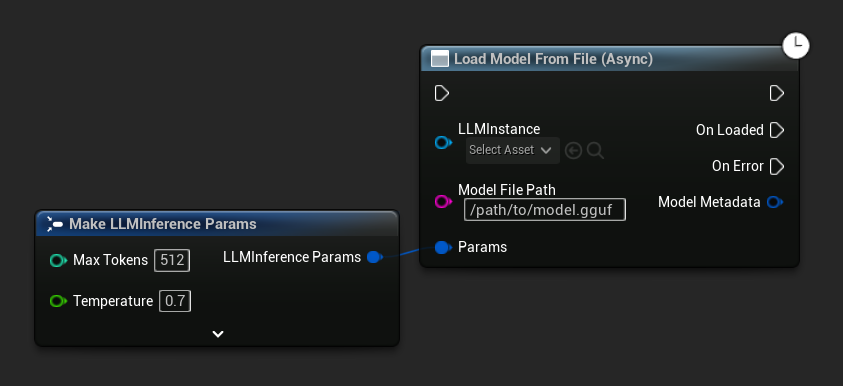
Load Model From File (Async) akzeptiert stattdessen einen absoluten Dateipfad:
Ereignisse binden
An die Delegaten der LLM-Instanz binden, um Rückrufe zu erhalten. Alle Rückrufe werden im Spielthread ausgelöst.
- Blueprint
- C++
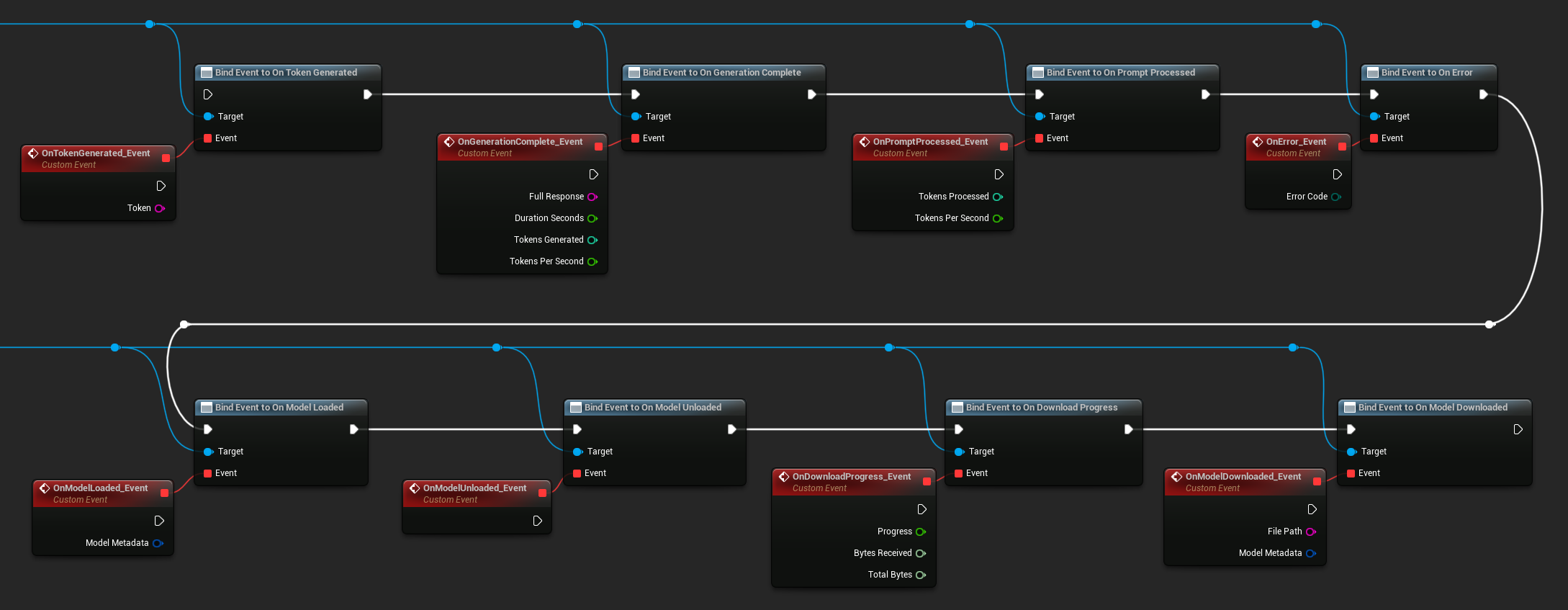
Verfügbare Delegaten:
- Bei Token generiert: Wird für jedes ausgegebene Token ausgelöst
- Bei Generierung abgeschlossen: Wird ausgelöst, wenn die vollständige Antwort bereit ist, mit Dauer, Token-Anzahl und Token pro Sekunde
- Bei Eingabeaufforderung verarbeitet: Wird ausgelöst, nachdem die Eingabeaufforderung verarbeitet wurde, bevor die Generierung beginnt
- Bei Fehler: Wird ausgelöst, wenn während eines Vorgangs ein Fehler auftritt
- Bei Modell geladen: Wird ausgelöst, wenn ein Modell fertig geladen ist
- Bei Modell entladen: Wird ausgelöst, wenn das Modell entladen wird
- Bei Download-Fortschritt: Wird während eines Modell-Downloads regelmäßig ausgelöst (Fortschrittsanteil, empfangene Bytes, Gesamtbytes)
- Bei Modell heruntergeladen: Wird ausgelöst, wenn ein reiner Download-Vorgang abgeschlossen ist
- Bei Konversation gespeichert: Wird ausgelöst, wenn eine Konversation in eine JSON-Datei geschrieben wurde
- Bei Konversation geladen: Wird ausgelöst, wenn eine Konversation aus einer Datei oder einem Speicher-Snapshot geladen wurde
- Bei Verlauf zusammengefasst: Wird ausgelöst, wenn die automatische Zusammenfassung ältere Nachrichten komprimiert (meldet Nachrichtenanzahl, gespeicherte Token und die Zusammenfassung)
LLM->OnTokenGeneratedNative.AddLambda([](const FString& Token)
{
});

LLM->OnGenerationCompleteNative.AddLambda(
[](const FString& FullResponse, float DurationSeconds, int32 TokensGenerated, float TokensPerSecond)
{
});

LLM->OnPromptProcessedNative.AddLambda([](int32 TokensProcessed, float TokensPerSecond)
{
});

LLM->OnErrorNative.AddLambda([](ELLMErrorCode ErrorCode)
{
});

LLM->OnModelLoadedNative.AddLambda([](const FLLMModelMetadata& ModelMetadata)
{
});

LLM->OnModelUnloadedNative.AddLambda([]()
{
});

LLM->OnDownloadProgressNative.AddLambda([](float Progress, int64 BytesReceived, int64 TotalBytes)
{
});

LLM->OnModelDownloadedNative.AddLambda([](const FString& FilePath, const FLLMModelMetadata& ModelMetadata)
{
});

LLM->OnConversationSavedNative.AddLambda([](const FString& FilePath)
{
});

LLM->OnConversationLoadedNative.AddLambda([](const FLLMConversationSnapshot& Snapshot)
{
});

LLM->OnHistorySummarizedNative.AddLambda([](int32 MessagesRemoved, int32 TokensSaved, const FString& Summary)
{
});
Nachrichten senden
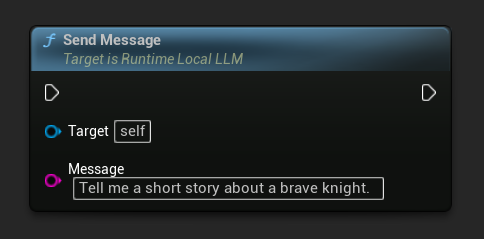
Sobald ein Modell geladen ist, senden Sie eine Benutzernachricht, um eine Antwort zu generieren:
- Blueprint
- C++
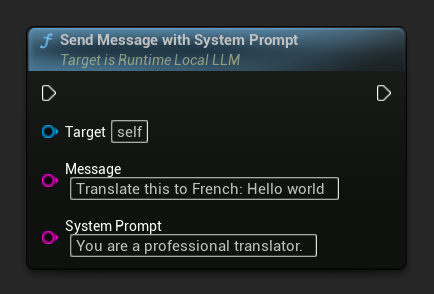
Um den System-Prompt für eine bestimmte Nachricht zu überschreiben, verwenden Sie Send Message With System Prompt:
LLM->SendMessage(TEXT("Tell me a short story about a brave knight."));

// With a custom system prompt override
LLM->SendMessageWithSystemPrompt(
    TEXT("Translate this to French: Hello world"),
    TEXT("You are a professional translator.")
);
Tokens werden durch OnTokenGenerated gestreamt, sobald sie erzeugt werden. Wenn die Generierung abgeschlossen ist, wird OnGenerationComplete mit der vollständigen Antwort, der Dauer, der Token-Anzahl und den Token pro Sekunde ausgelöst.
Asynchrone Nachricht senden (Blueprint)
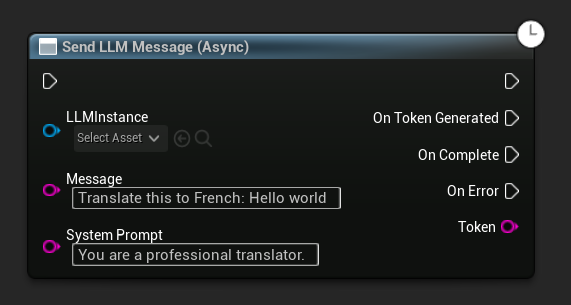
Der Send LLM Message (Async)-Knoten bietet dedizierte Ausgabepins für Tokens, Vervollständigung und Fehler:
Modelle zur Laufzeit herunterladen
Neben dem oben beschriebenen Download-und-Laden-Ablauf können Sie ein Modell auf die Festplatte herunterladen, ohne es zu laden. Dies ist nützlich, um Modelle in einem Ladebildschirm oder Einstellungsmenü vorab zwischenzuspeichern.
- Blueprint
- C++
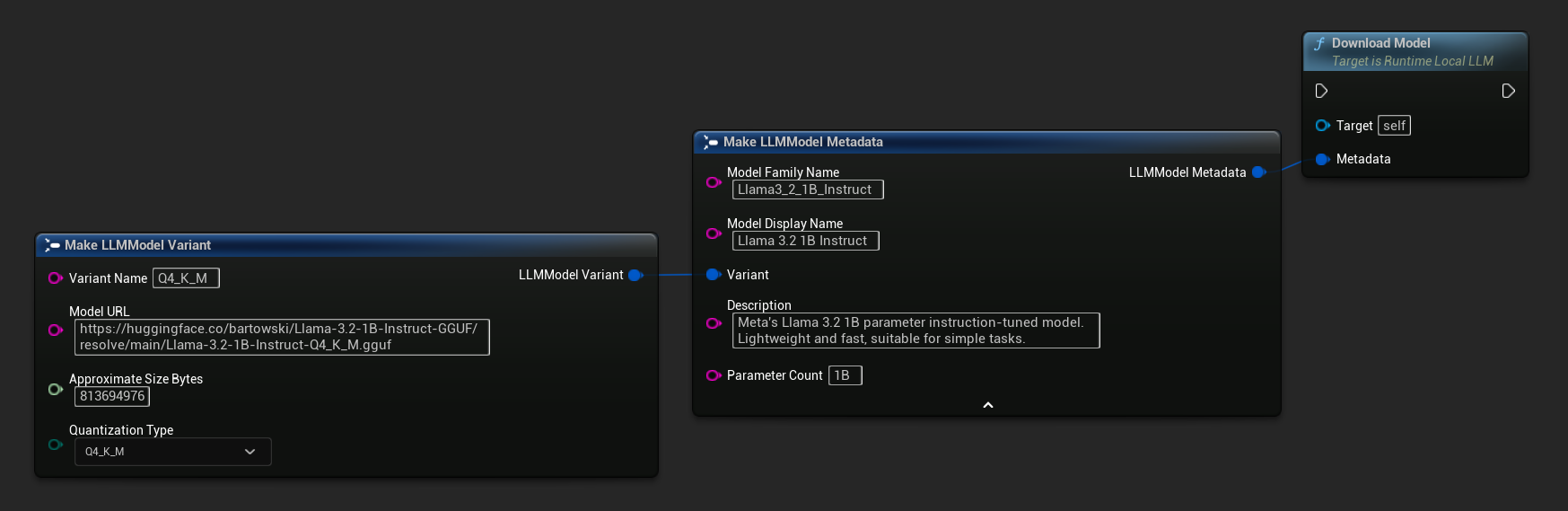
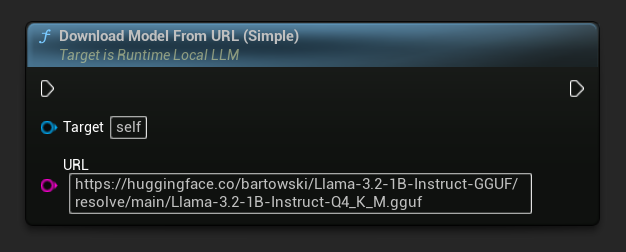
Eine URL-only-Variante ist ebenfalls verfügbar:
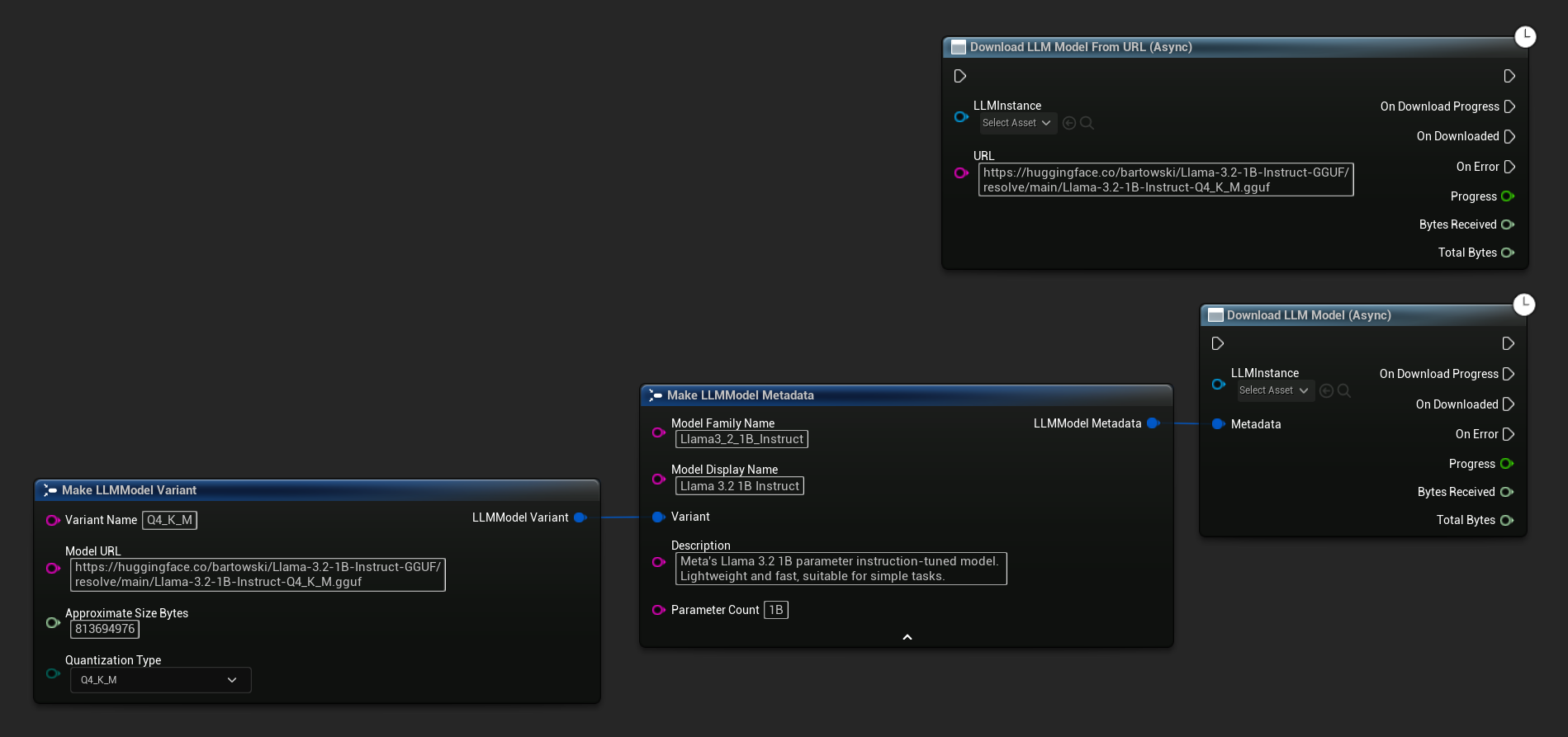
Der Knoten Download LLM Model (Async) und Download LLM Model From URL (Async) bietet Ausgabepins für Fortschritt, Abschluss und Fehler:
// With full metadata
FLLMModelMetadata Metadata;
Metadata.ModelFamilyName = TEXT("Llama3_2_1B_Instruct");
Metadata.ModelDisplayName = TEXT("Llama 3.2 1B Instruct");
Metadata.Description = TEXT("Meta's Llama 3.2 1B parameter instruction-tuned model. Lightweight and fast, suitable for simple tasks.");
Metadata.ParameterCount = TEXT("1B");
Metadata.Variant.VariantName = TEXT("Q4_K_M");
Metadata.Variant.ModelURL = TEXT("https://huggingface.co/bartowski/Llama-3.2-1B-Instruct-GGUF/resolve/main/Llama-3.2-1B-Instruct-Q4_K_M.gguf");
Metadata.Variant.ApproximateSizeBytes = 776LL * 1024 * 1024;
Metadata.Variant.QuantizationType = ELLMQuantizationType::Q4_K_M;
LLM->DownloadModel(Metadata);

// URL only
LLM->DownloadModelFromURL(
    TEXT("https://huggingface.co/bartowski/Llama-3.2-1B-Instruct-GGUF/resolve/main/Llama-3.2-1B-Instruct-Q4_K_M.gguf"));
Der OnDownloadProgress-Delegat meldet den Fortschritt während des Downloads. OnModelDownloaded wird ausgelöst, wenn die Datei auf die Festplatte gespeichert wurde.
Um einen laufenden Download abzubrechen:
- Blueprint
- C++
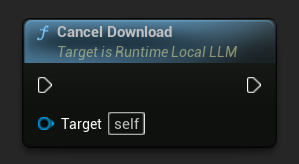
LLM->CancelDownload();
Das Plugin verhindert automatisch doppelte Downloads – wenn für dasselbe Modell bereits ein Download läuft, werden nachfolgende Aufrufe ignoriert.
Generation stoppen
Um eine laufende Generierung zu unterbrechen:
- Blueprint
- C++
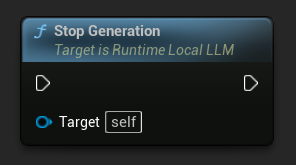
LLM->StopGeneration();
Gesprächskontext zurücksetzen
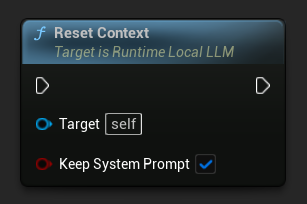
Löschen Sie den Gesprächsverlauf, um ein neues Gespräch zu beginnen:
- Blueprint
- C++
// Keep the system prompt
LLM->ResetContext(true);

// Clear everything including the system prompt
LLM->ResetContext(false);
Konversationen speichern und laden
Das Plugin kann den Gesprächsverlauf als JSON auf der Festplatte speichern oder als Schnappschuss im Arbeitsspeicher behalten. Standardmäßig wird der System-Prompt von den Speicherungen ausgeschlossen, sodass derselbe Gesprächsverlauf in verschiedene LLM-Instanzen mit unterschiedlichen Systemregeln geladen werden kann. Dies ist nützlich für Multi-NPC-Szenarien, in denen jeder Charakter seinen eigenen Speicher hat, sich die Systemanweisungen jedoch teilen oder unterscheiden können.
In Datei speichern
Speichern Sie das aktuelle Gespräch als JSON-Datei auf der Festplatte:
- Blueprint
- C++
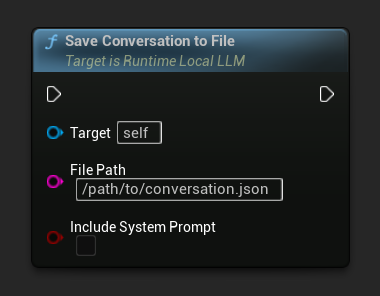
Der Parameter Include System Prompt steuert, ob die Systemnachricht (falls vorhanden) in die Datei geschrieben wird. Standardmäßig ist der Wert false, um die Portabilität zwischen NPCs zu gewährleisten.
On Conversation Saved wird ausgelöst, wenn die Datei geschrieben wird.
// Excludes system prompt by default
LLM->SaveConversationToFile(TEXT("/path/to/conversation.json"));

// Include the system prompt in the file
LLM->SaveConversationToFile(TEXT("/path/to/conversation.json"), /*bIncludeSystemPrompt=*/ true);
Aus Datei laden
Lade ein Gespräch aus einer JSON-Datei zurück:
- Blueprint
- C++
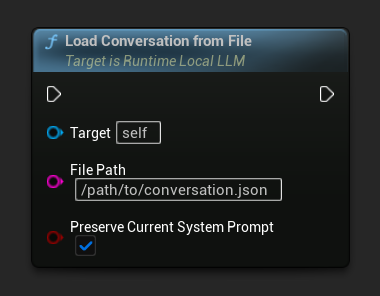
Der Parameter Preserve Current System Prompt (Standardwert true) bewahrt das aktuell geladene System-Prompt, während die gespeicherte Gesprächshistorie ausgetauscht wird. Dies ist die empfohlene Einstellung für den Austausch des NPC-Gedächtnisses.
On Conversation Loaded wird mit dem geladenen Snapshot ausgelöst.
// Keep current system prompt, swap in the saved history
LLM->LoadConversationFromFile(TEXT("/path/to/conversation.json"));

// Replace the system prompt with whatever's in the file
LLM->LoadConversationFromFile(TEXT("/path/to/conversation.json"), /*bPreserveCurrentSystemPrompt=*/ false);
In-Memory Snapshots (Multi-NPC-Workflow)
Für schnelles NPC-Austauschen während des Spiels sollte die aktuelle Unterhaltung im Arbeitsspeicher zwischengespeichert werden, anstatt auf die Festplatte zu schreiben. Dieses Muster ist die empfohlene Methode, um viele NPCs zu verwalten, die ein einziges geladenes Modell gemeinsam nutzen:
- Blueprint
- C++
Das typische Multi-NPC-Muster verwendet eine Map von Name → LLM-Konversations-Snapshot in Ihrem NPC-Manager oder Spielstatus:
- Beim Wechseln von einem NPC weg: Rufen Sie
Save Conversation To Memoryauf, speichern Sie dann inOn Conversation Loaded(das auch bei der Zustellung von Snapshots ausgelöst wird) den Snapshot in Ihrer Map, abgelegt unter dem NPC-Namen. - Beim Wechseln zu einem anderen NPC: Lesen Sie den Snapshot aus Ihrer Map und rufen Sie
Load Conversation From Memorymit aktivierter OptionPreserve Current System Promptauf.

Da der System-Prompt über Swaps hinweg geladen bleibt, kann die "Persönlichkeit" jedes NPC entweder in einem NPC-spezifischen System-Prompt kodiert werden (rufen Sie Send Message With System Prompt einmal nach einem Swap auf, um ihn zu aktualisieren) oder von allen NPCs gemeinsam genutzt werden.
// Maintain per-NPC snapshots
UPROPERTY()
TMap<FName, FLLMConversationSnapshot> NPCMemories;

// Save the currently active NPC's memory before switching
LLM->OnConversationLoadedNative.AddLambda([this](const FLLMConversationSnapshot& Snapshot)
{
    NPCMemories.Add(CurrentNPC, Snapshot);
});
LLM->SaveConversationToMemory();

// Activate another NPC's memory
if (const FLLMConversationSnapshot* Found = NPCMemories.Find(NextNPC))
{
    LLM->LoadConversationFromMemory(*Found, /*bPreserveCurrentSystemPrompt=*/ true);
    CurrentNPC = NextNPC;
}
Snapshots sind modellunabhängig – sie speichern Nachrichten, nicht den KV-Cache-Status. Derselbe Snapshot kann in ein anderes Modell geladen werden (auch wenn sich der Gesprächsstil verschieben kann). Das Feld OriginModelFamilyName im Snapshot ermöglicht es Ihnen zu überprüfen, welches Modell ihn erstellt hat, falls Sie Kompatibilität erzwingen möchten.
Automatische Kontextzusammenfassung
Lange Unterhaltungen überschreiten irgendwann das Kontextfenster des Modells, was normalerweise entweder zur Kürzung des Verlaufs oder zu Fehlern führen würde. Die automatische Zusammenfassungsfunktion des Plugins überwacht die Kontextnutzung und fasst, wenn ein konfigurierter Schwellenwert überschritten wird, ältere Nachrichten zu einer einzigen „Erinnerungs"-Nachricht zusammen, bevor die nächste Antwort generiert wird. Dadurch bleiben Token-Kosten und Latenz auch bei unbegrenzt langen Unterhaltungen stabil.
Die Zusammenfassung wird vom selben geladenen Modell durchgeführt, sodass kein zweites Modell oder API-Aufruf erforderlich ist.
Auto-Zusammenfassung aktivieren
- Blueprint
- C++
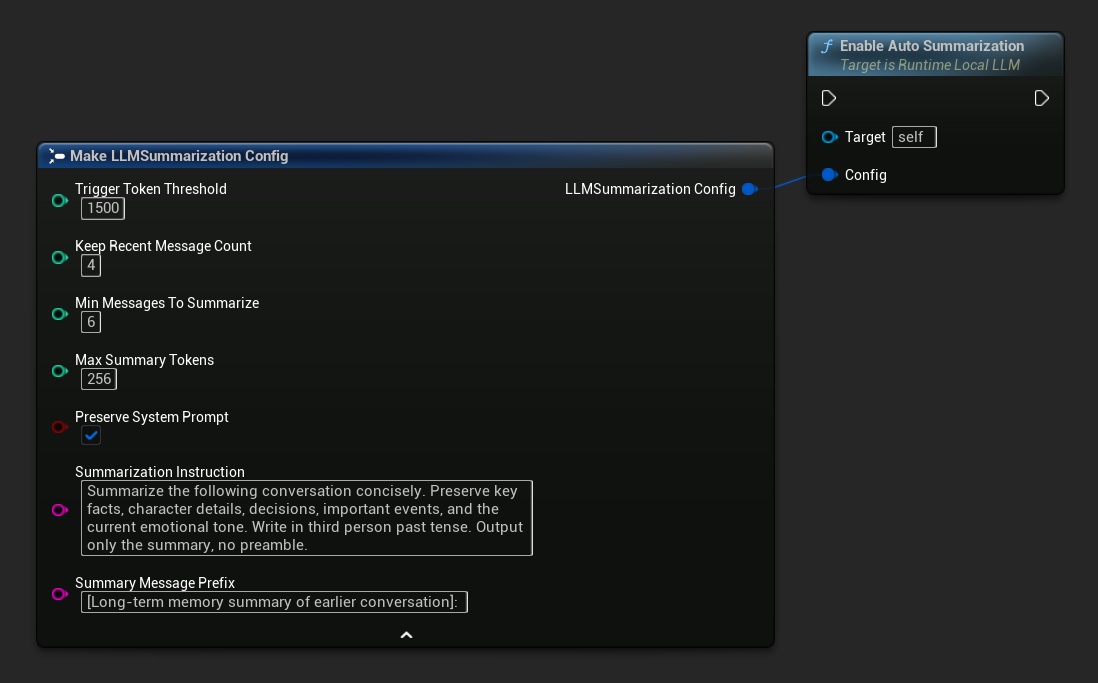
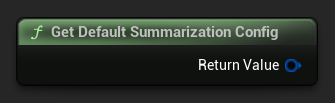
Verwenden Sie Get Default Summarization Config für sinnvolle Startvorgaben und passen Sie diese dann nach Bedarf an:
FLLMSummarizationConfig Config = URuntimeLocalLLM::GetDefaultSummarizationConfig();
Config.TriggerTokenThreshold = 1500;
Config.KeepRecentMessageCount = 4;
Config.MinMessagesToSummarize = 6;
LLM->EnableAutoSummarization(Config);
Nach der Aktivierung läuft die Zusammenfassung automatisch vor jedem SendMessage-Aufruf, wenn nötig, ohne dass weitere Aktionen erforderlich sind.
Standardmäßig wird die automatische Zusammenfassung ausgeführt, bevor eine neue Nachricht verarbeitet wird, da sie den Kontext neu aufbauen muss, was nicht sicher parallel zur Erstellung einer Antwort erfolgen kann. Wenn Sie stattdessen möchten, dass sie nach der Antwort ausgeführt wird, während der Spieler liest und tippt, deaktivieren Sie die automatische Zusammenfassung und steuern Sie sie manuell: Binden Sie an On Generation Complete, prüfen Sie Get Used Context Length gegen Ihren Schwellenwert und rufen Sie Summarize Now auf, wenn dieser überschritten wird. Da Summarize Now in derselben Hintergrundaufgaben-Warteschlange eingereiht wird, wird es direkt nach Abschluss der Antwort und vor der Verarbeitung der nächsten Nachricht ausgeführt.
Konfigurationsreferenz
| Parameter | Type | Standard | Beschreibung |
|---|---|---|---|
| Trigger-Token-Schwellenwert | int32 | 1500 | Die Zusammenfassung wird ausgeführt, wenn die verwendeten Kontext-Token diesen Wert überschreiten. Setzen Sie diesen Wert relativ zu Ihrer Context Size; etwa 60-75 % sind eine gute Faustregel. |
| Anzahl der letzten Nachrichten beibehalten | int32 | 4 | Die neuesten N Nachrichten werden niemals zusammengefasst, um die unmittelbare Gesprächskohärenz zu bewahren. |
| Minimale Nachrichten für Zusammenfassung | int32 | 6 | Überspringen Sie die Zusammenfassung, wenn weniger als diese Anzahl älterer Nachrichten in Frage kommt (vermeidet sinnlose winzige Zusammenfassungen). |
| Maximale Zusammenfassungs-Token | int32 | 256 | Maximale Länge der generierten Zusammenfassung in Tokens |
| System-Prompt beibehalten | bool | true | Die Systemnachricht (Index 0) muss stets unverändert bleiben. |
| Zusammenfassungsanweisung | FString | (see default) | Die Anweisung, die an das Modell gesendet wurde, um die Zusammenfassung zu erstellen |
| Präfix für Zusammenfassungsnachrichten | FString | "[Langzeitgedächtnis-Zusammenfassung des vorherigen Gesprächs]: " | Der generierten Zusammenfassung vorangestellt, wenn sie als Erinnerungsnachricht mit der Rolle des Assistenten in das Gespräch eingefügt wird. |
Manuelle Auslösung und Abhören von Zusammenfassungen
Sie können die Zusammenfassung jederzeit manuell auslösen, unabhängig vom Schwellenwert.
- Blueprint
- C++
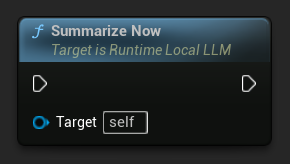
Binden Sie an On History Summarized, um benachrichtigt zu werden, wenn ein Zusammenfassungsdurchlauf abgeschlossen ist. Das Ereignis meldet, wie viele Nachrichten entfernt wurden, wie viele Token eingespart wurden und den generierten Zusammenfassungstext – nützlich, um einen dezenten Indikator in der Chat-Benutzeroberfläche anzuzeigen:
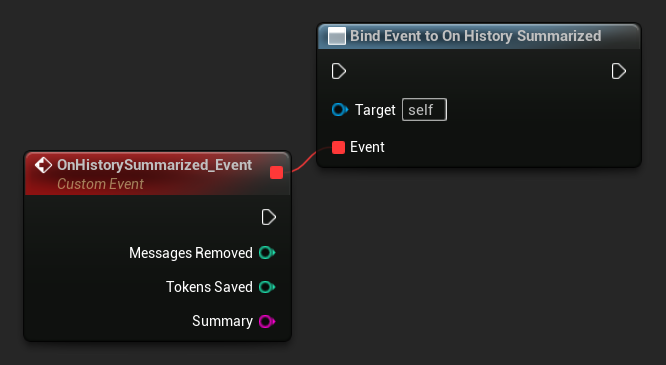
LLM->SummarizeNow();

LLM->OnHistorySummarizedNative.AddLambda(
    [](int32 MessagesRemoved, int32 TokensSaved, const FString& Summary)
{
    UE_LOG(LogTemp, Log, TEXT("Summarized %d messages, saved %d tokens"), MessagesRemoved, TokensSaved);
});
Abfrage der verwendeten Kontextlänge
Verwenden Sie Get Used Context Length, um zu überprüfen, wie viele Tokens derzeit im Kontextfenster des Modells belegt sind. Dies ist derselbe Wert, den der integrierte Auto-Zusammenfassungs-Trigger mit dem Trigger Token Threshold vergleicht.
- Blueprint
- C++
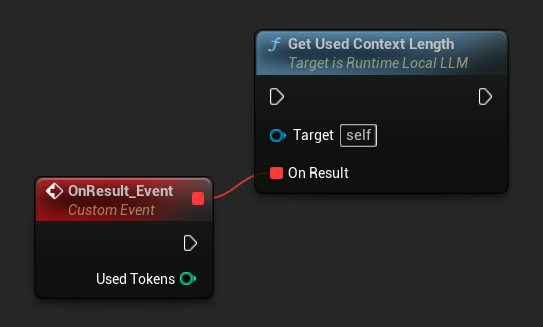
LLM->GetUsedContextLengthNative([](int32 UsedTokens)
{
    UE_LOG(LogTemp, Log, TEXT("Used context: %d tokens"), UsedTokens);
});
Auto-Summarisierung deaktivieren
- Blueprint
- C++
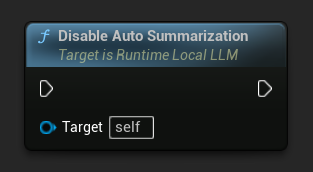
LLM->DisableAutoSummarization();
Das Deaktivieren macht bereits auf die Unterhaltung angewandte Zusammenfassungen nicht rückgängig.
Die Zusammenfassung benötigt einen Moment, um im Hintergrundthread ausgeführt zu werden (das Modell generiert die Zusammenfassung). Token-Stream-Callbacks werden während dieser internen Generierung unterdrückt, sodass sie nicht in Ihrer Chat-Oberfläche erscheinen. On History Summarized wird ausgelöst, sobald die Zusammenführung abgeschlossen ist.
Modell entladen
Ressourcen freigeben, wenn ein Modell nicht mehr benötigt wird:
- Blueprint
- C++
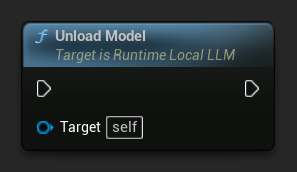
LLM->UnloadModel();
Abfragestatus
Überprüfen Sie den aktuellen Zustand der LLM-Instanz:
- Blueprint
- C++
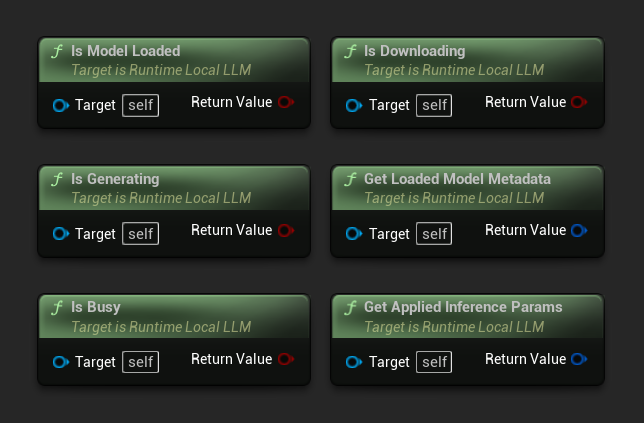
- Modell geladen: Wahr, wenn ein Modell für die Inferenz bereit ist
- Generiert: Wahr, wenn eine Generierung läuft
- Ist beschäftigt: Wahr, wenn ein Vorgang (Laden, Generieren, Herunterladen) aktiv ist
- Lädt herunter: Wahr, wenn ein Modell-Download läuft
- Metadaten des geladenen Modells abrufen: Gibt die Metadaten des aktuellen Modells zurück
- Angewandte Inferenzparameter abrufen: Gibt die beim Laden angewandten Parameter zurück
// Is Model Loaded - true if a model is ready for inference
if (LLM->IsModelLoaded())
{
  FLLMModelMetadata Metadata = LLM->GetLoadedModelMetadata();
  UE_LOG(LogTemp, Log, TEXT("Model: %s"), *Metadata.ModelDisplayName);

  FLLMInferenceParams Params = LLM->GetAppliedInferenceParams();
  UE_LOG(LogTemp, Log, TEXT("Context size: %d"), Params.ContextSize);
}

// Is Generating - true if token generation is currently active
if (LLM->IsGenerating())
{
  UE_LOG(LogTemp, Log, TEXT("Generation in progress..."));
}

// Is Busy - true if any operation (loading, generating, downloading) is active
if (LLM->IsBusy())
{
  UE_LOG(LogTemp, Log, TEXT("LLM is busy, deferring request"));
}

// Is Downloading - true if a model download is currently in progress
if (LLM->IsDownloading())
{
  UE_LOG(LogTemp, Log, TEXT("Model download in progress..."));
}

// Safe to send a new message or load a different model
if (!LLM->IsGenerating() && !LLM->IsBusy())
{
  UE_LOG(LogTemp, Log, TEXT("LLM is idle and ready"));
}
Modellbibliotheksfunktionen
Eine Reihe statischer Hilfsfunktionen wird zur Verwaltung von Modelldateien auf der Festplatte bereitgestellt. Diese sind nützlich für die Erstellung einer Benutzeroberfläche zur Modellauswahl oder zur Überprüfung der Modellverfügbarkeit zur Laufzeit.
Heruntergeladene Modellnamen / Metadaten abrufen
- Blueprint
- C++
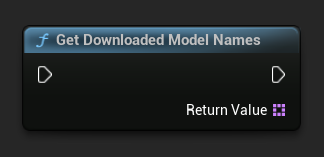
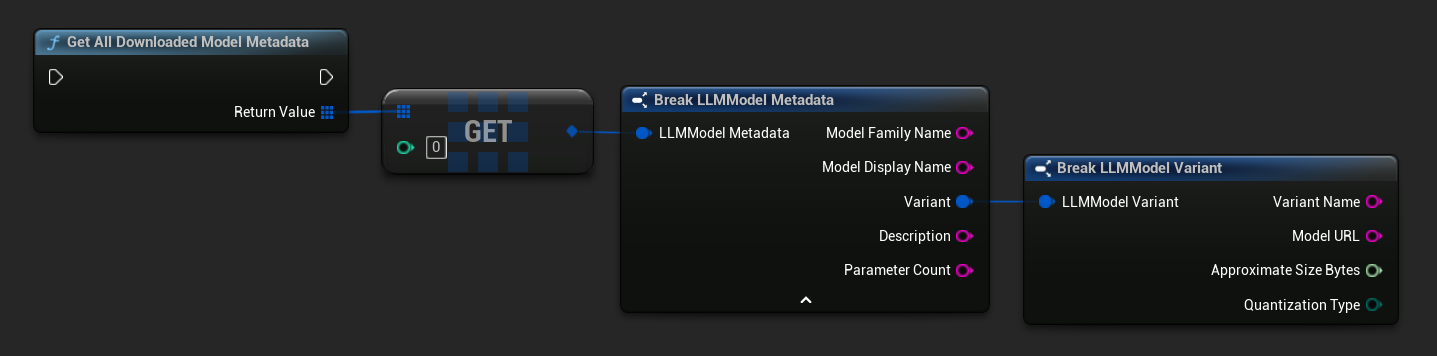
TArray<FName> ModelNames = URuntimeLLMLibrary::GetDownloadedModelNames();

TArray<FLLMModelMetadata> AllModels = URuntimeLLMLibrary::GetAllDownloadedModelMetadata();
for (const FLLMModelMetadata& Model : AllModels)
{
    UE_LOG(LogTemp, Log, TEXT("Model: %s (%s)"), *Model.ModelDisplayName, *Model.Variant.VariantName);
}
Prüfen, ob ein Modell auf der Festplatte vorhanden ist
- Blueprint
- C++
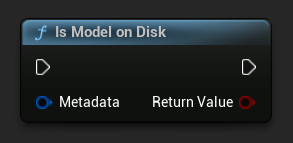
bool bExists = URuntimeLLMLibrary::IsModelOnDisk(Metadata);
Modell-Dateipfad abrufen
- Blueprint
- C++
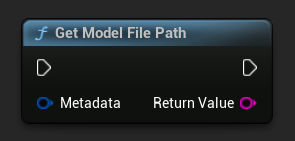
FString FilePath = URuntimeLLMLibrary::GetModelFilePath(Metadata);
Modelldateien löschen
- Blueprint
- C++
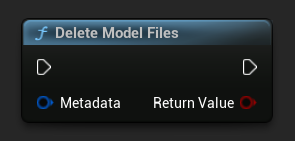
bool bDeleted = URuntimeLLMLibrary::DeleteModelFiles(Metadata);
Vordefinierte und verfügbare Modelle abrufen
- Blueprint
- C++
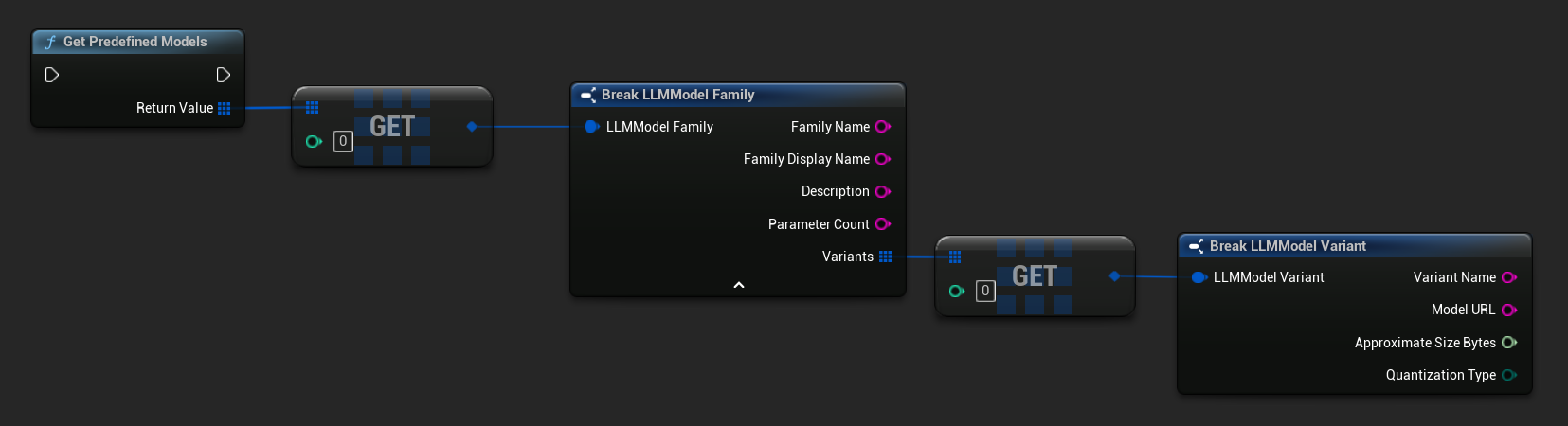
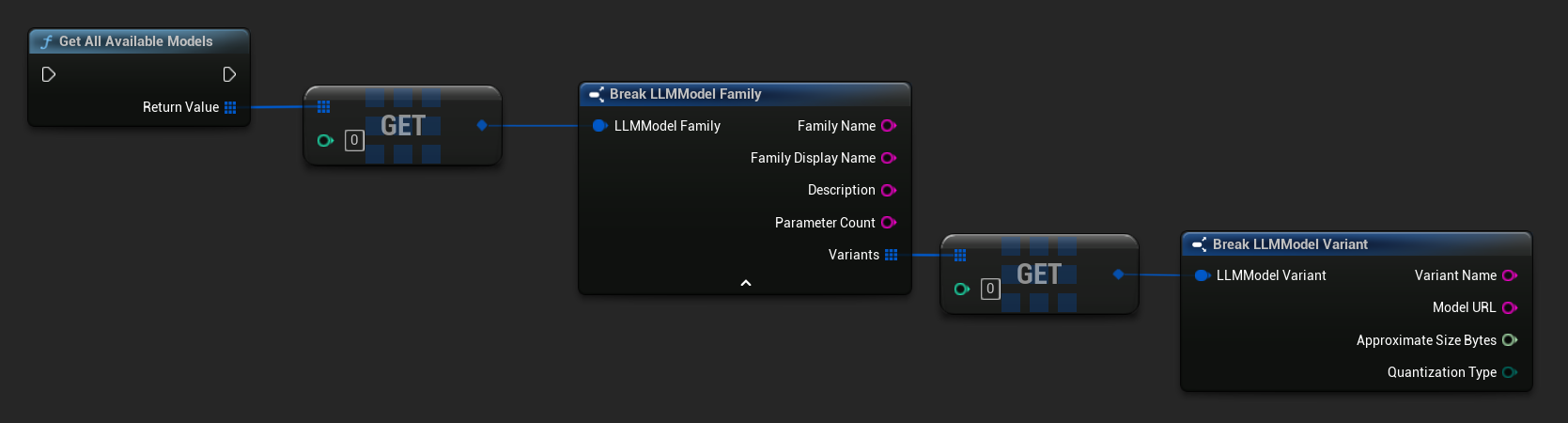
// Built-in catalog only
TArray<FLLMModelFamily> Predefined = URuntimeLLMLibrary::GetPredefinedModels();

// Catalog + custom imports
TArray<FLLMModelFamily> All = URuntimeLLMLibrary::GetAllAvailableModels();
Metadaten aus einer URL erstellen
Erstellen Sie Model-Metadaten aus einer rohen URL (Felder werden aus dem Dateinamen abgeleitet):
- Blueprint
- C++
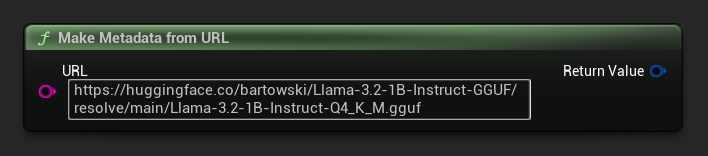
FLLMModelMetadata Metadata = URuntimeLocalLLM::MakeMetadataFromURL(
    TEXT("https://huggingface.co/bartowski/Llama-3.2-1B-Instruct-GGUF/resolve/main/Llama-3.2-1B-Instruct-Q4_K_M.gguf")
);
Hilfsfunktionen
Eine Reihe von Hilfsfunktionen wird für die Formatierung und Fehleranzeige bereitgestellt.
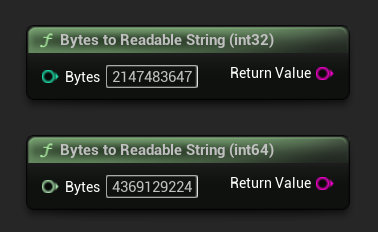
Bytes in lesbaren String umwandeln
Wandelt eine Byteanzahl in einen menschenlesbaren String um (z. B. „4,07 GB“). Nützlich zur Anzeige von Modellgrößen in der Benutzeroberfläche.
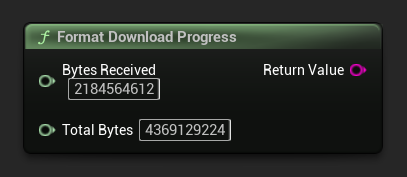
Format Download Progress
Formatiert einen Download-Fortschritts-String wie „1,23 GB / 4,07 GB (30,2 %)". Wenn die Gesamtgröße unbekannt ist, wird nur die empfangene Menge zurückgegeben.
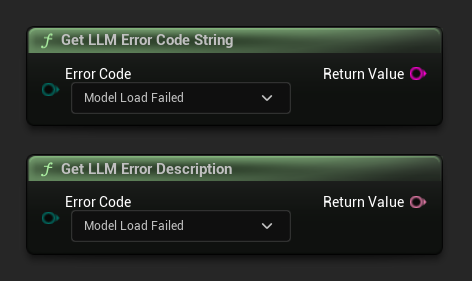
Fehlerbeschreibung / Fehlercode-Zeichenfolge abrufen
Get LLM Error Description gibt eine menschenlesbare Textbeschreibung für einen Fehlercode zurück. Get LLM Error Code String gibt den Namen des Enum-Werts als Zeichenfolge zurück (nützlich für die Protokollierung).
Fehlercode-Referenz
| Code | Wert | Beschreibung |
|---|---|---|
| Unbekannt | 0 | Ein nicht näher bezeichneter Fehler |
| ModelLoadFailed | 10 | Die GGUF-Datei konnte nicht geladen werden (beschädigte Datei, inkompatibles Format usw.) |
| ContextCreateFehlgeschlagen | 11 | Fehler beim Erstellen des Inferenzkontexts |
| ModelNotLoaded | 20 | Es wurde versucht, eine Inferenz durchzuführen, ohne dass ein Modell geladen war. |
| ChatTemplateFehlgeschlagen | 21 | Die Chatvorlage des Modells konnte nicht angewendet werden. |
| TokenizationFailed | 22 | Der eingegebene Text konnte nicht tokenisiert werden. |
| ContextOverflow | 23 | Die Eingabeaufforderung + der Kontext überschreitet die konfigurierte Kontextgröße. |
| PromptDecodeFehlgeschlagen | 24 | Die Prompt-Token konnten nicht dekodiert werden. |
| ContextTooFullToGenerate | 25 | Nicht genügend Kontextspeicherplatz, um eine Ausgabe zu generieren. |
| GenerationDecodeFailed | 30 | Ein Token konnte während der Generierung nicht dekodiert werden. |
| GenerationTruncated | 31 | Die Generierung wurde gestoppt, da das maximale Token-Limit erreicht wurde. |
| LLMInstanceNull | 40 | Die LLM-Instanz ist null oder ungültig. |
| ModelNotFoundOnDisk | 41 | Die Modelldatei existiert nicht am erwarteten Pfad. |
| ModelURLEmpty | 42 | Ein Download wurde mit einer leeren URL angefordert. |
| ModelDownloadAbgebrochen | 43 | Der Download wurde abgebrochen. |
| ModelDownloadEmptyData | 44 | Der Download wurde abgeschlossen, aber der Antworttext war leer. |
| ModelDownloadSaveFehlgeschlagen | 45 | Der Download wurde abgeschlossen, aber die Datei konnte nicht auf der Festplatte gespeichert werden. |