Parámetros de inferencia
La estructura de Parámetros de Inferencia del LLM controla cómo el modelo carga y genera texto. Pasas estos parámetros al cargar un modelo. Esta página describe cada parámetro y su efecto.
Referencia de parámetros
| Parámetro | Type | Predeterminado | Rango | Descripción |
|---|---|---|---|---|
| Tokens Máximos | int32 | 512 | 1–8192 | Número máximo de tokens a generar en una sola respuesta |
| Temperatura | flotante | 0.7 | 0.0–2.0 | Controla la aleatoriedad. 0.0 = determinista. Valores más altos = salida más creativa. |
| Top P | flotante | 0.9 | 0.0–1.0 | Muestreo de núcleo. Solo se consideran los tokens cuya probabilidad acumulada supera este valor. |
| Top K | int32 | 40 | 0–200 | Limita la selección a los K tokens más probables. 0 = desactivado. |
| Penalización por Repetición | flotante | 1.1 | 0.0–3.0 | Penaliza los tokens que ya aparecen en la salida. 1.0 = sin penalización |
| Capas de GPU | int32 | -1 | -1–200 | Capas del modelo para descargar a la GPU. -1 = automático. 0 = solo CPU. |
| Tamaño del Contexto | int32 | 2048 | 128–131072 | Tamaño máximo de la ventana de contexto en tokens. Los valores más grandes usan más memoria. |
| Mensaje del sistema | FString | "Eres un asistente útil." | — | Instrucción del sistema que define el comportamiento del modelo. |
| Semilla | int32 | -1 | -1+ | Semilla aleatoria para una salida reproducible. -1 = aleatorio |
| Número de Hilos | int32 | 0 | 0–128 | Hilos de CPU para la generación. 0 = automático. |
Uso
- Blueprint
- C++
Los parámetros de inferencia aparecen como un pin de estructura en los nodos de carga y asíncronos. Desglose la estructura para establecer valores individuales:
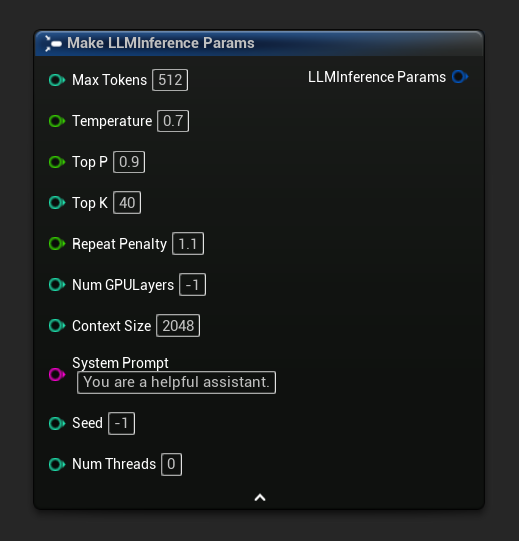
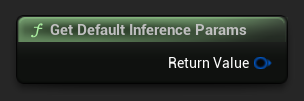
Para obtener un conjunto de parámetros predeterminados como punto de partida, usa Get Default Inference Params:
// Creative writing
FLLMInferenceParams CreativeParams;
CreativeParams.MaxTokens = 1024;
CreativeParams.Temperature = 1.2f;
CreativeParams.TopP = 0.95f;
CreativeParams.TopK = 80;
CreativeParams.RepeatPenalty = 1.2f;
CreativeParams.SystemPrompt = TEXT("You are a creative storyteller.");

// Factual / deterministic
FLLMInferenceParams FactualParams;
FactualParams.MaxTokens = 256;
FactualParams.Temperature = 0.1f;
FactualParams.TopP = 0.5f;
FactualParams.TopK = 10;
FactualParams.SystemPrompt = TEXT("Answer questions concisely and accurately.");

// Mobile-optimized
FLLMInferenceParams MobileParams;
MobileParams.MaxTokens = 128;
MobileParams.ContextSize = 1024;
MobileParams.NumGPULayers = 0;
MobileParams.NumThreads = 4;
MobileParams.SystemPrompt = TEXT("You are a helpful assistant. Keep responses brief.");

// Get defaults programmatically
FLLMInferenceParams DefaultParams = URuntimeLocalLLM::GetDefaultInferenceParams();
Recomendaciones de Plataforma
Móvil / VR (Android, iOS, Meta Quest)
- Tamaño de Contexto: 1024–2048
- Capas de GPU: 0 (solo CPU) a menos que el dispositivo tenga soporte de cómputo GPU confirmado
- Tokens Máximos: Menos de 256 para interacciones receptivas
- Número de Hilos: 2–4 según el dispositivo
Escritorio (Windows, Mac, Linux)
- Tamaño de Contexto: 2048–8192 para la mayoría de conversaciones
- Capas de GPU: -1 (automático) para aprovechar la aceleración por GPU cuando esté disponible
- Hilos: 0 (automático)
- Tokens Máximos: 512–2048 para respuestas más largas
Conversaciones de larga duración
Si tu aplicación mantiene conversaciones durante sesiones largas (diálogos de NPC, asistentes persistentes, juegos de rol), considera combinar el tamaño de tu contexto con resumen automático en lugar de solo aumentar el Context Size. Un Context Size modesto de 2048–4096 con resumen automático habilitado mantiene la latencia y el uso de memoria estables, mientras que ventanas de contexto más grandes hacen que cada generación sea progresivamente más lenta. Consulta Resumen Automático de Contexto.