Propriétés des ondes sonores
Accès aux données audio
Récupération du tampon PCM
Vous pouvez récupérer l'intégralité du tampon PCM directement depuis une onde sonore.
- Blueprint
- C++
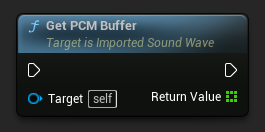
// Assuming ImportedSoundWave is a UE reference to a UImportedSoundWave object
TArray<float> PCMBuffer = ImportedSoundWave->GetPCMBufferCopy();
如果需要将获取的PCM数据转换为字节,请参阅浮点数组转字节。
播放属性
循环播放
要创建无缝的音频循环,您可以设置循环播放,以便在播放结束后自动将声波播放时间倒回零并重新播放。
- Blueprint
- C++
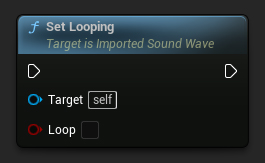
// Assuming ImportedSoundWave is a UE reference to a UImportedSoundWave object
ImportedSoundWave->SetLooping(false);
Contrôle du Volume
Vous pouvez ajuster le volume du son en cours de lecture selon vos besoins.
- Blueprint
- C++
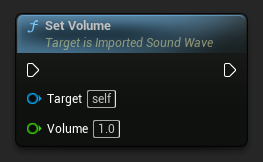
// Assuming ImportedSoundWave is a UE reference to a UImportedSoundWave object
ImportedSoundWave->SetVolume(1.0f);
Ajustement de la Hauteur
Vous pouvez modifier la hauteur du son en cours de lecture selon vos préférences.
- Blueprint
- C++
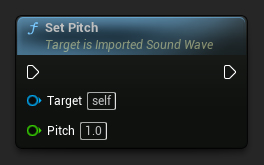
// Assuming ImportedSoundWave is a UE reference to a UImportedSoundWave object
ImportedSoundWave->SetPitch(1.0f);
Caratteristiche Aggiuntive
Sottotitoli
Puoi impostare i sottotitoli, ovvero definire il testo e il momento in cui dovrebbero essere visualizzati.
- Blueprint
- C++
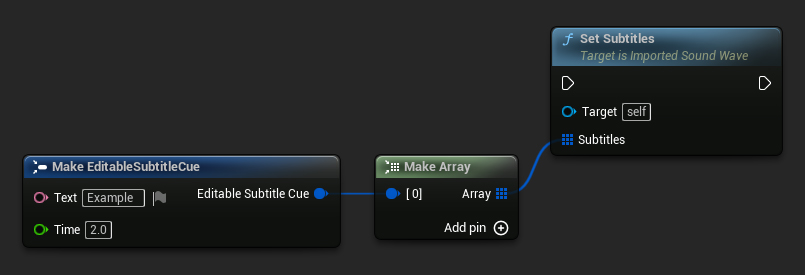
// Assuming ImportedSoundWave is a UE reference to a UImportedSoundWave object
TArray<FEditableSubtitleCue> Subtitles;
FEditableSubtitleCue Subtitle;
Subtitle.Text = FText::FromString("Example");
Subtitle.Time = 2.0f;
Subtitles.Add(Subtitle);
ImportedSoundWave->SetSubtitles(Subtitles);
Modalità di Virtualizzazione
Puoi impostare la modalità di virtualizzazione, come Play When Silent, che permette all'onda sonora di continuare la riproduzione anche durante i silenzi.
- Blueprint
- C++
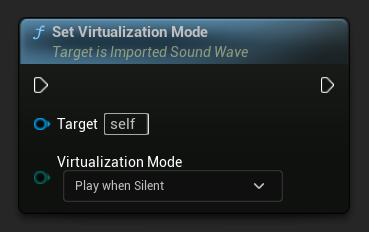
// Assuming ImportedSoundWave is a UE reference to a UImportedSoundWave object
ImportedSoundWave->SetVirtualizationMode(EVirtualizationMode::PlayWhenSilent);
Questo è particolarmente utile se stai utilizzando l'attenuazione del suono per controllare come l'audio si affievolisce con la distanza.
Ambisonics
Puoi contrassegnare un'onda sonora come sorgente Ambisonics per la codifica audio spaziale 3D. Il motore audio supporta solo Ambisonics di Primo Ordine (FOA), che richiede esattamente 4 canali.
- Blueprint
- C++
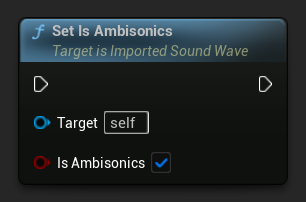
// Assuming ImportedSoundWave is a UE reference to a UImportedSoundWave object
ImportedSoundWave->SetIsAmbisonics(true);
Modifiche al Formato Audio
Ricampionamento Manuale e Mixaggio dei Canali
Se è necessario modificare la frequenza di campionamento o il numero di canali nell'onda sonora importata, è possibile utilizzare le funzioni appropriate per ricampionare e mixare i dati audio.
- Blueprint
- C++
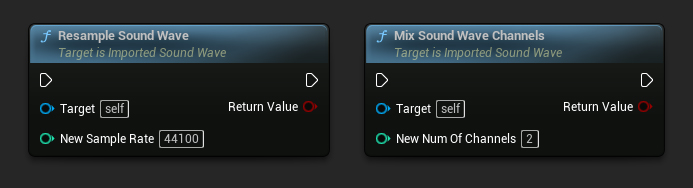
// Assuming ImportedSoundWave is a UE reference to a UImportedSoundWave object
ImportedSoundWave->ResampleSoundWave(44100);
ImportedSoundWave->MixSoundWaveChannels(2);
Questo modificherà l'intero dato dell'onda sonora e influenzerà di conseguenza l'output dai delegati OnGeneratePCMData e OnPopulateAudioData.
Conversione Automatica del Formato
Puoi ricampionare e mixare automaticamente tutti i dati audio successivi da popolare al tasso di campionamento e al numero di canali desiderati specificati.
- Blueprint
- C++
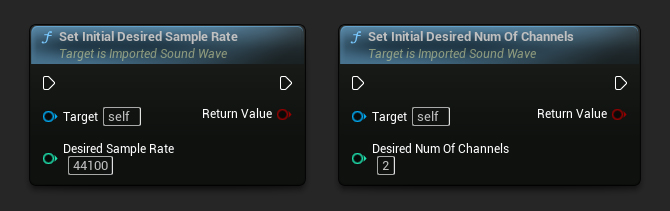
// Assuming ImportedSoundWave is a UE reference to a UImportedSoundWave object
ImportedSoundWave->SetInitialDesiredSampleRate(44100);
ImportedSoundWave->SetInitialDesiredNumOfChannels(2);
Cela affectera également la sortie des délégués OnGeneratePCMData et OnPopulateAudioData en conséquence.