플러그인 사용 방법
이 가이드는 전체 런타임 API를 다룹니다: LLM 인스턴스 생성, 모델 로드, 메시지 전송, 런타임 모델 다운로드, 상태 관리 및 유틸리티 함수.
LLM 인스턴스 생성
먼저 Runtime Local LLM 객체를 생성합니다. 조기 가비지 컬렉션을 방지하기 위해 이에 대한 참조를 유지합니다(예: Blueprints의 변수 또는 C++의 UPROPERTY로).
- 블루프린트
- C++
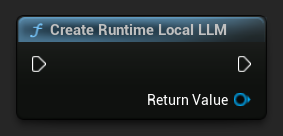
UPROPERTY()
URuntimeLocalLLM* LLM;

LLM = URuntimeLocalLLM::CreateRuntimeLocalLLM();
모델 로드
메시지를 보내기 전에 모델을 로드해야 합니다. 이 플러그인은 워크플로에 따라 여러 가지 로딩 방법을 제공합니다.
이름으로 불러오기
편집기 설정 패널을 통해 모델을 관리하는 경우 Load Model (By Name)을 사용하세요.
- 블루프린트
- C++
- UE 5.3 및 이전 버전
- UE 5.4+
UE 5.3 및 이전 버전에서는 드롭다운이 나타나지 않으므로 사용 가능한 모델을 수동으로 검색해야 합니다. Get All Downloaded Model Metadata를 사용하여 인덱스 0(또는 필요한 모델)의 요소를 가져온 후, Get Model File Name에 전달하여 이름 문자열을 검색한 다음, 이를 Load Model (By Name)에 전달합니다.
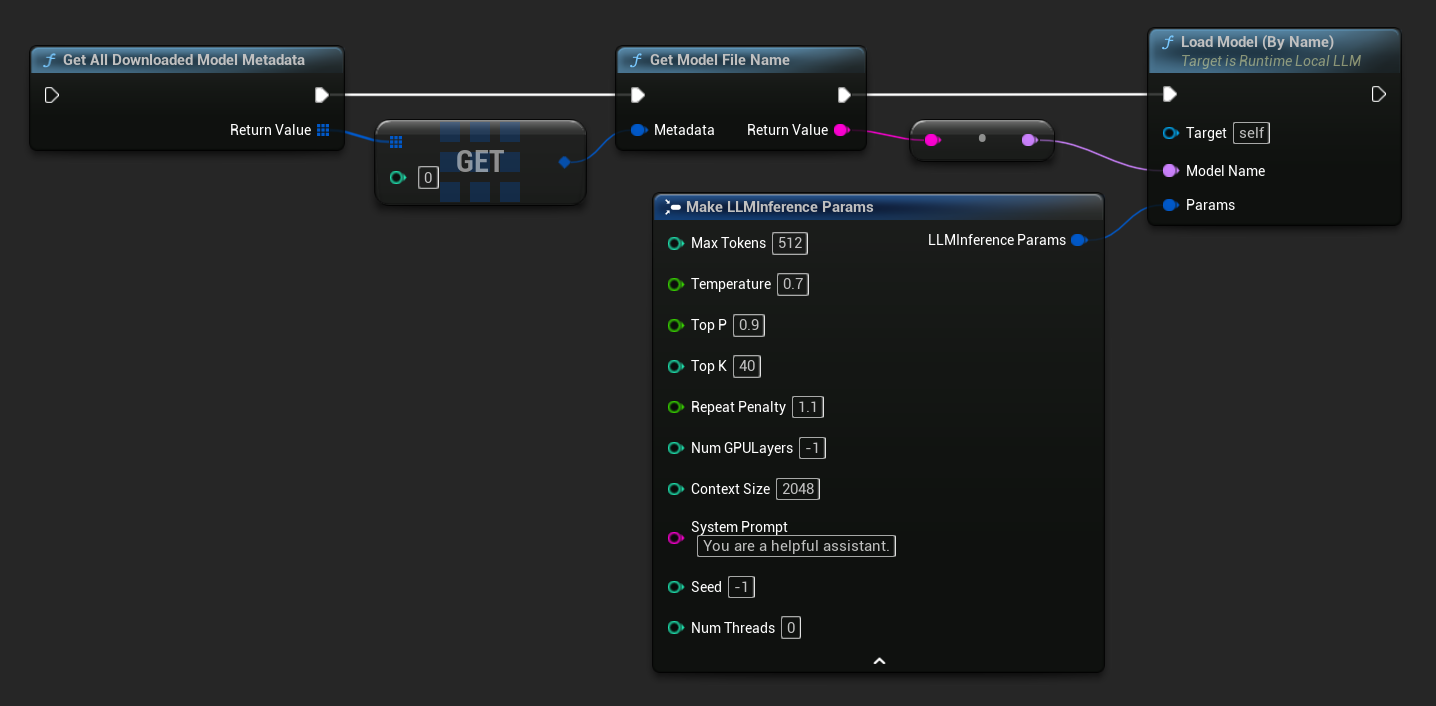
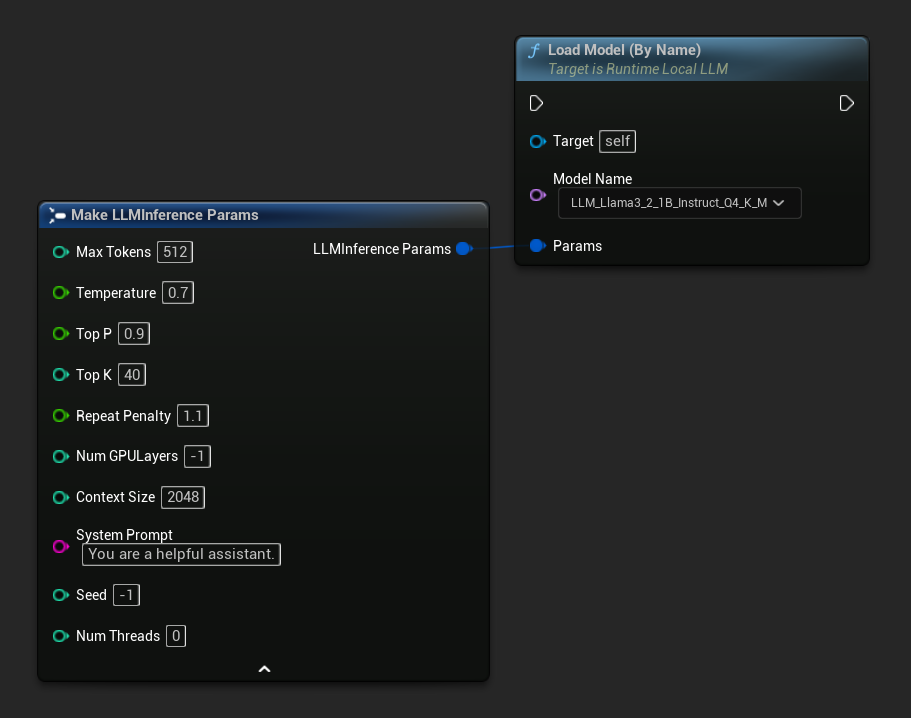
UE 5.4 이상에서 Load Model (By Name)은 디스크에 있는 모든 모델의 드롭다운 목록을 표시합니다. 로드하려는 모델을 선택하기만 하면 됩니다.
C++에서는 GetAllDownloadedModelMetadata를 사용하여 사용 가능한 모델을 검색하고, GetModelFileName을 사용하여 LoadModelByName에 전달할 이름을 가져옵니다.
FLLMInferenceParams Params;
Params.MaxTokens = 512;
Params.Temperature = 0.7f;
Params.SystemPrompt = TEXT("You are a helpful assistant.");

TArray<FLLMModelMetadata> DownloadedModels = URuntimeLLMLibrary::GetAllDownloadedModelMetadata();

if (DownloadedModels.Num() > 0)
{
    const FLLMModelMetadata& Model = DownloadedModels[0]; // Select the first available model
    FString ModelFileName = URuntimeLLMLibrary::GetModelFileName(Model);
    LLM->LoadModelByName(FName(*ModelFileName), Params);
}
파일 경로에서 로드
.gguf 파일의 절대 파일 경로에서 직접 모델을 로드합니다:
- 블루프린트
- C++
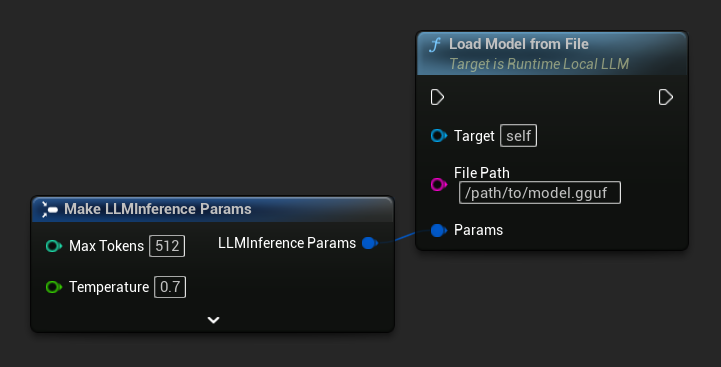
FLLMInferenceParams Params;
LLM->LoadModelFromFile(TEXT("/path/to/model.gguf"), Params);
URL에서 로드 (다운로드 및 로드)
URL에서 모델을 다운로드하고(디스크에 없는 경우) 자동으로 로드합니다. 파일이 이미 로컬에 존재하면 다운로드를 건너뜁니다.
- 블루프린트
- C++
가장 간단한 변형은 URL만 필요로 하며, 메타데이터는 파일 이름에서 파생됩니다:
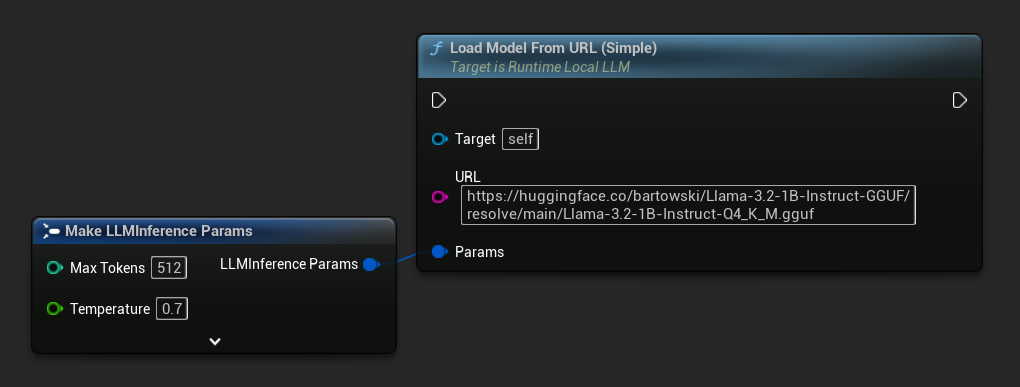
Load Model From URL을 전체 모델 메타데이터와 함께 사용하여 더 풍부한 모델 정보를 얻을 수도 있습니다:
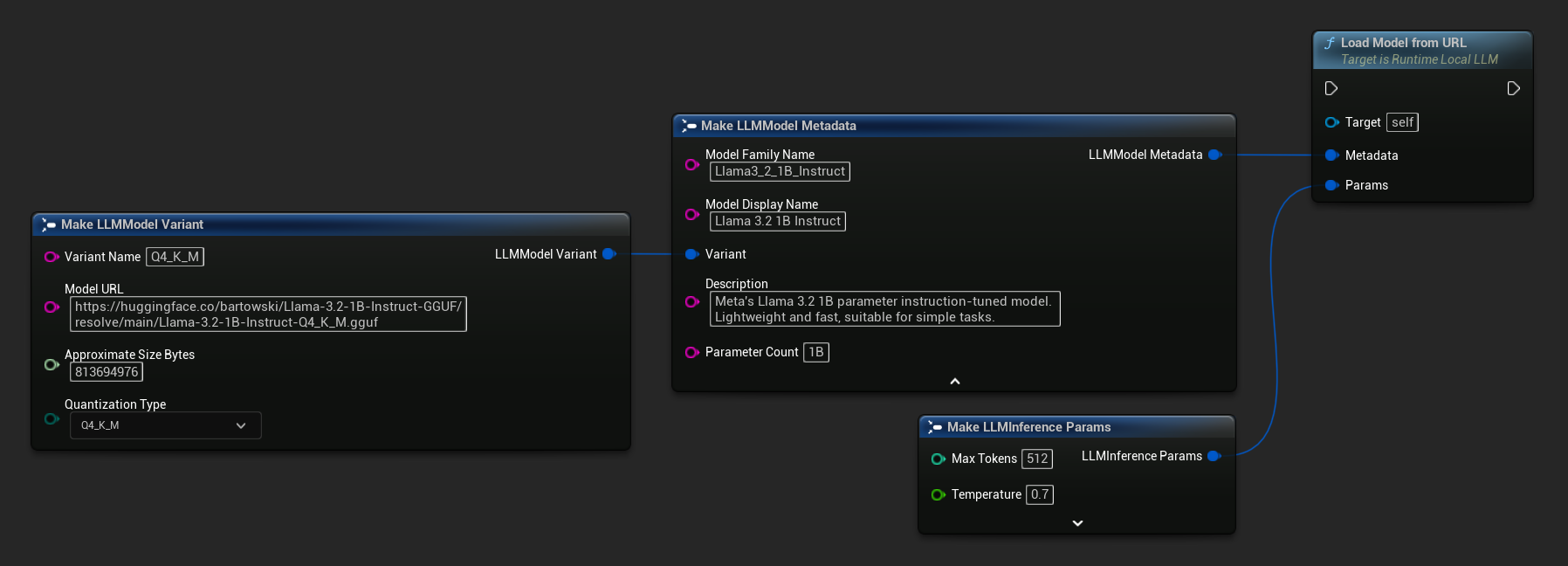
FLLMInferenceParams Params;

// Simple: URL only - metadata is derived from the filename
LLM->LoadModelFromURLSimple(
    TEXT("https://huggingface.co/bartowski/Llama-3.2-1B-Instruct-GGUF/resolve/main/Llama-3.2-1B-Instruct-Q4_K_M.gguf"), Params);

// With full metadata
FLLMModelMetadata Metadata;
Metadata.ModelFamilyName = TEXT("Llama3_2_1B_Instruct");
Metadata.ModelDisplayName = TEXT("Llama 3.2 1B Instruct");
Metadata.Description = TEXT("Meta's Llama 3.2 1B parameter instruction-tuned model. Lightweight and fast, suitable for simple tasks.");
Metadata.ParameterCount = TEXT("1B");
Metadata.Variant.VariantName = TEXT("Q4_K_M");
Metadata.Variant.ModelURL = TEXT("https://huggingface.co/bartowski/Llama-3.2-1B-Instruct-GGUF/resolve/main/Llama-3.2-1B-Instruct-Q4_K_M.gguf");
Metadata.Variant.ApproximateSizeBytes = 776LL * 1024 * 1024;
Metadata.Variant.QuantizationType = ELLMQuantizationType::Q4_K_M;
LLM->LoadModelFromURL(Metadata, Params);
비동기 로드 (블루프린트)
출력 핀을 통해 로드 완료 및 오류를 처리하여 수동으로 델리게이트를 바인딩하는 대신, 두 개의 비동기 노드를 사용할 수 있습니다.
Load Model By Name (Async)는 Load Model (By Name)을 반영합니다. UE 5.4+에서는 디스크에 있는 모든 모델의 드롭다운을 표시합니다.
- UE 5.4+
- UE 5.3 및 이전 버전
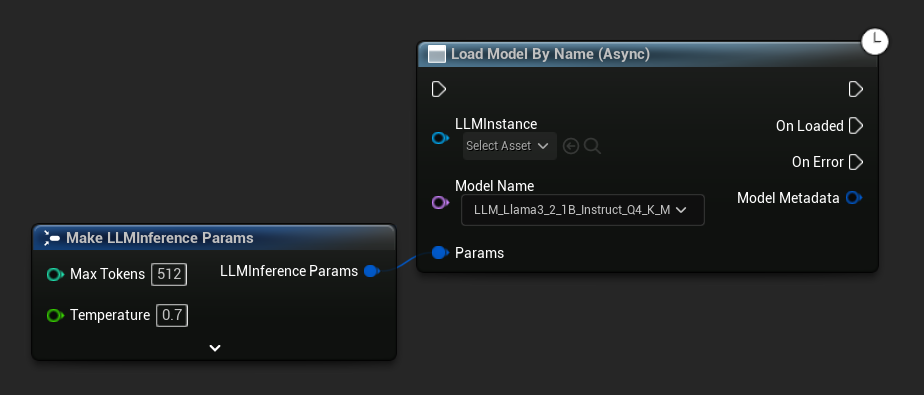
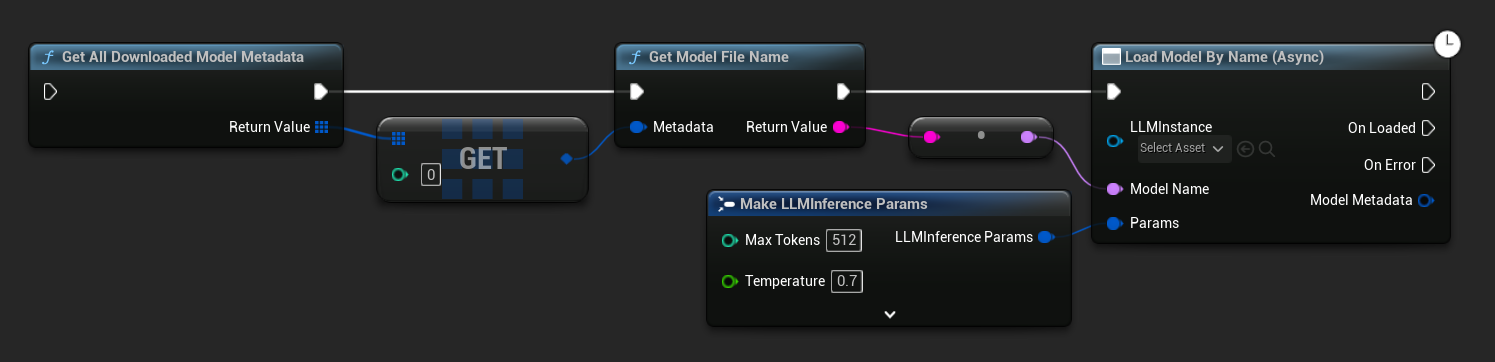
UE 5.3 및 이전 버전에서는 드롭다운이 나타나지 않습니다. Get All Downloaded Model Metadata를 사용하여 인덱스 0(또는 필요한 모델)의 요소를 가져온 후, 이를 Get Model File Name에 전달하고, 그 결과를 Load Model By Name (Async)에 전달하세요.
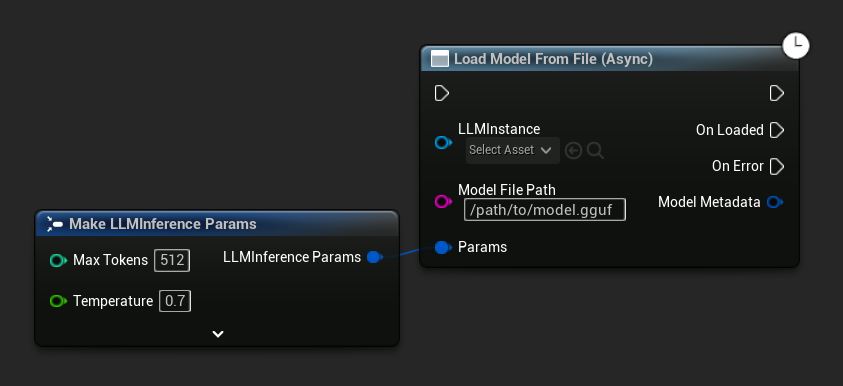
Load Model From File (Async)는 절대 파일 경로를 대신 사용합니다:
이벤트 바인딩
LLM 인스턴스의 델리게이트에 바인딩하여 콜백을 수신합니다. 모든 콜백은 게임 스레드에서 실행됩니다.
- 블루프린트
- C++
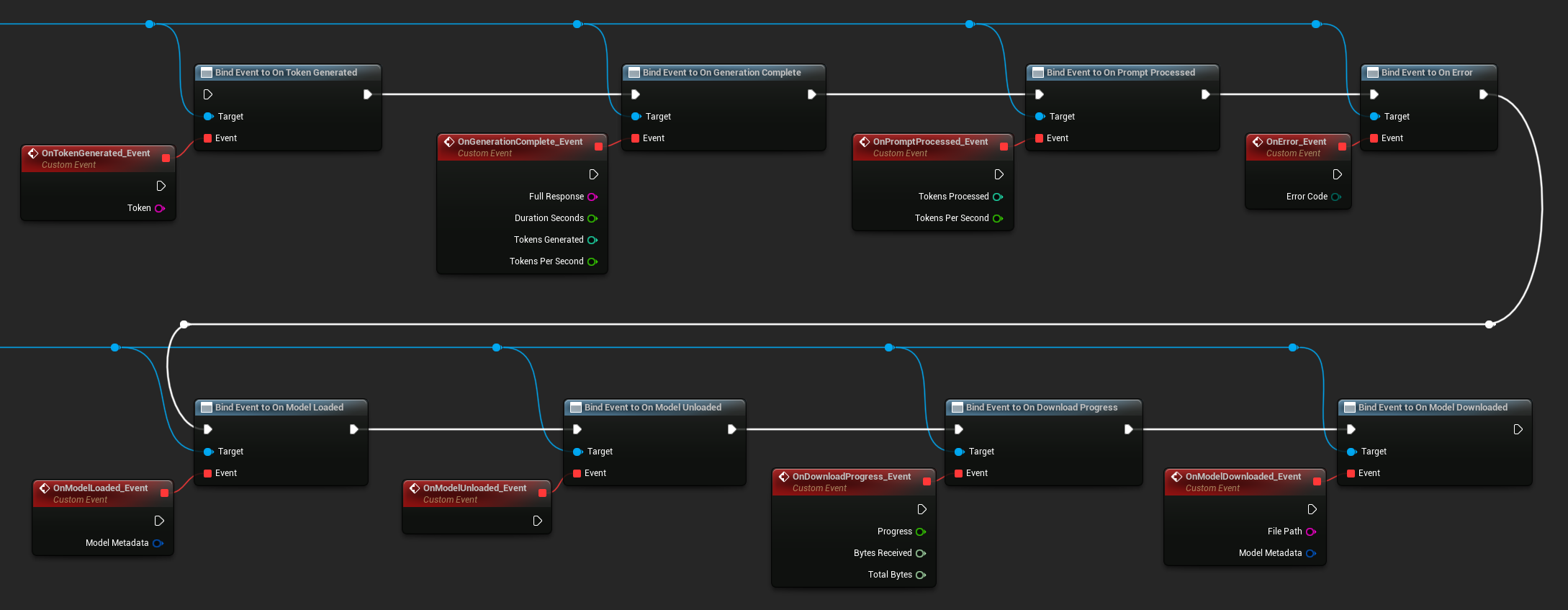
사용 가능한 델리게이트:
- 토큰 생성 시: 각 출력 토큰에 대해 실행됩니다.
- 생성 완료 시: 전체 응답이 준비되면 실행되며, 지속 시간, 토큰 수, 초당 토큰 수를 포함합니다.
- 프롬프트 처리 시: 입력 프롬프트가 처리된 후, 생성이 시작되기 전에 실행됩니다.
- 오류 발생 시: 모든 작업 중 오류가 발생하면 실행됩니다.
- 모델 로드 시: 모델 로딩이 완료되면 실행됩니다.
- 모델 언로드 시: 모델이 언로드되면 실행됩니다.
- 다운로드 진행률: 모델 다운로드 중 주기적으로 실행됩니다 (진행률, 수신 바이트, 총 바이트).
- 모델 다운로드 완료 시: 다운로드 전용 작업이 완료되면 실행됩니다.
- 대화 저장 시: 대화가 JSON 파일에 기록되면 실행됩니다.
- 대화 로드 시: 파일 또는 메모리 스냅샷에서 대화가 로드되면 실행됩니다.
- 기록 요약 시: 자동 요약이 오래된 메시지를 압축할 때 실행됩니다 (메시지 수, 절약된 토큰, 요약 내용을 보고).
LLM->OnTokenGeneratedNative.AddLambda([](const FString& Token)
{
});

LLM->OnGenerationCompleteNative.AddLambda(
[](const FString& FullResponse, float DurationSeconds, int32 TokensGenerated, float TokensPerSecond)
{
});

LLM->OnPromptProcessedNative.AddLambda([](int32 TokensProcessed, float TokensPerSecond)
{
});

LLM->OnErrorNative.AddLambda([](ELLMErrorCode ErrorCode)
{
});

LLM->OnModelLoadedNative.AddLambda([](const FLLMModelMetadata& ModelMetadata)
{
});

LLM->OnModelUnloadedNative.AddLambda([]()
{
});

LLM->OnDownloadProgressNative.AddLambda([](float Progress, int64 BytesReceived, int64 TotalBytes)
{
});

LLM->OnModelDownloadedNative.AddLambda([](const FString& FilePath, const FLLMModelMetadata& ModelMetadata)
{
});

LLM->OnConversationSavedNative.AddLambda([](const FString& FilePath)
{
});

LLM->OnConversationLoadedNative.AddLambda([](const FLLMConversationSnapshot& Snapshot)
{
});

LLM->OnHistorySummarizedNative.AddLambda([](int32 MessagesRemoved, int32 TokensSaved, const FString& Summary)
{
});
메시지 보내기
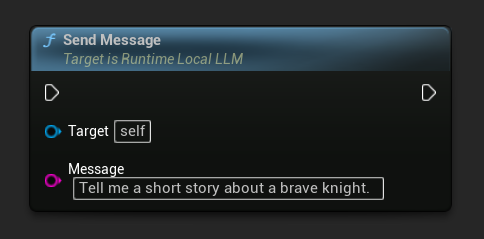
모델이 로드되면 사용자 메시지를 보내 응답을 생성합니다:
- 블루프린트
- C++
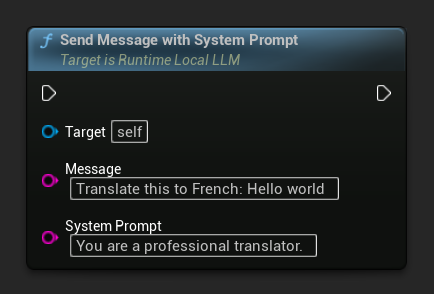
특정 메시지의 시스템 프롬프트를 재정의하려면 Send Message With System Prompt를 사용하세요:
LLM->SendMessage(TEXT("Tell me a short story about a brave knight."));

// With a custom system prompt override
LLM->SendMessageWithSystemPrompt(
    TEXT("Translate this to French: Hello world"),
    TEXT("You are a professional translator.")
);
토큰이 생성될 때 OnTokenGenerated를 통해 스트리밍됩니다. 생성이 완료되면 OnGenerationComplete가 전체 응답, 지속 시간, 토큰 수 및 초당 토큰 수와 함께 실행됩니다.
비동기 메시지 전송 (블루프린트)
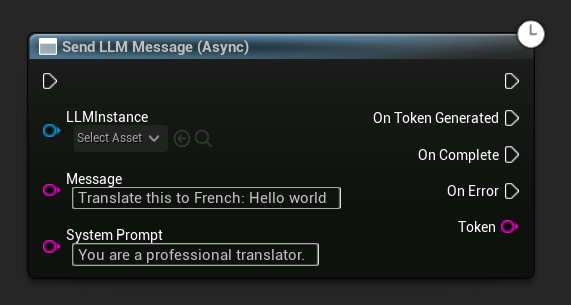
Send LLM Message (Async) 노드는 토큰, 완료 및 오류에 대한 전용 출력 핀을 제공합니다.
런타임에 모델 다운로드
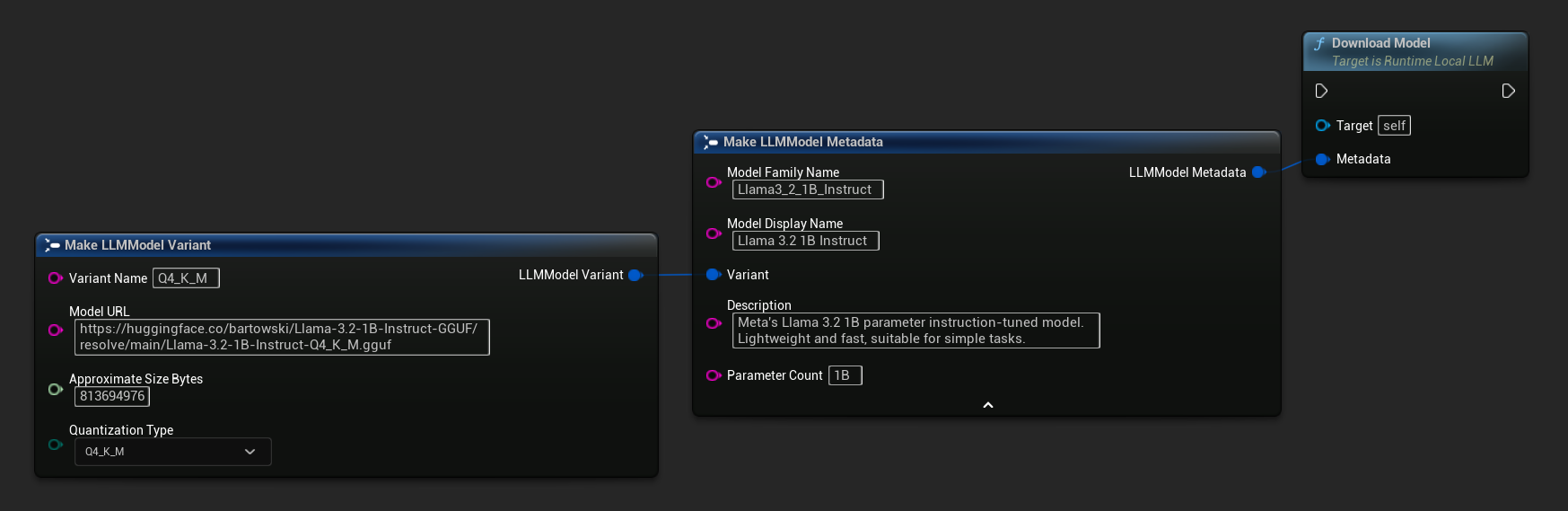
위에서 설명한 다운로드 및 로드 흐름 외에도, 모델을 로드하지 않고 디스크에 다운로드할 수 있습니다. 이는 로딩 화면이나 설정 메뉴에서 모델을 미리 캐싱할 때 유용합니다.
- 블루프린트
- C++
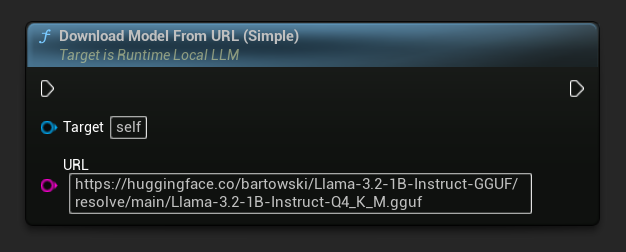
URL 전용 변형도 사용 가능합니다:
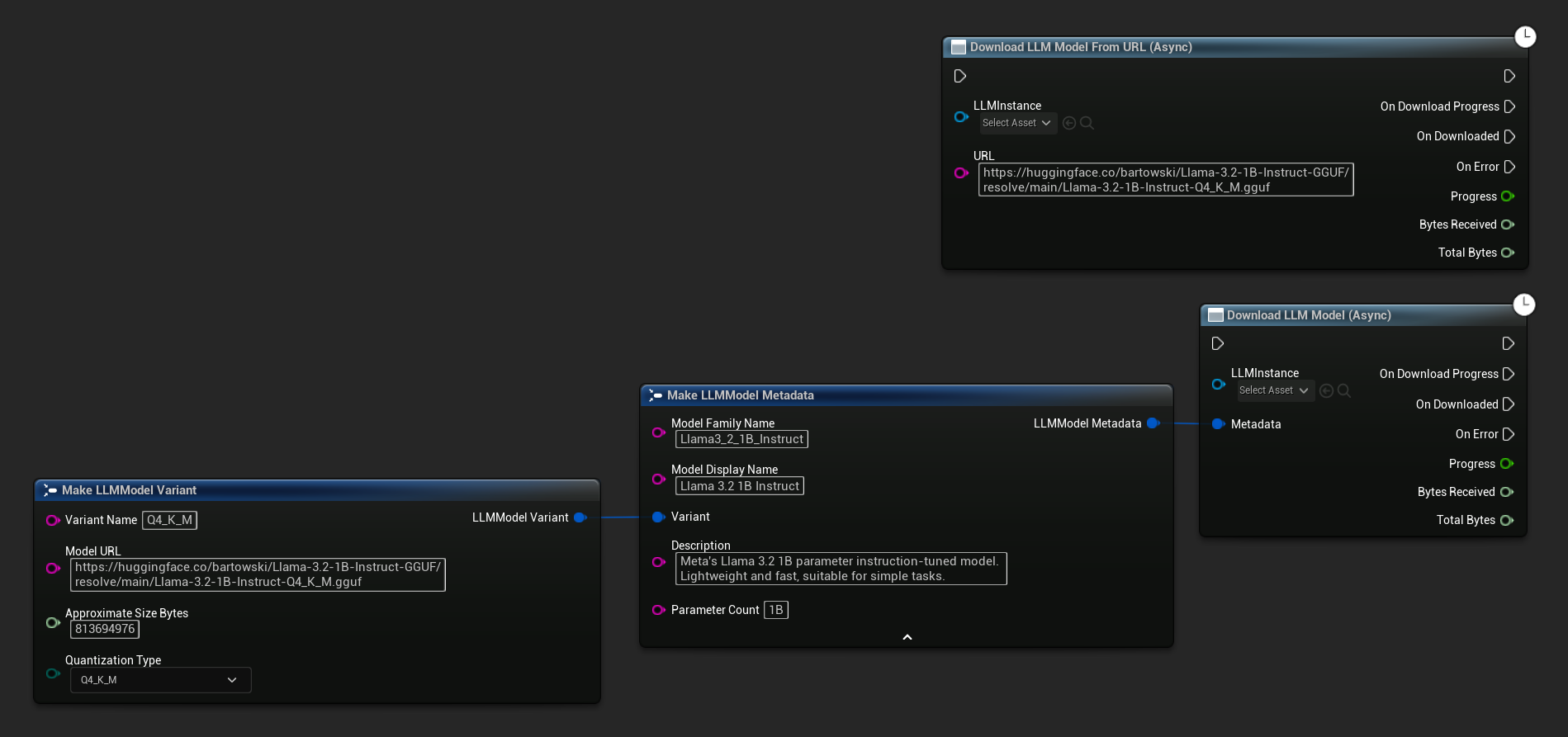
Download LLM Model (Async) 및 Download LLM Model From URL (Async) 노드는 진행률, 완료 및 오류에 대한 출력 핀을 제공합니다.
// With full metadata
FLLMModelMetadata Metadata;
Metadata.ModelFamilyName = TEXT("Llama3_2_1B_Instruct");
Metadata.ModelDisplayName = TEXT("Llama 3.2 1B Instruct");
Metadata.Description = TEXT("Meta's Llama 3.2 1B parameter instruction-tuned model. Lightweight and fast, suitable for simple tasks.");
Metadata.ParameterCount = TEXT("1B");
Metadata.Variant.VariantName = TEXT("Q4_K_M");
Metadata.Variant.ModelURL = TEXT("https://huggingface.co/bartowski/Llama-3.2-1B-Instruct-GGUF/resolve/main/Llama-3.2-1B-Instruct-Q4_K_M.gguf");
Metadata.Variant.ApproximateSizeBytes = 776LL * 1024 * 1024;
Metadata.Variant.QuantizationType = ELLMQuantizationType::Q4_K_M;
LLM->DownloadModel(Metadata);

// URL only
LLM->DownloadModelFromURL(
    TEXT("https://huggingface.co/bartowski/Llama-3.2-1B-Instruct-GGUF/resolve/main/Llama-3.2-1B-Instruct-Q4_K_M.gguf"));
OnDownloadProgress 델리게이트는 다운로드 중 진행 상황을 보고합니다. OnModelDownloaded는 파일이 디스크에 저장될 때 실행됩니다.
진행 중인 다운로드를 취소하려면:
- 블루프린트
- C++
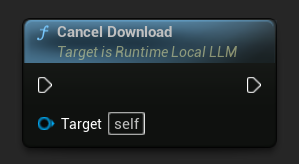
LLM->CancelDownload();
이 플러그인은 중복 다운로드를 자동으로 방지합니다. 동일한 모델에 대한 다운로드가 이미 진행 중인 경우, 이후의 호출은 무시됩니다.
생성 중지
생성 중인 작업을 중단하려면:
- 블루프린트
- C++
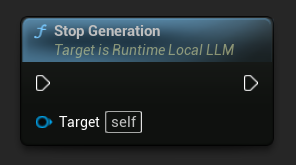
LLM->StopGeneration();
대화 컨텍스트 초기화
대화 기록을 지우고 새 대화를 시작합니다:
- 블루프린트
- C++
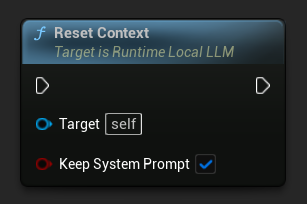
// Keep the system prompt
LLM->ResetContext(true);

// Clear everything including the system prompt
LLM->ResetContext(false);
대화 저장 및 불러오기
이 플러그인은 대화 기록을 JSON 형식으로 디스크에 저장하거나 메모리에 스냅샷으로 유지할 수 있습니다. 기본적으로 시스템 프롬프트는 저장에서 제외되므로, 동일한 대화 기록을 다른 시스템 규칙을 가진 여러 LLM 인스턴스에 로드할 수 있습니다. 이는 각 캐릭터가 고유한 메모리를 가지면서도 시스템 지시사항을 공유하거나 다르게 설정할 수 있는 다중 NPC 시나리오에 유용합니다.
파일에 저장
현재 대화를 디스크의 JSON 파일로 저장하세요:
- 블루프린트
- C++
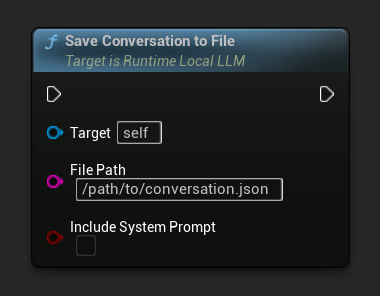
Include System Prompt 매개변수는 시스템 메시지(있는 경우)를 파일에 기록할지 여부를 제어합니다. NPC 간 이식성을 위해 기본값은 false입니다.
대화 저장됨은 파일이 기록될 때 실행됩니다.
// Excludes system prompt by default
LLM->SaveConversationToFile(TEXT("/path/to/conversation.json"));

// Include the system prompt in the file
LLM->SaveConversationToFile(TEXT("/path/to/conversation.json"), /*bIncludeSystemPrompt=*/ true);
파일에서 로드
JSON 파일에서 대화를 다시 불러오기:
- 블루프린트
- C++
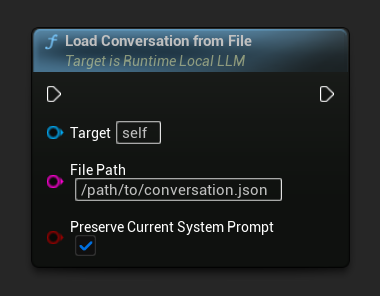
Preserve Current System Prompt 파라미터(기본값 true)는 저장된 대화 기록을 교체하는 동안 현재 로드된 시스템 프롬프트를 그대로 유지합니다. 이는 NPC 메모리 교체에 권장되는 설정입니다.
대화 로드됨은 로드된 스냅샷과 함께 실행됩니다.
// Keep current system prompt, swap in the saved history
LLM->LoadConversationFromFile(TEXT("/path/to/conversation.json"));

// Replace the system prompt with whatever's in the file
LLM->LoadConversationFromFile(TEXT("/path/to/conversation.json"), /*bPreserveCurrentSystemPrompt=*/ false);
인메모리 스냅샷 (멀티 NPC 워크플로우)
게임플레이 중 빠른 NPC 교체를 위해 현재 대화를 디스크에 쓰지 않고 메모리에 스냅샷으로 저장하세요. 이 패턴은 단일 로드된 모델을 공유하는 여러 NPC를 관리하는 권장 방식입니다.
- 블루프린트
- C++
일반적인 다중 NPC 패턴은 NPC 관리자나 게임 상태에서 이름 → LLM 대화 스냅샷 맵을 사용합니다.
- NPC에서 전환할 때:
Save Conversation To Memory를 호출한 후,On Conversation Loaded(스냅샷 전달 시에도 실행됨)에서 스냅샷을 NPC 이름을 키로 하여 맵에 저장합니다. - 다른 NPC로 전환할 때: 맵에서 스냅샷을 읽어와
Preserve Current System Prompt를 활성화한 상태로Load Conversation From Memory를 호출합니다.

시스템 프롬프트가 스왑 간에도 계속 로드되어 있으므로, 각 NPC의 "성격"은 NPC별 시스템 프롬프트에 인코딩하거나(스왑 후 Send Message With System Prompt를 한 번 호출하여 업데이트) 모든 NPC 간에 공유할 수 있습니다.
// Maintain per-NPC snapshots
UPROPERTY()
TMap<FName, FLLMConversationSnapshot> NPCMemories;

// Save the currently active NPC's memory before switching
LLM->OnConversationLoadedNative.AddLambda([this](const FLLMConversationSnapshot& Snapshot)
{
    NPCMemories.Add(CurrentNPC, Snapshot);
});
LLM->SaveConversationToMemory();

// Activate another NPC's memory
if (const FLLMConversationSnapshot* Found = NPCMemories.Find(NextNPC))
{
    LLM->LoadConversationFromMemory(*Found, /*bPreserveCurrentSystemPrompt=*/ true);
    CurrentNPC = NextNPC;
}
스냅샷은 모델에 종속되지 않습니다. 메시지를 저장할 뿐, KV 캐시 상태는 저장하지 않습니다. 동일한 스냅샷을 다른 모델에 로드할 수 있습니다(단, 대화 스타일이 달라질 수 있습니다). 스냅샷의 OriginModelFamilyName 필드를 통해 어떤 모델이 생성했는지 확인할 수 있으며, 호환성을 강제하려면 이 정보를 활용할 수 있습니다.
자동 컨텍스트 요약
긴 대화는 결국 모델의 컨텍스트 창을 초과하게 되며, 이는 일반적으로 기록이 잘리거나 오류가 발생하게 됩니다. 플러그인의 자동 요약 기능은 컨텍스트 사용량을 모니터링하고, 설정된 임계값을 초과하면 다음 응답이 생성되기 전에 오래된 메시지를 단일 "메모리" 메시지로 요약합니다. 이를 통해 무기한 긴 대화에서도 토큰 비용과 지연 시간을 안정적으로 유지할 수 있습니다.
요약은 동일하게 로드된 모델에 의해 수행되므로, 별도의 모델이나 API 호출이 필요하지 않습니다.
자동 요약 활성화
- 블루프린트
- C++
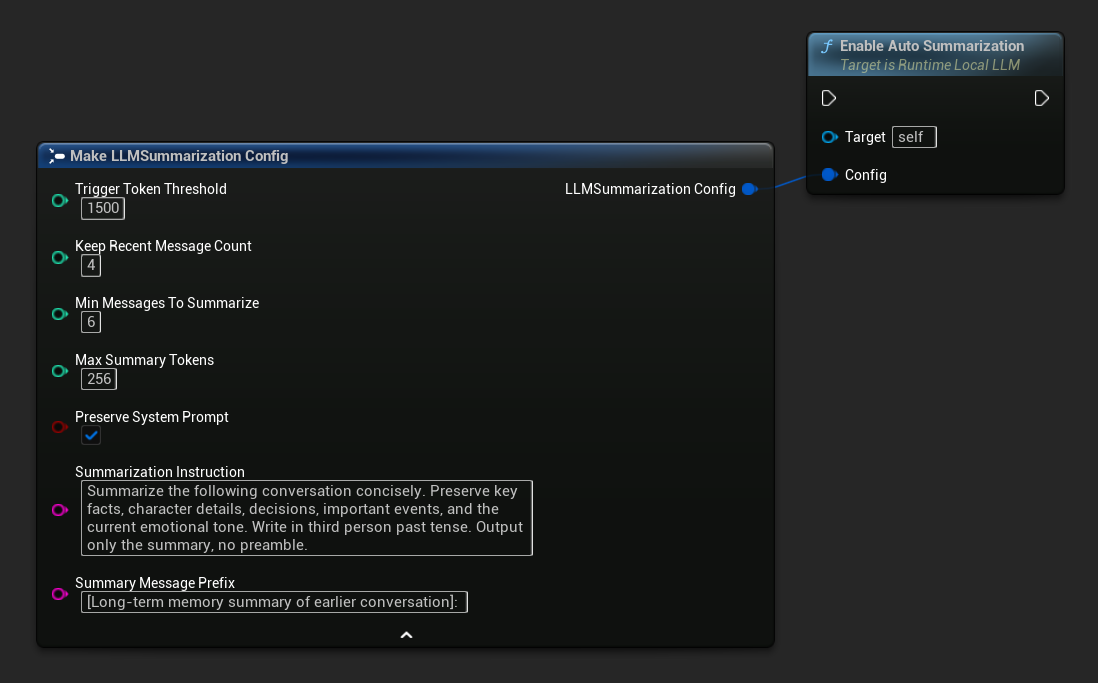
기본 요약 설정 가져오기를 사용하여 합리적인 기본값을 얻은 후 필요에 따라 조정하세요:
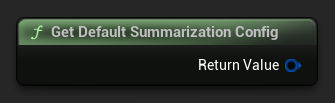
FLLMSummarizationConfig Config = URuntimeLocalLLM::GetDefaultSummarizationConfig();
Config.TriggerTokenThreshold = 1500;
Config.KeepRecentMessageCount = 4;
Config.MinMessagesToSummarize = 6;
LLM->EnableAutoSummarization(Config);
활성화되면, 필요 시 각 SendMessage 호출 전에 요약이 자동으로 실행되며, 추가 작업이 필요하지 않습니다.
기본적으로 자동 요약은 새 메시지가 처리되기 전에 실행됩니다. 이는 응답 생성과 동시에 안전하게 수행될 수 없는 컨텍스트를 재구축해야 하기 때문입니다. 대신 플레이어가 읽고 입력하는 동안 응답 후에 실행되도록 하려면 자동 요약을 비활성화하고 수동으로 구동하세요: On Generation Complete에 바인딩하고, Get Used Context Length를 임계값과 확인한 후, 초과 시 Summarize Now를 호출하세요. Summarize Now는 동일한 백그라운드 작업 큐에 대기되므로, 응답이 완료된 직후이자 다음 메시지가 처리되기 전에 실행됩니다.
설정 참조
| 매개변수 | Type | 기본값 | 설명 |
|---|---|---|---|
| 트리거 토큰 임계값 | int32 | 1500 | 요약은 사용된 컨텍스트 토큰이 이 값을 초과할 때 실행됩니다. 컨텍스트 크기를 기준으로 설정하되, 약 60-75%가 적절한 기준입니다. |
| 최근 메시지 수 유지 | int32 | 4 | 가장 최근 N개의 메시지는 요약되지 않으며, 즉각적인 대화의 일관성을 유지합니다. |
| 요약할 최소 메시지 수 | int32 | 6 | 이전 메시지 중 요약 대상이 되는 메시지가 이 개수보다 적으면 요약을 건너뜁니다 (의미 없는 작은 요약을 방지). |
| 최대 요약 토큰 | int32 | 256 | 생성된 요약의 최대 토큰 길이 |
| 시스템 프롬프트 유지 | bool | true | 항상 시스템 메시지(인덱스 0)를 그대로 유지하세요 |
| 요약 지침 | FString | (see default) | 모델에 요약을 생성하도록 보낸 명령어 |
| 요약 메시지 접두사 | FString | "[이전 대화의 장기 기억 요약]:" | 어시스턴트 역할의 메모리 메시지로 대화에 삽입될 때 생성된 요약 앞에 추가됩니다. |
수동 트리거 및 요약 청취
임계값과 관계없이 언제든지 수동으로 요약을 트리거할 수 있습니다.
- 블루프린트
- C++
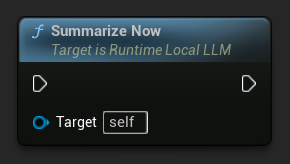
On History Summarized에 바인딩하여 요약 패스가 완료될 때 알림을 받습니다. 이 이벤트는 제거된 메시지 수, 절약된 토큰 수, 생성된 요약 텍스트를 보고하므로 채팅 UI에 미묘한 표시기를 표시하는 데 유용합니다.
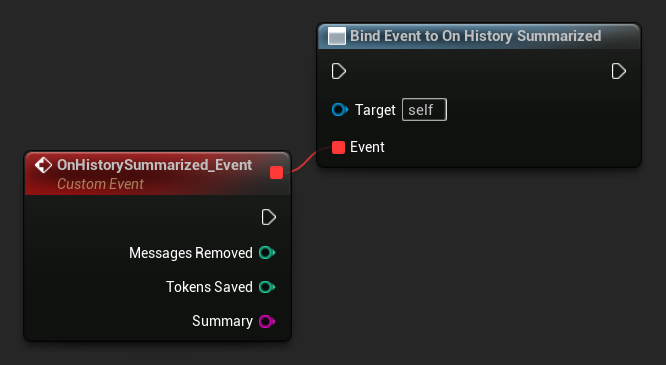
LLM->SummarizeNow();

LLM->OnHistorySummarizedNative.AddLambda(
    [](int32 MessagesRemoved, int32 TokensSaved, const FString& Summary)
{
    UE_LOG(LogTemp, Log, TEXT("Summarized %d messages, saved %d tokens"), MessagesRemoved, TokensSaved);
});
사용된 컨텍스트 길이 조회 중
Get Used Context Length를 사용하여 모델의 컨텍스트 창에 현재 몇 개의 토큰이 점유되어 있는지 확인하세요. 이 값은 내장된 자동 요약 트리거가 Trigger Token Threshold와 비교하여 확인하는 값과 동일합니다.
- 블루프린트
- C++
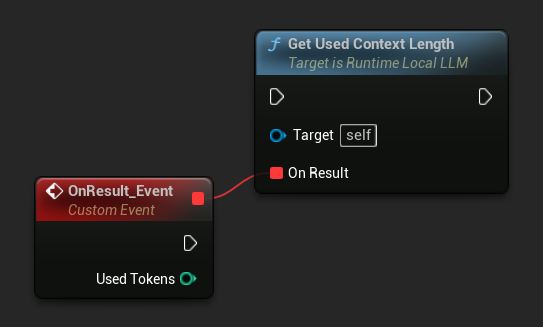
LLM->GetUsedContextLengthNative([](int32 UsedTokens)
{
    UE_LOG(LogTemp, Log, TEXT("Used context: %d tokens"), UsedTokens);
});
자동 요약 비활성화
- 블루프린트
- C++
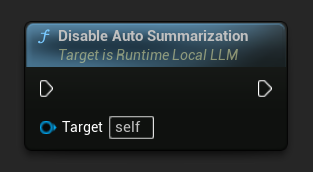
LLM->DisableAutoSummarization();
비활성화해도 이미 대화에 적용된 요약은 되돌려지지 않습니다.
요약은 백그라운드 스레드에서 실행되는 데 시간이 걸립니다(모델이 요약을 생성 중입니다). 이 내부 생성 중에는 토큰 스트림 콜백이 억제되므로 채팅 UI에 표시되지 않습니다. On History Summarized는 스플라이스가 완료되면 한 번 실행됩니다.
모델 언로드하기
모델이 더 이상 필요하지 않을 때 리소스를 해제합니다:
- 블루프린트
- C++
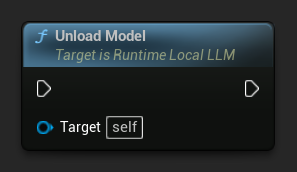
LLM->UnloadModel();
쿼리 상태
LLM 인스턴스의 현재 상태를 확인하세요:
- 블루프린트
- C++
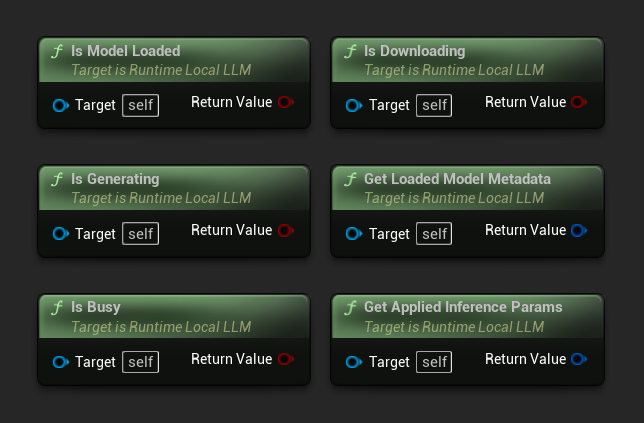
- 모델 로드됨: 추론 준비가 완료된 모델이 있으면 True
- 생성 중: 생성이 진행 중이면 True
- 사용 중: 로딩, 생성, 다운로드 등 어떤 작업이 활성화되어 있으면 True
- 다운로드 중: 모델 다운로드가 진행 중이면 True
- 로드된 모델 메타데이터 가져오기: 현재 모델의 메타데이터를 반환합니다
- 적용된 추론 파라미터 가져오기: 로드 시 적용된 파라미터를 반환합니다
// Is Model Loaded - true if a model is ready for inference
if (LLM->IsModelLoaded())
{
  FLLMModelMetadata Metadata = LLM->GetLoadedModelMetadata();
  UE_LOG(LogTemp, Log, TEXT("Model: %s"), *Metadata.ModelDisplayName);

  FLLMInferenceParams Params = LLM->GetAppliedInferenceParams();
  UE_LOG(LogTemp, Log, TEXT("Context size: %d"), Params.ContextSize);
}

// Is Generating - true if token generation is currently active
if (LLM->IsGenerating())
{
  UE_LOG(LogTemp, Log, TEXT("Generation in progress..."));
}

// Is Busy - true if any operation (loading, generating, downloading) is active
if (LLM->IsBusy())
{
  UE_LOG(LogTemp, Log, TEXT("LLM is busy, deferring request"));
}

// Is Downloading - true if a model download is currently in progress
if (LLM->IsDownloading())
{
  UE_LOG(LogTemp, Log, TEXT("Model download in progress..."));
}

// Safe to send a new message or load a different model
if (!LLM->IsGenerating() && !LLM->IsBusy())
{
  UE_LOG(LogTemp, Log, TEXT("LLM is idle and ready"));
}
모델 라이브러리 함수
모델 파일을 디스크에서 관리하기 위한 정적 유틸리티 함수 세트가 제공됩니다. 이는 모델 선택 UI를 구축하거나 런타임 시 모델 가용성을 확인하는 데 유용합니다.
다운로드된 모델 이름 / 메타데이터 가져오기
- 블루프린트
- C++
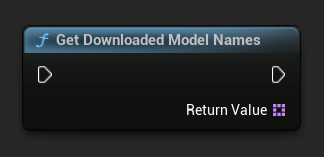
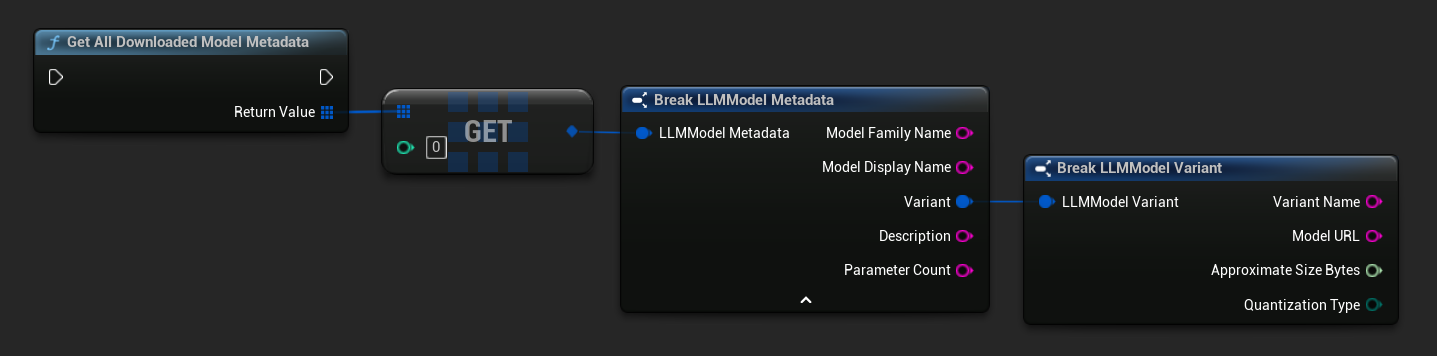
TArray<FName> ModelNames = URuntimeLLMLibrary::GetDownloadedModelNames();

TArray<FLLMModelMetadata> AllModels = URuntimeLLMLibrary::GetAllDownloadedModelMetadata();
for (const FLLMModelMetadata& Model : AllModels)
{
    UE_LOG(LogTemp, Log, TEXT("Model: %s (%s)"), *Model.ModelDisplayName, *Model.Variant.VariantName);
}
모델이 디스크에 있는지 확인
- 블루프린트
- C++
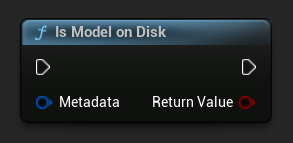
bool bExists = URuntimeLLMLibrary::IsModelOnDisk(Metadata);
모델 파일 경로 가져오기
- 블루프린트
- C++
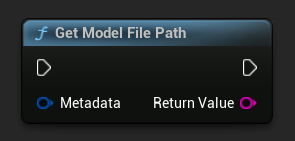
FString FilePath = URuntimeLLMLibrary::GetModelFilePath(Metadata);
모델 파일 삭제
- 블루프린트
- C++
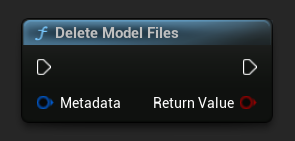
bool bDeleted = URuntimeLLMLibrary::DeleteModelFiles(Metadata);
사전 정의된 사용 가능한 모델 가져오기
- 블루프린트
- C++
// Built-in catalog only
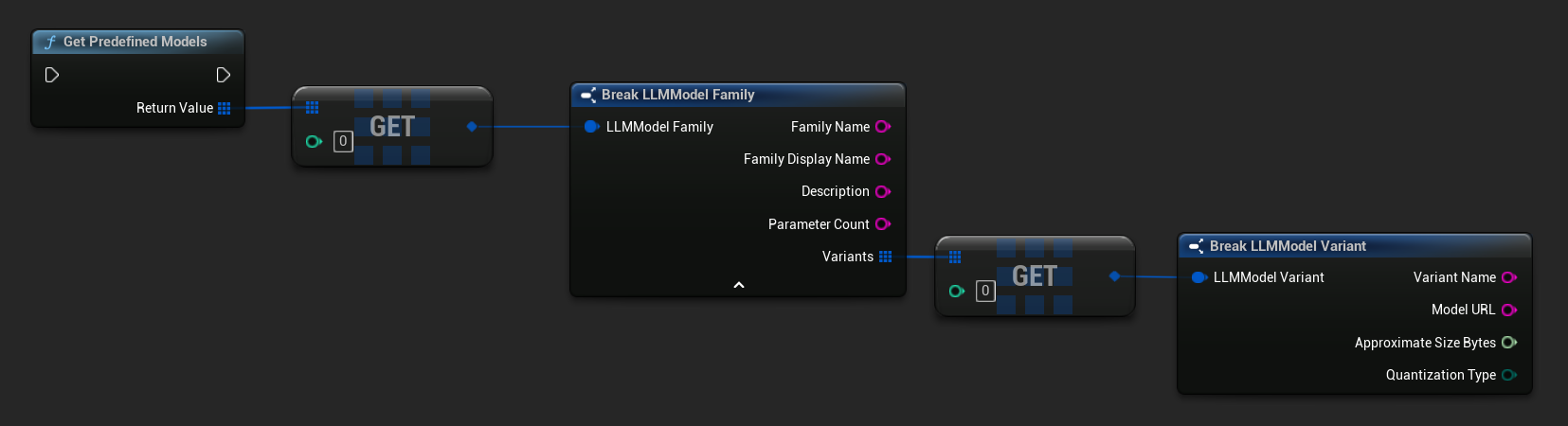
TArray<FLLMModelFamily> Predefined = URuntimeLLMLibrary::GetPredefinedModels();

// Catalog + custom imports
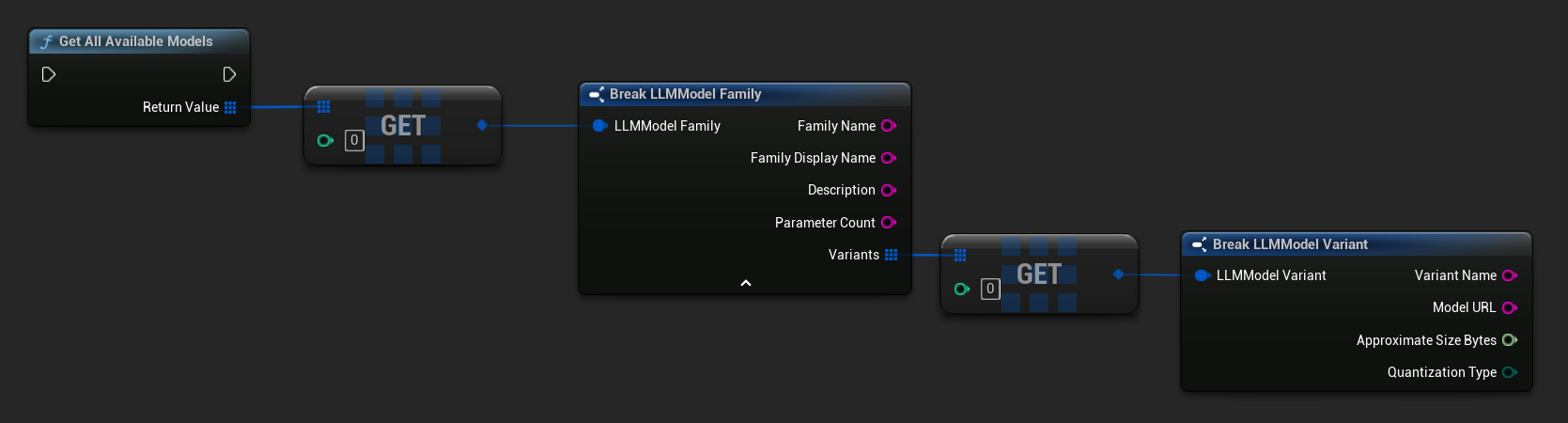
TArray<FLLMModelFamily> All = URuntimeLLMLibrary::GetAllAvailableModels();
URL에서 메타데이터 구축
원시 URL에서 모델 메타데이터를 구성합니다(필드는 파일 이름에서 파생됨).
- 블루프린트
- C++
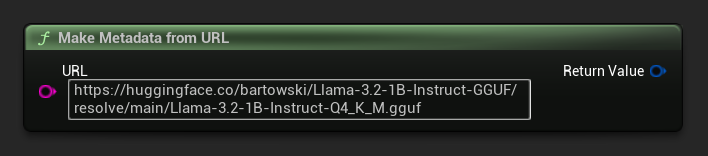
FLLMModelMetadata Metadata = URuntimeLocalLLM::MakeMetadataFromURL(
    TEXT("https://huggingface.co/bartowski/Llama-3.2-1B-Instruct-GGUF/resolve/main/Llama-3.2-1B-Instruct-Q4_K_M.gguf")
);
유틸리티 함수
서식 지정 및 오류 표시를 위한 도우미 함수 세트가 제공됩니다.
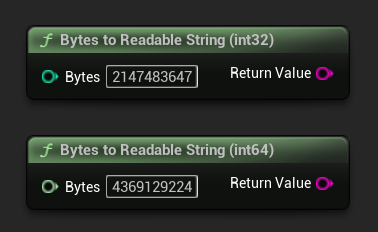
바이트를 읽을 수 있는 문자열로 변환
바이트 수를 사람이 읽을 수 있는 문자열로 변환합니다(예: "4.07 GB"). UI에서 모델 크기를 표시할 때 유용합니다.
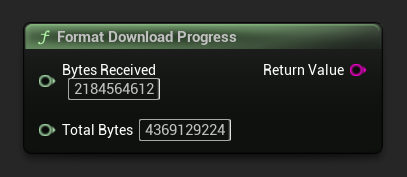
형식 다운로드 진행률
다운로드 진행률 문자열을 "1.23 GB / 4.07 GB (30.2%)" 형식으로 포맷합니다. 전체 크기를 알 수 없는 경우, 수신된 양만 반환합니다.
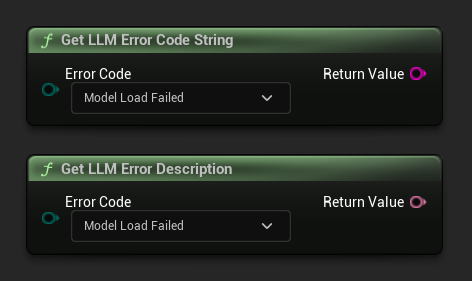
오류 설명 가져오기 / 오류 코드 문자열
Get LLM Error Description는 오류 코드에 대한 사람이 읽을 수 있는 텍스트 설명을 반환합니다. Get LLM Error Code String은 열거형 값 이름을 문자열로 반환합니다(로깅에 유용함).
오류 코드 참조
| Code | 값 | 설명 |
|---|---|---|
| 알 수 없음 | 0 | 지정되지 않은 오류 |
| 모델 로드 실패 | 10 | GGUF 파일을 불러오지 못했습니다 (파일 손상, 호환되지 않는 형식 등). |
| ContextCreateFailed | 11 | 추론 컨텍스트를 생성하지 못했습니다. |
| 모델이 로드되지 않음 | 20 | 모델이 로드되지 않은 상태에서 추론이 시도되었습니다. |
| ChatTemplateFailed | 21 | 모델의 채팅 템플릿을 적용하지 못했습니다. |
| 토큰화 실패 | 22 | 입력 텍스트를 토큰화할 수 없습니다. |
| ContextOverflow | 23 | 프롬프트 + 컨텍스트가 설정된 컨텍스트 크기를 초과했습니다. |
| PromptDecodeFailed | 24 | 프롬프트 토큰을 디코딩하지 못했습니다. |
| ContextTooFullToGenerate | 25 | 출력을 생성할 수 있는 컨텍스트 공간이 부족합니다. |
| GenerationDecodeFailed | 30 | 생성 중 토큰 디코딩에 실패했습니다. |
| GenerationTruncated | 31 | 생성이 중단되었습니다. 최대 토큰 제한에 도달했기 때문입니다. |
| LLMInstanceNull | 40 | LLM 인스턴스가 null이거나 유효하지 않습니다. |
| ModelNotFoundOnDisk | 41 | 모델 파일이 예상된 경로에 존재하지 않습니다 |
| ModelURLEmpty | 42 | 다운로드 요청 시 URL이 비어 있었습니다. |
| 모델 다운로드 취소됨 | 43 | 다운로드가 취소되었습니다. |
| ModelDownloadEmptyData | 44 | 다운로드가 완료되었지만 응답 본문이 비어 있습니다. |
| 모델 다운로드 저장 실패 | 45 | 다운로드가 완료되었지만 파일을 디스크에 저장할 수 없습니다. |