Inference parameters
The LLM Inference Parameters structure controls how the model loads and generates text. You pass these parameters when loading a model. This page describes each parameter and its effect.
Parameter Reference
| Parameter | Type | Default | Range | Description |
|---|---|---|---|---|
| Max Tokens | int32 | 512 | 1–8192 | Maximum number of tokens to generate in a single response |
| Temperature | float | 0.7 | 0.0–2.0 | Controls randomness. 0.0 = deterministic. Higher values = more creative output |
| Top P | float | 0.9 | 0.0–1.0 | Nucleus sampling. Only tokens whose cumulative probability exceeds this value are considered |
| Top K | int32 | 40 | 0–200 | Limits selection to the top K most probable tokens. 0 = disabled |
| Repeat Penalty | float | 1.1 | 0.0–3.0 | Penalizes tokens that already appear in the output. 1.0 = no penalty |
| Num GPU Layers | int32 | -1 | -1–200 | Model layers to offload to GPU. -1 = auto. 0 = CPU only |
| Context Size | int32 | 2048 | 128–131072 | Maximum context window in tokens. Larger values use more memory |
| System Prompt | FString | "You are a helpful assistant." | — | System instruction that shapes the model's behavior |
| Seed | int32 | -1 | -1+ | Random seed for reproducible output. -1 = random |
| Num Threads | int32 | 0 | 0–128 | CPU threads for generation. 0 = automatic |
Usage
- Blueprint
- C++
Inference parameters appear as a struct pin on load and async nodes. Break the struct to set individual values:
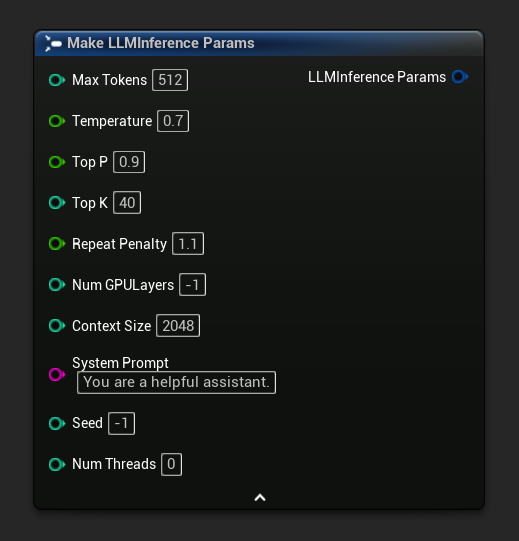
To get a default set of parameters as a starting point, use Get Default Inference Params:

// Creative writing
FLLMInferenceParams CreativeParams;
CreativeParams.MaxTokens = 1024;
CreativeParams.Temperature = 1.2f;
CreativeParams.TopP = 0.95f;
CreativeParams.TopK = 80;
CreativeParams.RepeatPenalty = 1.2f;
CreativeParams.SystemPrompt = TEXT("You are a creative storyteller.");

// Factual / deterministic
FLLMInferenceParams FactualParams;
FactualParams.MaxTokens = 256;
FactualParams.Temperature = 0.1f;
FactualParams.TopP = 0.5f;
FactualParams.TopK = 10;
FactualParams.SystemPrompt = TEXT("Answer questions concisely and accurately.");

// Mobile-optimized
FLLMInferenceParams MobileParams;
MobileParams.MaxTokens = 128;
MobileParams.ContextSize = 1024;
MobileParams.NumGPULayers = 0;
MobileParams.NumThreads = 4;
MobileParams.SystemPrompt = TEXT("You are a helpful assistant. Keep responses brief.");

// Get defaults programmatically
FLLMInferenceParams DefaultParams = URuntimeLocalLLM::GetDefaultInferenceParams();
Platform Recommendations
Mobile / VR (Android, iOS, Meta Quest)
- Context Size: 1024–2048
- Num GPU Layers: 0 (CPU only) unless the device has confirmed GPU compute support
- Max Tokens: Under 256 for responsive interactions
- Num Threads: 2–4 depending on the device
Desktop (Windows, Mac, Linux)
- Context Size: 2048–8192 for most conversations
- Num GPU Layers: -1 (auto) to leverage GPU acceleration when available
- Num Threads: 0 (auto)
- Max Tokens: 512–2048 for longer responses
Long-Running Conversations
If your application maintains conversations over long sessions (NPC dialogue, persistent assistants, roleplay), consider pairing your context size with automatic summarization rather than just increasing Context Size. A modest Context Size of 2048–4096 with auto-summarization enabled keeps latency and memory usage stable, while larger context windows make every generation progressively slower. See Automatic Context Summarization.