Vosk Extension
By default, the Runtime Speech Recognizer plugin uses whisper.cpp for recognition. On platforms without GPU acceleration support in whisper.cpp, most notably Android and Android-based platforms such as Meta Quest, recognition falls back to CPU + intrinsics, which is slower and heavier on battery life. The Vosk extension plugin adds an alternative provider based on Vosk, a lightweight speech recognition toolkit that works well on constrained hardware and performs especially well on Meta Quest.
Switching between whisper.cpp and Vosk only takes a few Blueprint nodes, and switching back is just as easy, so you can keep both options available and pick a provider per platform if needed.
Installation
To use the Vosk extension:
-
Ensure the main Runtime Speech Recognizer plugin is already installed in your project
-
Download the Vosk extension plugin from here
-
Extract the folder from the downloaded archive into the
Pluginsfolder of your project (create this folder if it doesn't exist) -
Rebuild your project (this extension requires a C++ project)
-
The Vosk extension supports Unreal Engine 5.0 through 5.8
-
This extension is provided as source code and requires a C++ project to use
-
For more information on how to build plugins manually, see the Building Plugins tutorial
Switching to the Vosk provider
Once the extension is installed, switching a speech recognizer over to Vosk comes down to three nodes, right after CreateSpeechRecognizer:

- Call Set Speech Recognizer Provider, passing the Vosk provider class.
- Cast To Runtime Vosk Speech Recognizer Provider on the result.
- Call Set Vosk Model Path (By Name) on the cast result, picking a downloaded model from the dropdown.
Everything else in your existing setup (Start Speech Recognition, Process Audio Data, the delegates, VAD, and so on) keeps working unmodified. To switch back to whisper.cpp, remove these three nodes, or simply don't call Set Speech Recognizer Provider at all, since whisper.cpp is the default.
Downloading Vosk models
Vosk models are downloaded and managed from Project Settings -> Plugins -> Runtime Speech Recognizer Vosk. The panel lists the predefined model catalog grouped by language, and each entry has a Download button, with a progress bar shown while the download and extraction are in progress, and a Delete button once the model is on disk.
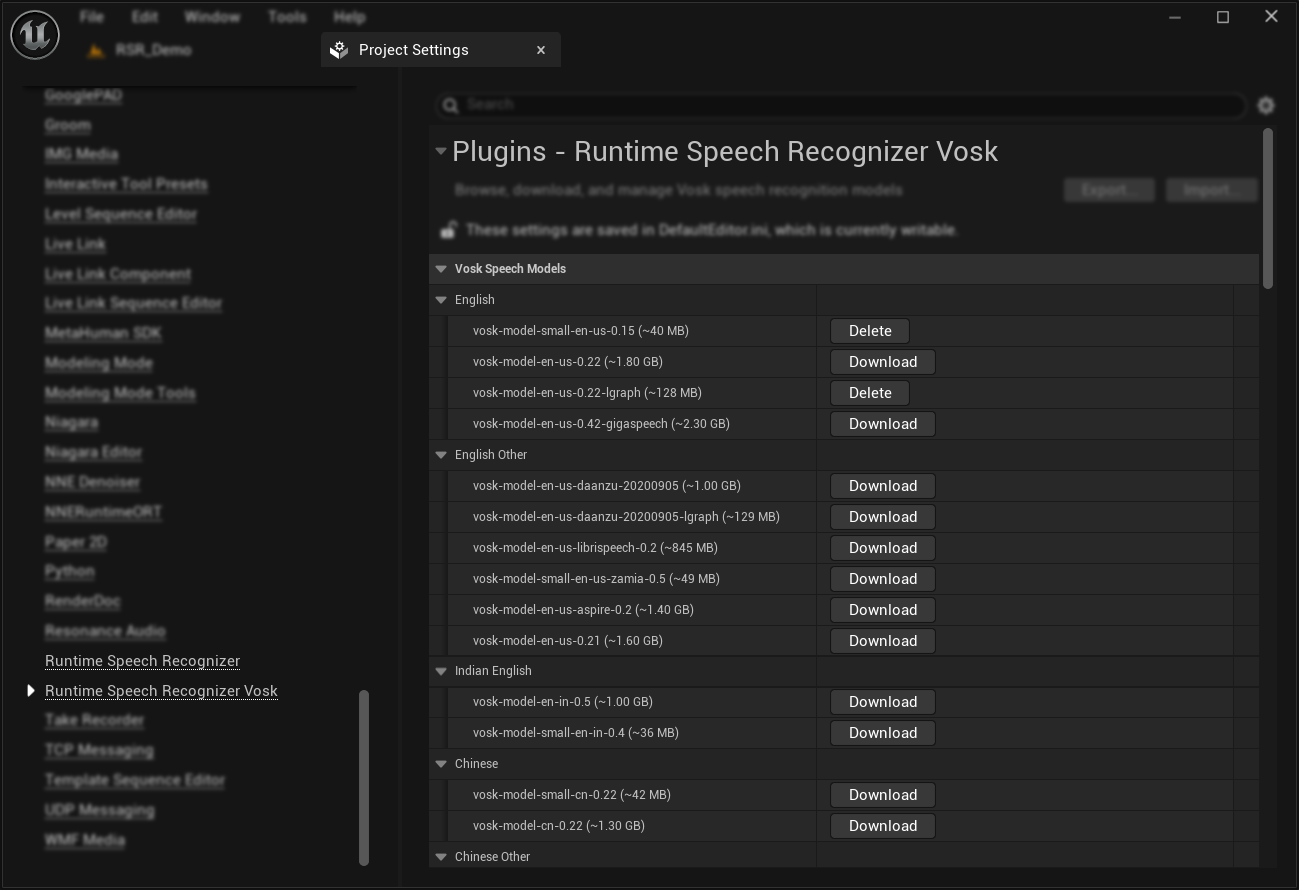
Downloaded models are extracted under Content/RuntimeSpeechRecognizerVosk/Models, and the plugin takes care of staging that folder for packaging automatically. You're also not limited to a single packaged model: any model you download stays available and can be selected at runtime with Set Vosk Model Path (By Name). On Android, the model files ship inside the packaged app and are copied to persistent storage on first use, which is handled internally when the model is selected.
Supported languages (click to expand)
The predefined catalog includes models for: English, Indian English, Chinese, Russian, French, German, Spanish, Portuguese/Brazilian Portuguese, Greek, Turkish, Vietnamese, Italian, Dutch, Catalan, Arabic, Arabic Tunisian, Farsi, Filipino, Ukrainian, Kazakh, Swedish, Japanese, Esperanto, Hindi, Czech, Polish, Uzbek, Korean, Breton, Gujarati, Tajik, Telugu, Kyrgyz, and Georgian, along with a dedicated speaker identification model.
Some languages have multiple variants in the panel (for example, a smaller model suited to mobile hardware alongside a larger, more accurate one), so it's worth reviewing the options for your target language directly in the Project Settings panel rather than assuming only one is available. See the full Vosk model list for details on accuracy, size, and licensing of each variant.
Parameters and behavior
Vosk is a fundamentally different recognizer from whisper.cpp, so most entries from the Recognition Parameter List don't apply to it. Calling an unsupported setter on the Vosk provider has no effect, so Blueprint logic written for whisper.cpp keeps working unmodified after switching providers. The functions that do have an effect on Vosk are:
- Set Language: selects which language's model is used. Vosk doesn't support automatic language detection, so if you set the language to Auto, it's ignored.
- Set Step Size: how much audio accumulates before it's sent for recognition, same mechanism as with whisper.cpp. Since Vosk is a streaming recognizer, a small value (the Vosk provider defaults to 200 ms) keeps partial results responsive.
- Set Max Tokens: repurposed for Vosk, described below.
Set Max Tokens and streaming output
The Set Max Tokens parameter controls how the Vosk provider delivers recognized text through On Recognized Text Segment:
- 0 (default): text accumulates internally and is delivered as a single finished segment once recognition finalizes, either through a VAD-triggered stop (as in the Voice-activated command recognition or Auto-initializing voice recognition examples) or through whatever logic in your project calls Stop Speech Recognition or forces the last audio chunk through. This matches the segment-based behavior whisper.cpp uses.
- Greater than 0: the provider switches into a streaming mode. Instead of it waiting for a finished segment, it broadcasts partial results as recognition progresses, each one replacing the last with a longer version of the same phrase, until the segment finishes and the text resets for the next one. A short utterance might look like this over several broadcasts of On Recognized Text Segment:
"The"
"The cat"
"The cat is"
"The cat is sleeping"
The exact numeric value doesn't matter to Vosk itself since it has no built-in token limit. Any value above 0 turns on streaming delivery.
Since partials only arrive as often as audio is queued (governed by Set Step Size), pair a low Max Tokens with a low Step Size for responsive live output.
Platform support
The Vosk extension works on Windows, Android, and Android-based platforms such as Meta Quest. It's most useful on Android and Meta Quest, where whisper.cpp has no GPU acceleration path, and it performs especially well on Meta Quest specifically. If you're already on Windows or another desktop platform with Vulkan or Metal acceleration available, whisper.cpp is likely a better default. Vosk is meant as an alternative for the platforms where whisper.cpp is at its weakest.
Advanced: working with models directly
The Project Settings panel covers downloading and deleting models for most projects. If your project needs to work with models directly instead of relying on the Editor panel, for example checking availability or managing files at runtime, the plugin exposes the underlying library functions:
- Get Available Vosk Model Names: returns the names of models ready to use right now, whether extracted to disk already or just packaged and waiting for their first use. This is what powers the dropdown on Set Vosk Model Path (By Name).
- Is Vosk Model Available: the same check as above, for a single model by ID.
- Get Vosk Models Directory: returns the absolute path to the directory models are read from at runtime.
- Get Vosk Model Folder Path: returns the absolute path to a specific model's folder on disk.
- Delete Vosk Model Files: deletes a model's extracted files from disk.