Cách sử dụng plugin
Trình tích hợp Chatbot AI Thời gian chạy cung cấp hai chức năng chính: Trò chuyện Văn bản-với-Văn bản và Chuyển văn bản thành giọng nói (TTS). Cả hai tính năng đều tuân theo quy trình làm việc tương tự:
- Đăng ký token nhà cung cấp API của bạn
- Cấu hình cài đặt cụ thể cho tính năng
- Gửi yêu cầu và xử lý phản hồi
Đăng ký Token Nhà cung cấp
Trước khi gửi bất kỳ yêu cầu nào, hãy đăng ký token nhà cung cấp API của bạn bằng hàm RegisterProviderToken.
Ollama chạy cục bộ và không yêu cầu token API. Bạn có thể bỏ qua bước này cho Ollama.
- Blueprint
- C++
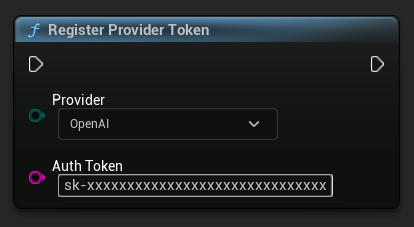
// Register an OpenAI provider token, as an example
UAIChatbotCredentialsManager::RegisterProviderToken(
    EAIChatbotIntegratorOrgs::OpenAI,
    TEXT("sk-xxxxxxxxxxxxxxxxxxxxxxxxxxxxxx")
);

// Register other providers as needed
UAIChatbotCredentialsManager::RegisterProviderToken(
    EAIChatbotIntegratorOrgs::Anthropic,
    TEXT("sk-ant-xxxxxxxxxxxxxxxxxxxxxxxxxxxxxx")
);

UAIChatbotCredentialsManager::RegisterProviderToken(
    EAIChatbotIntegratorOrgs::DeepSeek,
    TEXT("sk-xxxxxxxxxxxxxxxxxxxxxxxxxxxxxx")
);

etc
Chức năng Trò chuyện Văn bản-đến-Văn bản
Plugin hỗ trợ hai chế độ yêu cầu trò chuyện cho mỗi nhà cung cấp:
Yêu cầu Trò chuyện Không Streaming
Lấy toàn bộ phản hồi trong một lần gọi duy nhất.
- OpenAI
- DeepSeek
- Claude
- Gemini
- Grok
- Ollama
- Blueprint
- C++
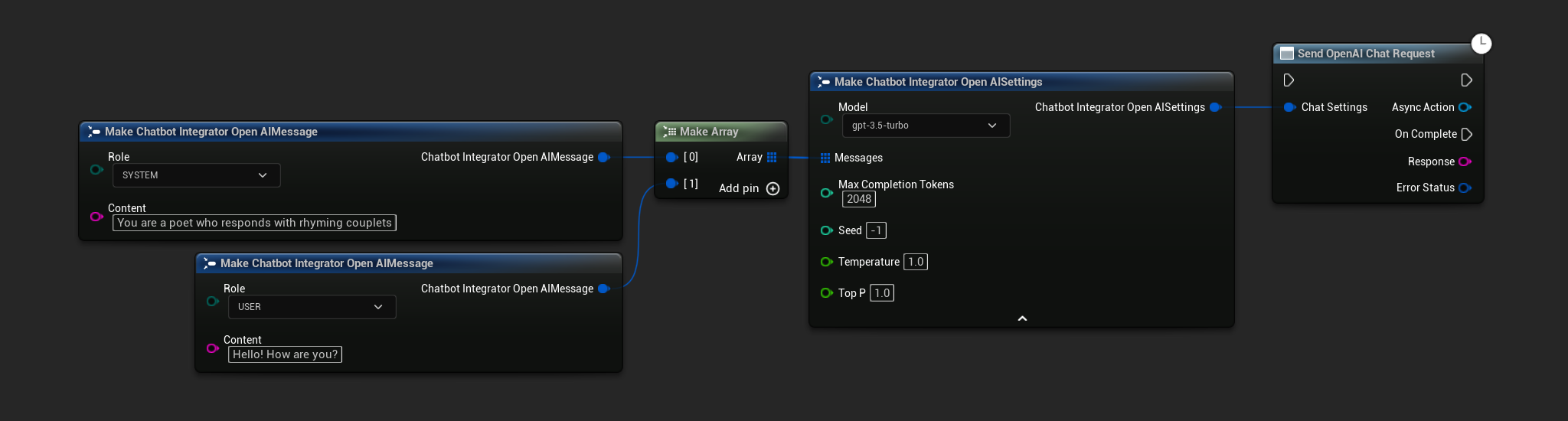
// Example of sending a non-streaming chat request to OpenAI
FChatbotIntegrator_OpenAISettings Settings;
Settings.Messages.Add(FChatbotIntegrator_OpenAIMessage{
    EChatbotIntegrator_OpenAIRole::SYSTEM,
    TEXT("You are a helpful assistant.")
});
Settings.Messages.Add(FChatbotIntegrator_OpenAIMessage{
    EChatbotIntegrator_OpenAIRole::USER,
    TEXT("What is the capital of France?")
});

UAIChatbotIntegratorOpenAI::SendChatRequestNative(
    Settings,
    FOnOpenAIChatCompletionResponseNative::CreateWeakLambda(
        this,
        [this](const FString& Response, const FChatbotIntegratorErrorStatus& ErrorStatus)
        {
            UE_LOG(LogTemp, Log, TEXT("Chat completion response: %s, Error: %d: %s"),
                *Response, ErrorStatus.bIsError, *ErrorStatus.ErrorMessage);
        }
    )
);
- Blueprint
- C++
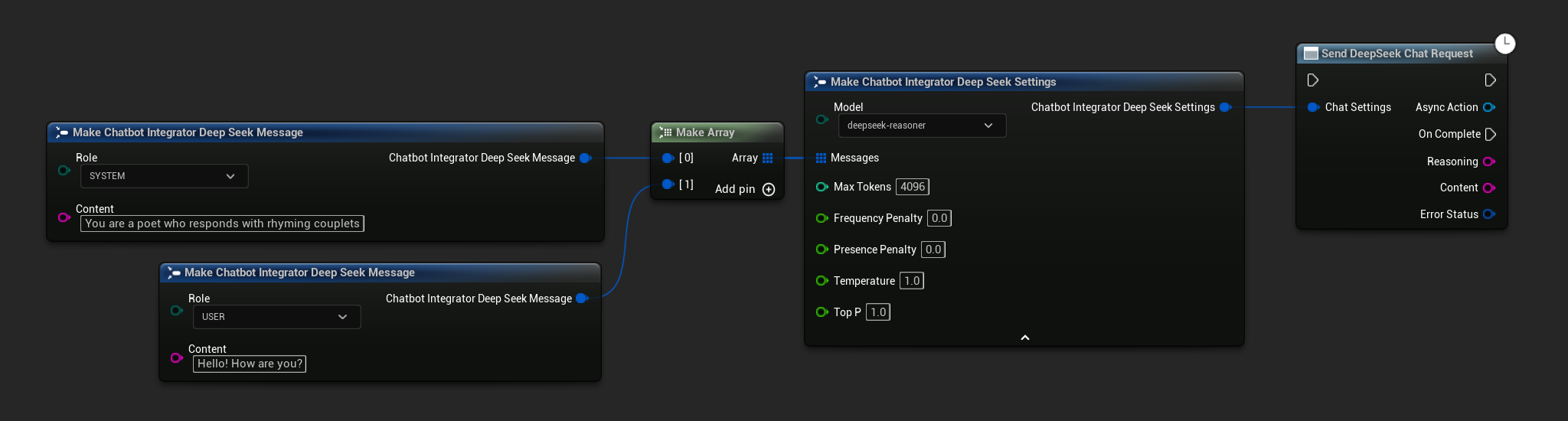
// Example of sending a non-streaming chat request to DeepSeek
FChatbotIntegrator_DeepSeekSettings Settings;
Settings.Messages.Add(FChatbotIntegrator_DeepSeekMessage{
    EChatbotIntegrator_DeepSeekRole::SYSTEM,
    TEXT("You are a helpful assistant.")
});
Settings.Messages.Add(FChatbotIntegrator_DeepSeekMessage{
    EChatbotIntegrator_DeepSeekRole::USER,
    TEXT("What is the capital of France?")
});

UAIChatbotIntegratorDeepSeek::SendChatRequestNative(
    Settings,
    FOnDeepSeekChatCompletionResponseNative::CreateWeakLambda(
        this,
        [this](const FString& Reasoning, const FString& Content, const FChatbotIntegratorErrorStatus& ErrorStatus)
        {
            UE_LOG(LogTemp, Log, TEXT("Chat completion reasoning: %s, Content: %s, Error: %d: %s"),
                *Reasoning, *Content, ErrorStatus.bIsError, *ErrorStatus.ErrorMessage);
        }
    )
);
- Blueprint
- C++
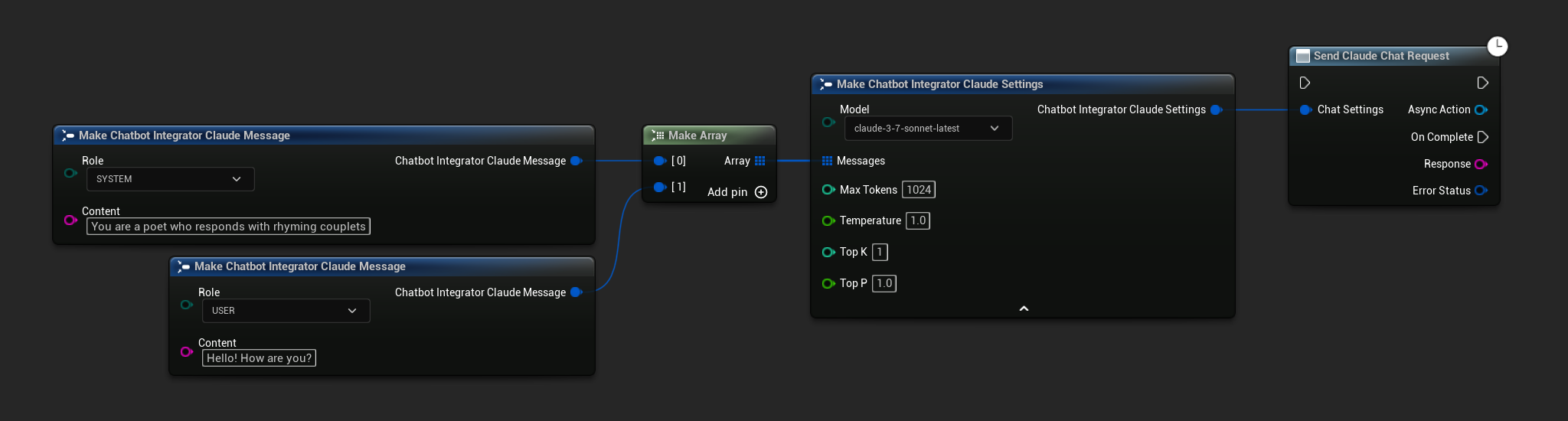
// Example of sending a non-streaming chat request to Claude
FChatbotIntegrator_ClaudeSettings Settings;
Settings.Messages.Add(FChatbotIntegrator_ClaudeMessage{
    EChatbotIntegrator_ClaudeRole::SYSTEM,
    TEXT("You are a helpful assistant.")
});
Settings.Messages.Add(FChatbotIntegrator_ClaudeMessage{
    EChatbotIntegrator_ClaudeRole::USER,
    TEXT("What is the capital of France?")
});

UAIChatbotIntegratorClaude::SendChatRequestNative(
    Settings,
    FOnClaudeChatCompletionResponseNative::CreateWeakLambda(
        this,
        [this](const FString& Response, const FChatbotIntegratorErrorStatus& ErrorStatus)
        {
            UE_LOG(LogTemp, Log, TEXT("Chat completion response: %s, Error: %d: %s"),
                *Response, ErrorStatus.bIsError, *ErrorStatus.ErrorMessage);
        }
    )
);
- Blueprint
- C++
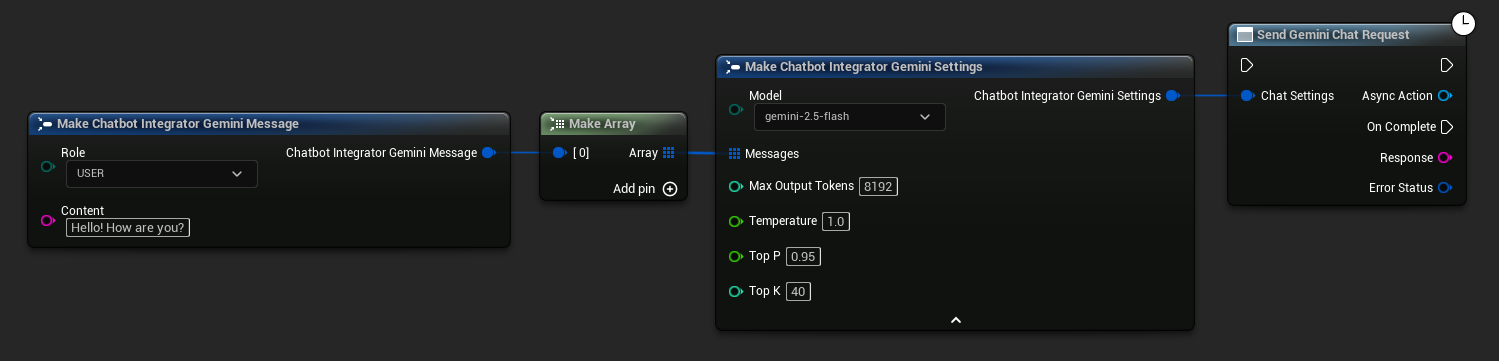
// Example of sending a non-streaming chat request to Gemini
FChatbotIntegrator_GeminiSettings Settings;
Settings.Messages.Add(FChatbotIntegrator_GeminiMessage{
    EChatbotIntegrator_GeminiRole::USER,
    TEXT("What is the capital of France?")
});

UAIChatbotIntegratorGemini::SendChatRequestNative(
    Settings,
    FOnGeminiChatCompletionResponseNative::CreateWeakLambda(
        this,
        [this](const FString& Response, const FChatbotIntegratorErrorStatus& ErrorStatus)
        {
            UE_LOG(LogTemp, Log, TEXT("Chat completion response: %s, Error: %d: %s"),
                *Response, ErrorStatus.bIsError, *ErrorStatus.ErrorMessage);
        }
    )
);
- Blueprint
- C++
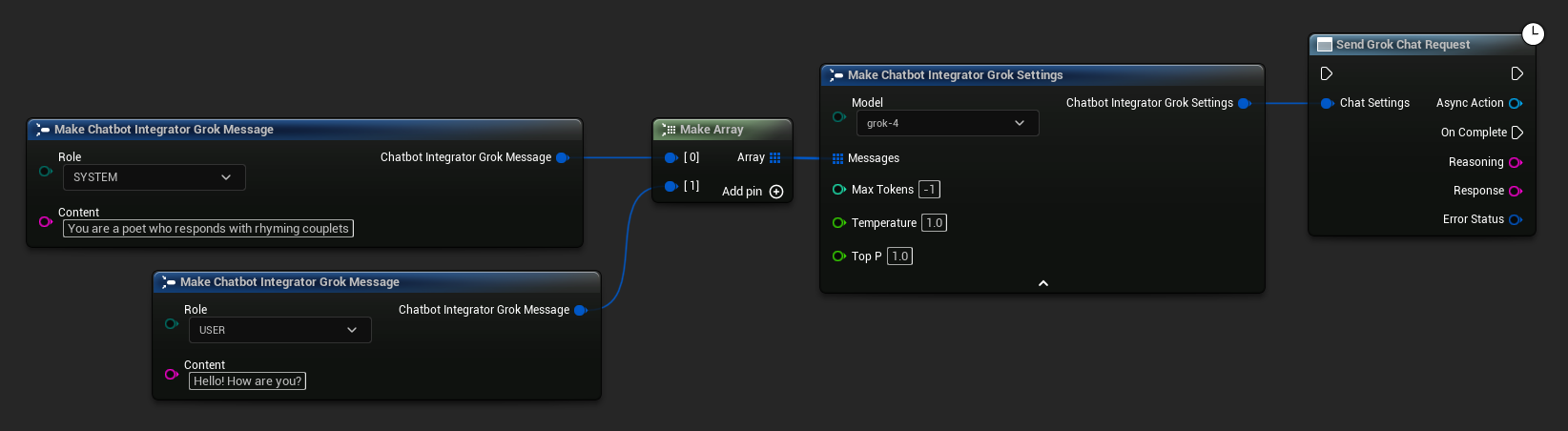
// Example of sending a non-streaming chat request to Grok
FChatbotIntegrator_GrokSettings Settings;
Settings.Messages.Add(FChatbotIntegrator_GrokMessage{
    EChatbotIntegrator_GrokRole::SYSTEM,
    TEXT("You are a helpful assistant.")
});
Settings.Messages.Add(FChatbotIntegrator_GrokMessage{
    EChatbotIntegrator_GrokRole::USER,
    TEXT("What is the capital of France?")
});

UAIChatbotIntegratorGrok::SendChatRequestNative(
    Settings,
    FOnGrokChatCompletionResponseNative::CreateWeakLambda(
        this,
        [this](const FString& Reasoning, const FString& Response, const FChatbotIntegratorErrorStatus& ErrorStatus)
        {
            UE_LOG(LogTemp, Log, TEXT("Chat completion reasoning: %s, Response: %s, Error: %d: %s"),
                *Reasoning, *Response, ErrorStatus.bIsError, *ErrorStatus.ErrorMessage);
        }
    )
);
- Blueprint
- C++
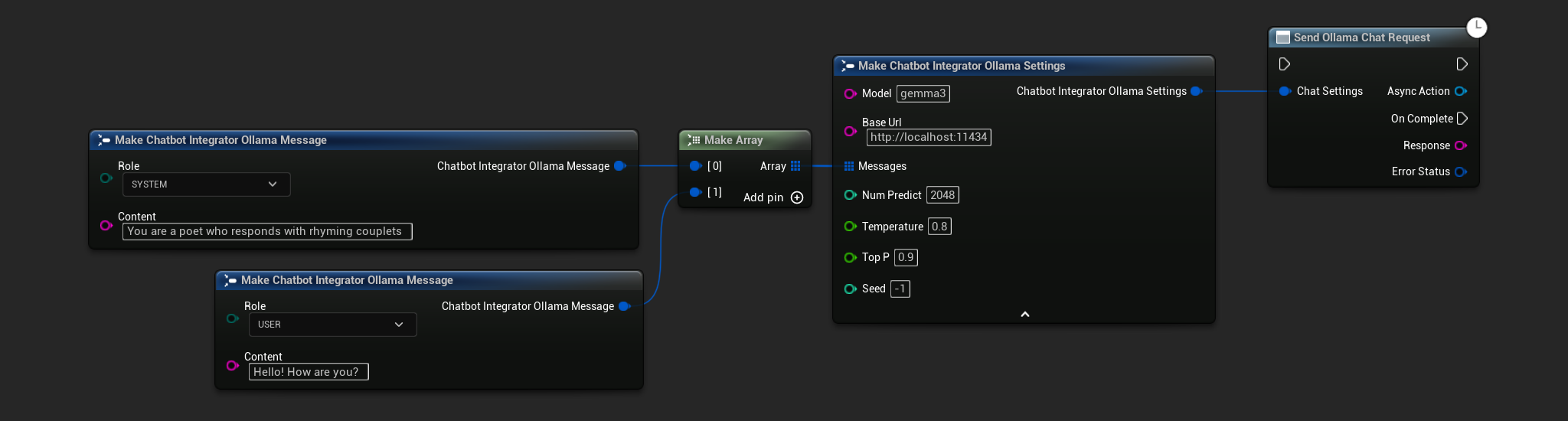
// Example of sending a non-streaming chat request to Ollama
FChatbotIntegrator_OllamaSettings Settings;
Settings.Model = TEXT("gemma3");
Settings.BaseUrl = TEXT("http://localhost:11434");
Settings.Messages.Add(FChatbotIntegrator_OllamaMessage{
    EChatbotIntegrator_OllamaRole::SYSTEM,
    TEXT("You are a helpful assistant.")
});
Settings.Messages.Add(FChatbotIntegrator_OllamaMessage{
    EChatbotIntegrator_OllamaRole::USER,
    TEXT("What is the capital of France?")
});

UAIChatbotIntegratorOllama::SendChatRequestNative(
    Settings,
    FOnOllamaChatCompletionResponseNative::CreateWeakLambda(
        this,
        [this](const FString& Response, const FChatbotIntegratorErrorStatus& ErrorStatus)
        {
            UE_LOG(LogTemp, Log, TEXT("Chat completion response: %s, Error: %d: %s"),
                *Response, ErrorStatus.bIsError, *ErrorStatus.ErrorMessage);
        }
    )
);
Yêu cầu Trò chuyện Luồng (Streaming Chat Requests)
Nhận các khối phản hồi theo thời gian thực để có tương tác năng động hơn.
- OpenAI
- DeepSeek
- Claude
- Gemini
- Grok
- Ollama
- Blueprint
- C++
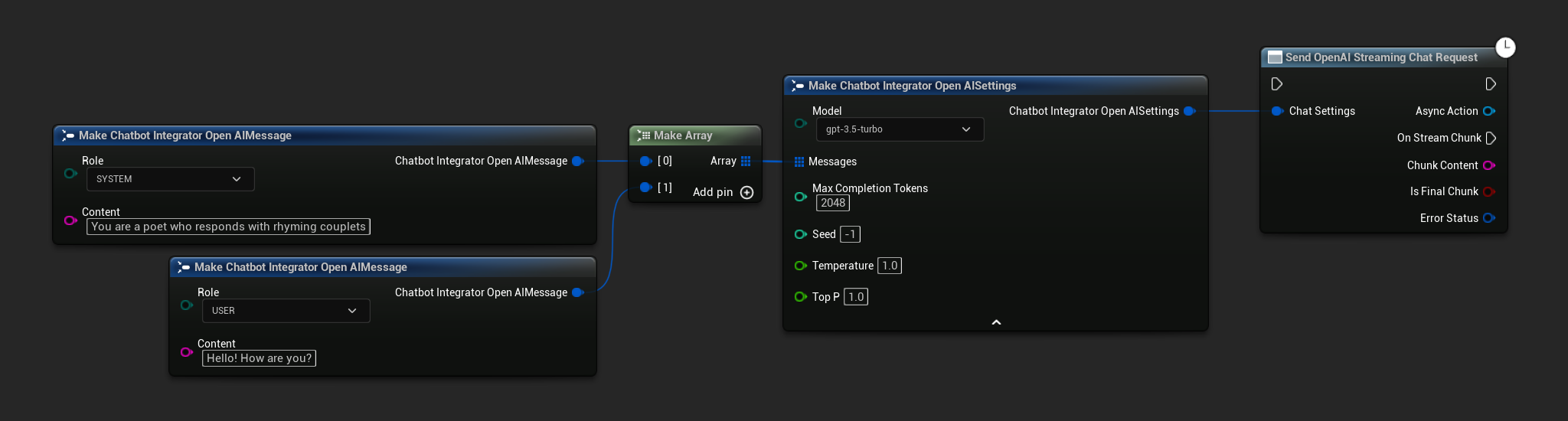
// Example of sending a streaming chat request to OpenAI
FChatbotIntegrator_OpenAIStreamingSettings Settings;
Settings.Messages.Add(FChatbotIntegrator_OpenAIMessage{
    EChatbotIntegrator_OpenAIRole::SYSTEM,
    TEXT("You are a helpful assistant.")
});
Settings.Messages.Add(FChatbotIntegrator_OpenAIMessage{
    EChatbotIntegrator_OpenAIRole::USER,
    TEXT("What is the capital of France?")
});

UAIChatbotIntegratorOpenAIStream::SendStreamingChatRequestNative(
    Settings,
    FOnOpenAIChatCompletionStreamNative::CreateWeakLambda(
        this,
        [this](const FString& ChunkContent, bool IsFinalChunk, const FChatbotIntegratorErrorStatus& ErrorStatus)
        {
            UE_LOG(LogTemp, Log, TEXT("Streaming chat chunk: %s, IsFinalChunk: %d, Error: %d: %s"),
                *ChunkContent, IsFinalChunk, ErrorStatus.bIsError, *ErrorStatus.ErrorMessage);
        }
    )
);
- Blueprint
- C++
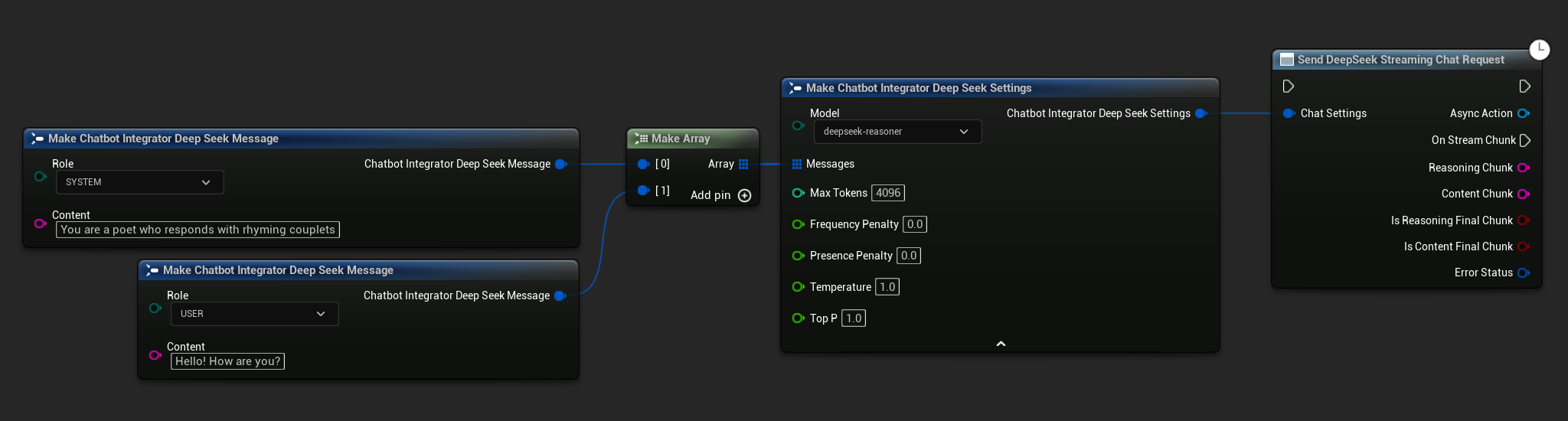
// Example of sending a streaming chat request to DeepSeek
FChatbotIntegrator_DeepSeekSettings Settings;
Settings.Messages.Add(FChatbotIntegrator_DeepSeekMessage{
    EChatbotIntegrator_DeepSeekRole::SYSTEM,
    TEXT("You are a helpful assistant.")
});
Settings.Messages.Add(FChatbotIntegrator_DeepSeekMessage{
    EChatbotIntegrator_DeepSeekRole::USER,
    TEXT("What is the capital of France?")
});

UAIChatbotIntegratorDeepSeekStream::SendStreamingChatRequestNative(
    Settings,
    FOnDeepSeekChatCompletionStreamNative::CreateWeakLambda(
        this,
        [this](const FString& ReasoningChunk, const FString& ContentChunk,
               bool IsReasoningFinalChunk, bool IsContentFinalChunk,
               const FChatbotIntegratorErrorStatus& ErrorStatus)
        {
            UE_LOG(LogTemp, Log, TEXT("Streaming reasoning: %s, content: %s, Error: %d: %s"),
                *ReasoningChunk, *ContentChunk, ErrorStatus.bIsError, *ErrorStatus.ErrorMessage);
        }
    )
);
- Blueprint
- C++
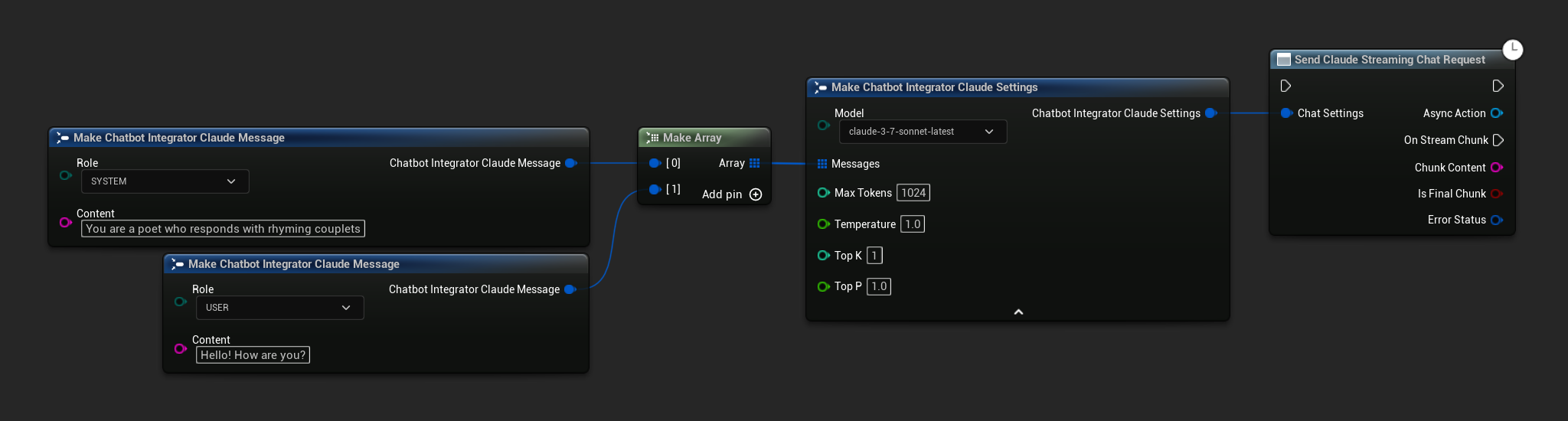
// Example of sending a streaming chat request to Claude
FChatbotIntegrator_ClaudeSettings Settings;
Settings.Messages.Add(FChatbotIntegrator_ClaudeMessage{
    EChatbotIntegrator_ClaudeRole::SYSTEM,
    TEXT("You are a helpful assistant.")
});
Settings.Messages.Add(FChatbotIntegrator_ClaudeMessage{
    EChatbotIntegrator_ClaudeRole::USER,
    TEXT("What is the capital of France?")
});

UAIChatbotIntegratorClaudeStream::SendStreamingChatRequestNative(
    Settings,
    FOnClaudeChatCompletionStreamNative::CreateWeakLambda(
        this,
        [this](const FString& ChunkContent, bool IsFinalChunk, const FChatbotIntegratorErrorStatus& ErrorStatus)
        {
            UE_LOG(LogTemp, Log, TEXT("Streaming chat chunk: %s, IsFinalChunk: %d, Error: %d: %s"),
                *ChunkContent, IsFinalChunk, ErrorStatus.bIsError, *ErrorStatus.ErrorMessage);
        }
    )
);
- Blueprint
- C++
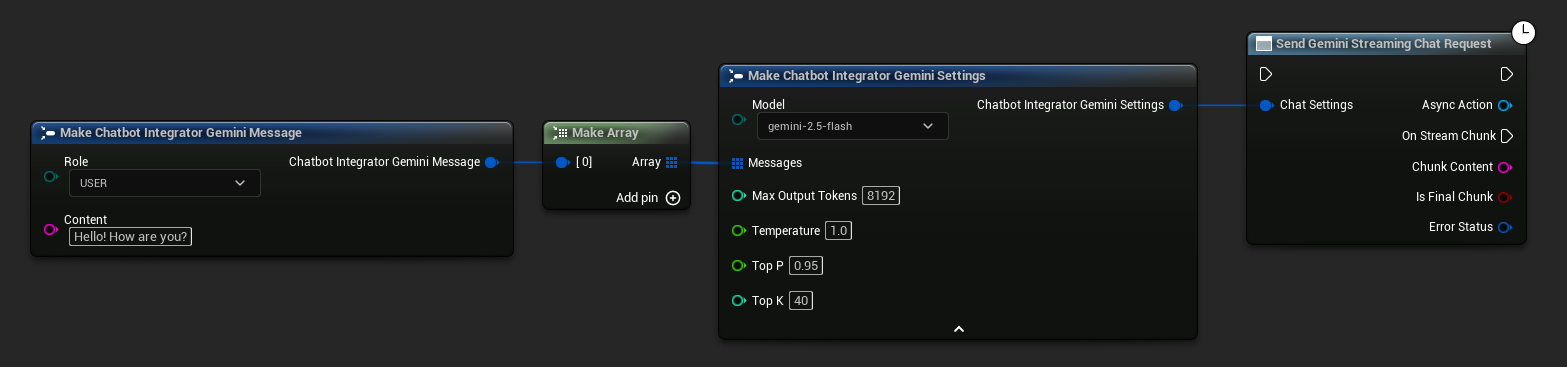
// Example of sending a streaming chat request to Gemini
FChatbotIntegrator_GeminiSettings Settings;
Settings.Messages.Add(FChatbotIntegrator_GeminiMessage{
    EChatbotIntegrator_GeminiRole::USER,
    TEXT("What is the capital of France?")
});

UAIChatbotIntegratorGeminiStream::SendStreamingChatRequestNative(
    Settings,
    FOnGeminiChatCompletionStreamNative::CreateWeakLambda(
        this,
        [this](const FString& ChunkContent, bool IsFinalChunk, const FChatbotIntegratorErrorStatus& ErrorStatus)
        {
            UE_LOG(LogTemp, Log, TEXT("Streaming chat chunk: %s, IsFinalChunk: %d, Error: %d: %s"),
                *ChunkContent, IsFinalChunk, ErrorStatus.bIsError, *ErrorStatus.ErrorMessage);
        }
    )
);
- Blueprint
- C++
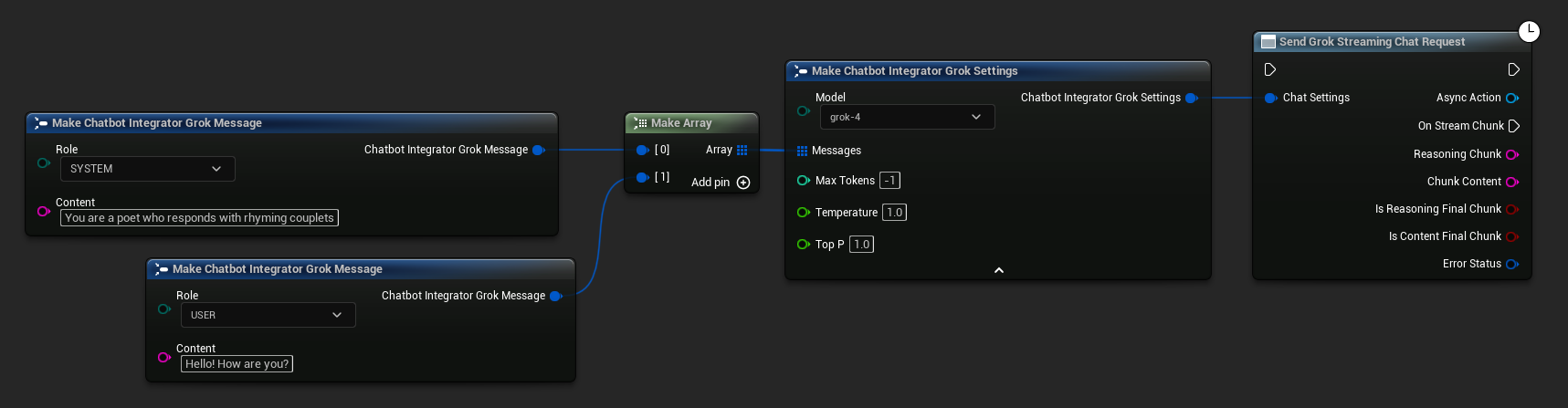
// Example of sending a streaming chat request to Grok
FChatbotIntegrator_GrokSettings Settings;
Settings.Messages.Add(FChatbotIntegrator_GrokMessage{
    EChatbotIntegrator_GrokRole::SYSTEM,
    TEXT("You are a helpful assistant.")
});
Settings.Messages.Add(FChatbotIntegrator_GrokMessage{
    EChatbotIntegrator_GrokRole::USER,
    TEXT("What is the capital of France?")
});

UAIChatbotIntegratorGrokStream::SendStreamingChatRequestNative(
    Settings,
    FOnGrokChatCompletionStreamNative::CreateWeakLambda(
        this,
        [this](const FString& ReasoningChunk, const FString& ContentChunk,
               bool IsReasoningFinalChunk, bool IsContentFinalChunk,
               const FChatbotIntegratorErrorStatus& ErrorStatus)
        {
            UE_LOG(LogTemp, Log, TEXT("Streaming reasoning: %s, content: %s, Error: %d: %s"),
                *ReasoningChunk, *ContentChunk, ErrorStatus.bIsError, *ErrorStatus.ErrorMessage);
        }
    )
);
- Blueprint
- C++
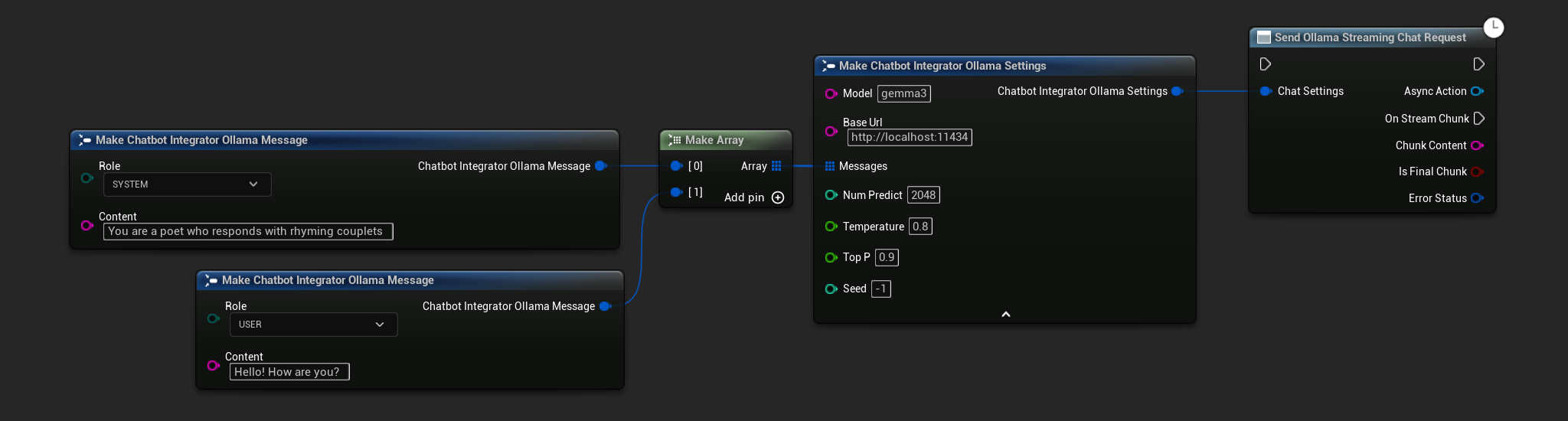
// Example of sending a streaming chat request to Ollama
FChatbotIntegrator_OllamaSettings Settings;
Settings.Model = TEXT("gemma3");
Settings.BaseUrl = TEXT("http://localhost:11434");
Settings.Messages.Add(FChatbotIntegrator_OllamaMessage{
    EChatbotIntegrator_OllamaRole::SYSTEM,
    TEXT("You are a helpful assistant.")
});
Settings.Messages.Add(FChatbotIntegrator_OllamaMessage{
    EChatbotIntegrator_OllamaRole::USER,
    TEXT("What is the capital of France?")
});

UAIChatbotIntegratorOllamaStream::SendStreamingChatRequestNative(
    Settings,
    FOnOllamaChatCompletionStreamNative::CreateWeakLambda(
        this,
        [this](const FString& ChunkContent, bool IsFinalChunk, const FChatbotIntegratorErrorStatus& ErrorStatus)
        {
            UE_LOG(LogTemp, Log, TEXT("Streaming chat chunk: %s, IsFinalChunk: %d, Error: %d: %s"),
                *ChunkContent, IsFinalChunk, ErrorStatus.bIsError, *ErrorStatus.ErrorMessage);
        }
    )
);
Chức năng Chuyển văn bản thành giọng nói (TTS)
Chuyển đổi văn bản thành âm thanh giọng nói chất lượng cao bằng các nhà cung cấp TTS hàng đầu. Plugin trả về dữ liệu âm thanh thô (TArray<uint8>) mà bạn có thể xử lý theo nhu cầu của dự án.
Mặc dù các ví dụ dưới đây minh họa quá trình xử lý âm thanh để phát lại bằng plugin Runtime Audio Importer (xem tài liệu nhập âm thanh), Runtime AI Chatbot Integrator được thiết kế linh hoạt. Plugin chỉ đơn giản trả về dữ liệu âm thanh thô, cho bạn toàn quyền tự do trong cách xử lý cho trường hợp sử dụng cụ thể của mình, có thể bao gồm phát lại âm thanh, lưu vào tệp, xử lý âm thanh thêm, truyền đến các hệ thống khác, tùy chỉnh trực quan hóa, v.v.
Yêu cầu TTS không phát trực tiếp (Non-Streaming)
Các yêu cầu TTS không phát trực tiếp trả về toàn bộ dữ liệu âm thanh trong một phản hồi duy nhất sau khi toàn bộ văn bản đã được xử lý. Cách tiếp cận này phù hợp với các văn bản ngắn hơn, nơi việc chờ đợi âm thanh hoàn chỉnh không phải là vấn đề.
- OpenAI TTS
- ElevenLabs TTS
- Google Cloud TTS
- Azure TTS
- Blueprint
- C++

// Example of sending a TTS request to OpenAI
FChatbotIntegrator_OpenAITTSSettings TTSSettings;
TTSSettings.Input = TEXT("Hello, this is a test of text-to-speech functionality.");
TTSSettings.Voice = EChatbotIntegrator_OpenAITTSVoice::NOVA;
TTSSettings.Speed = 1.0f;
TTSSettings.ResponseFormat = EChatbotIntegrator_OpenAITTSFormat::MP3;

UAIChatbotIntegratorOpenAITTS::SendTTSRequestNative(
	TTSSettings,
	FOnOpenAITTSResponseNative::CreateWeakLambda(
		this,
		[this](const TArray<uint8>& AudioData, const FChatbotIntegratorErrorStatus& ErrorStatus)
		{
			if (!ErrorStatus.bIsError)
			{
				// Process the audio data using Runtime Audio Importer plugin
				UE_LOG(LogTemp, Log, TEXT("Received TTS audio data: %d bytes"), AudioData.Num());

				URuntimeAudioImporterLibrary* RuntimeAudioImporter = URuntimeAudioImporterLibrary::CreateRuntimeAudioImporter();
				RuntimeAudioImporter->AddToRoot();
				RuntimeAudioImporter->OnResultNative.AddWeakLambda(this, [this](URuntimeAudioImporterLibrary* Importer, UImportedSoundWave* ImportedSoundWave, ERuntimeImportStatus Status)
				{
					if (Status == ERuntimeImportStatus::SuccessfulImport)
					{
						UE_LOG(LogTemp, Warning, TEXT("Successfully imported audio"));
						// Handle ImportedSoundWave playback
					}
					Importer->RemoveFromRoot();
				});
				RuntimeAudioImporter->ImportAudioFromBuffer(AudioData, ERuntimeAudioFormat::Mp3);
			}
		}
	)
);
- Blueprint
- C++
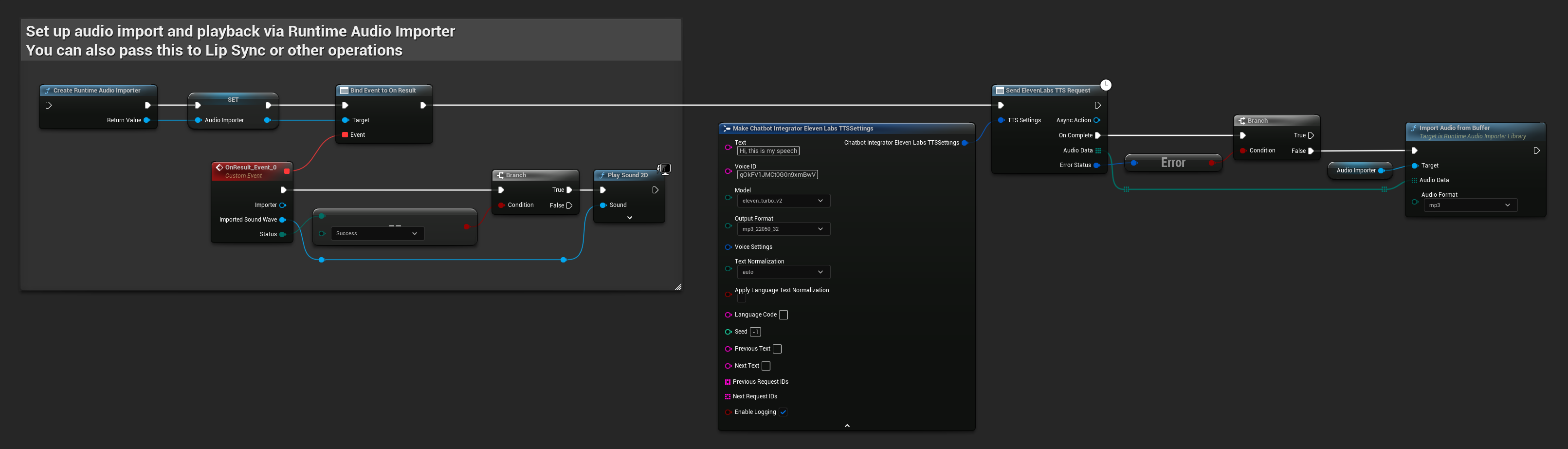
// Example of sending a TTS request to ElevenLabs
FChatbotIntegrator_ElevenLabsTTSSettings TTSSettings;
TTSSettings.Text = TEXT("Hello, this is a test of text-to-speech functionality.");
TTSSettings.VoiceID = TEXT("your-voice-id");
TTSSettings.Model = EChatbotIntegrator_ElevenLabsTTSModel::ELEVEN_TURBO_V2;
TTSSettings.OutputFormat = EChatbotIntegrator_ElevenLabsTTSFormat::MP3_44100_128;

UAIChatbotIntegratorElevenLabsTTS::SendTTSRequestNative(
	TTSSettings,
	FOnElevenLabsTTSResponseNative::CreateWeakLambda(
		this,
		[this](const TArray<uint8>& AudioData, const FChatbotIntegratorErrorStatus& ErrorStatus)
		{
			if (!ErrorStatus.bIsError)
			{
				UE_LOG(LogTemp, Log, TEXT("Received TTS audio data: %d bytes"), AudioData.Num());
				// Process audio data as needed
			}
		}
	)
);
- Blueprint
- C++
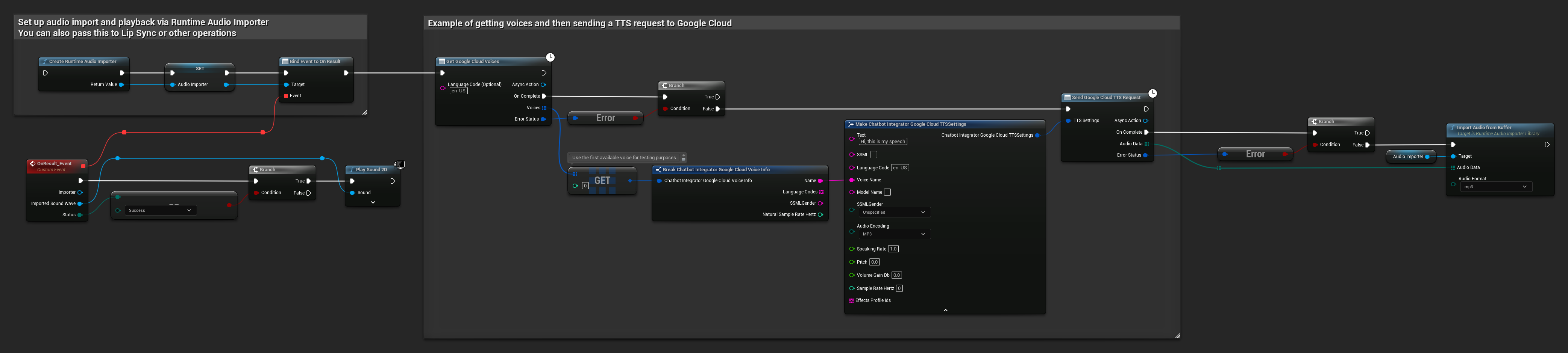
// Example of getting voices and then sending a TTS request to Google Cloud
// First, get available voices
UAIChatbotIntegratorGoogleCloudVoices::GetVoicesNative(
    TEXT("en-US"), // Optional language filter
    FOnGoogleCloudVoicesResponseNative::CreateWeakLambda(
        this,
        [this](const TArray<FChatbotIntegrator_GoogleCloudVoiceInfo>& Voices, const FChatbotIntegratorErrorStatus& ErrorStatus)
        {
            if (!ErrorStatus.bIsError && Voices.Num() > 0)
            {
                // Use the first available voice
                const FChatbotIntegrator_GoogleCloudVoiceInfo& FirstVoice = Voices[0];
                UE_LOG(LogTemp, Log, TEXT("Using voice: %s"), *FirstVoice.Name);

                // Now send TTS request with the selected voice
                FChatbotIntegrator_GoogleCloudTTSSettings TTSSettings;
                TTSSettings.Text = TEXT("Hello, this is a test of text-to-speech functionality.");
                TTSSettings.LanguageCode = FirstVoice.LanguageCodes.Num() > 0 ? FirstVoice.LanguageCodes[0] : TEXT("en-US");
                TTSSettings.VoiceName = FirstVoice.Name;
                TTSSettings.AudioEncoding = EChatbotIntegrator_GoogleCloudAudioEncoding::MP3;

                UAIChatbotIntegratorGoogleCloudTTS::SendTTSRequestNative(
                    TTSSettings,
                    FOnGoogleCloudTTSResponseNative::CreateWeakLambda(
                        this,
                        [this](const TArray<uint8>& AudioData, const FChatbotIntegratorErrorStatus& TTSErrorStatus)
                        {
                            if (!TTSErrorStatus.bIsError)
                            {
                                UE_LOG(LogTemp, Log, TEXT("Received TTS audio data: %d bytes"), AudioData.Num());

                                // Process the audio data using Runtime Audio Importer plugin
                                URuntimeAudioImporterLibrary* RuntimeAudioImporter = URuntimeAudioImporterLibrary::CreateRuntimeAudioImporter();
                                RuntimeAudioImporter->AddToRoot();
                                RuntimeAudioImporter->OnResultNative.AddWeakLambda(this, [this](URuntimeAudioImporterLibrary* Importer, UImportedSoundWave* ImportedSoundWave, ERuntimeImportStatus Status)
                                {
                                    if (Status == ERuntimeImportStatus::SuccessfulImport)
                                    {
                                        UE_LOG(LogTemp, Warning, TEXT("Successfully imported audio"));
                                        // Handle ImportedSoundWave playback
                                    }
                                    Importer->RemoveFromRoot();
                                });
                                RuntimeAudioImporter->ImportAudioFromBuffer(AudioData, ERuntimeAudioFormat::Mp3);
                            }
                            else
                            {
                                UE_LOG(LogTemp, Error, TEXT("TTS request failed: %s"), *TTSErrorStatus.ErrorMessage);
                            }
                        }
                    )
                );
            }
            else
            {
                UE_LOG(LogTemp, Error, TEXT("Failed to get voices: %s"), *ErrorStatus.ErrorMessage);
            }
        }
    )
);
- Blueprint
- C++
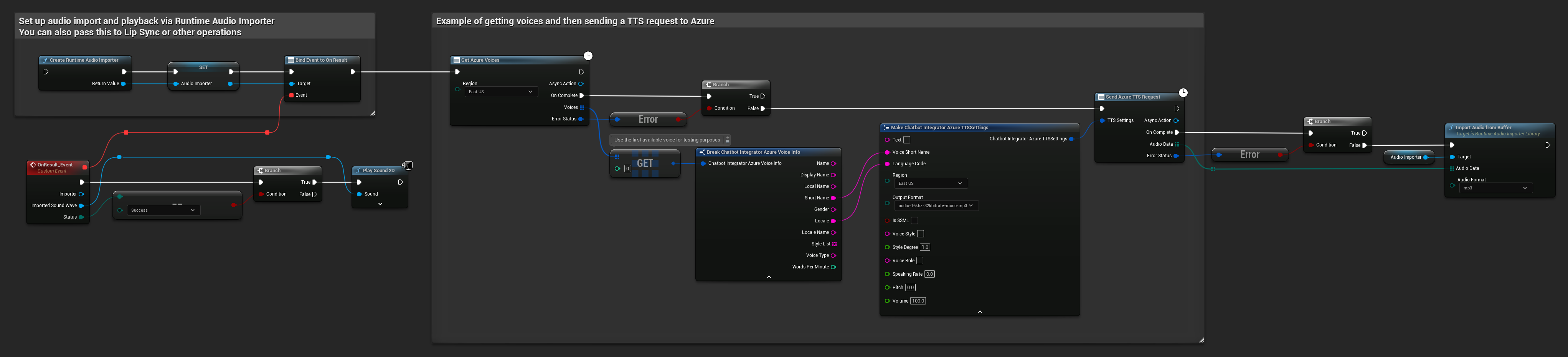
// Example of getting voices and then sending a TTS request to Azure
// First, get available voices
UAIChatbotIntegratorAzureGetVoices::GetVoicesNative(
    EChatbotIntegrator_AzureRegion::EAST_US,
    FOnAzureVoiceListResponseNative::CreateWeakLambda(
        this,
        [this](const TArray<FChatbotIntegrator_AzureVoiceInfo>& Voices, const FChatbotIntegratorErrorStatus& ErrorStatus)
        {
            if (!ErrorStatus.bIsError && Voices.Num() > 0)
            {
                // Use the first available voice
                const FChatbotIntegrator_AzureVoiceInfo& FirstVoice = Voices[0];
                UE_LOG(LogTemp, Log, TEXT("Using voice: %s (%s)"), *FirstVoice.DisplayName, *FirstVoice.ShortName);

                // Now send TTS request with the selected voice
                FChatbotIntegrator_AzureTTSSettings TTSSettings;
                TTSSettings.Text = TEXT("Hello, this is a test of text-to-speech functionality.");
                TTSSettings.VoiceShortName = FirstVoice.ShortName;
                TTSSettings.LanguageCode = FirstVoice.Locale;
                TTSSettings.Region = EChatbotIntegrator_AzureRegion::EAST_US;
                TTSSettings.OutputFormat = EChatbotIntegrator_AzureTTSFormat::AUDIO_16KHZ_32KBITRATE_MONO_MP3;

                UAIChatbotIntegratorAzureTTS::SendTTSRequestNative(
                    TTSSettings,
                    FOnAzureTTSResponseNative::CreateWeakLambda(
                        this,
                        [this](const TArray<uint8>& AudioData, const FChatbotIntegratorErrorStatus& TTSErrorStatus)
                        {
                            if (!TTSErrorStatus.bIsError)
                            {
                                UE_LOG(LogTemp, Log, TEXT("Received TTS audio data: %d bytes"), AudioData.Num());

                                // Process the audio data using Runtime Audio Importer plugin
                                URuntimeAudioImporterLibrary* RuntimeAudioImporter = URuntimeAudioImporterLibrary::CreateRuntimeAudioImporter();
                                RuntimeAudioImporter->AddToRoot();
                                RuntimeAudioImporter->OnResultNative.AddWeakLambda(this, [this](URuntimeAudioImporterLibrary* Importer, UImportedSoundWave* ImportedSoundWave, ERuntimeImportStatus Status)
                                {
                                    if (Status == ERuntimeImportStatus::SuccessfulImport)
                                    {
                                        UE_LOG(LogTemp, Warning, TEXT("Successfully imported audio"));
                                        // Handle ImportedSoundWave playback
                                    }
                                    Importer->RemoveFromRoot();
                                });
                                RuntimeAudioImporter->ImportAudioFromBuffer(AudioData, ERuntimeAudioFormat::Mp3);
                            }
                            else
                            {
                                UE_LOG(LogTemp, Error, TEXT("TTS request failed: %s"), *TTSErrorStatus.ErrorMessage);
                            }
                        }
                    )
                );
            }
            else
            {
                UE_LOG(LogTemp, Error, TEXT("Failed to get voices: %s"), *ErrorStatus.ErrorMessage);
            }
        }
    )
);
Yêu cầu TTS Truyền phát
Truyền phát TTS cung cấp các khối âm thanh ngay khi chúng được tạo ra, cho phép bạn xử lý dữ liệu một cách gia tăng thay vì phải chờ toàn bộ âm thanh được tổng hợp. Điều này giúp giảm đáng kể độ trễ cảm nhận đối với các văn bản dài hơn và cho phép các ứng dụng thời gian thực. ElevenLabs Streaming TTS cũng hỗ trợ các chức năng truyền phát theo khối nâng cao cho các kịch bản tạo văn bản động.
- OpenAI Streaming TTS
- ElevenLabs Streaming TTS
- Blueprint
- C++
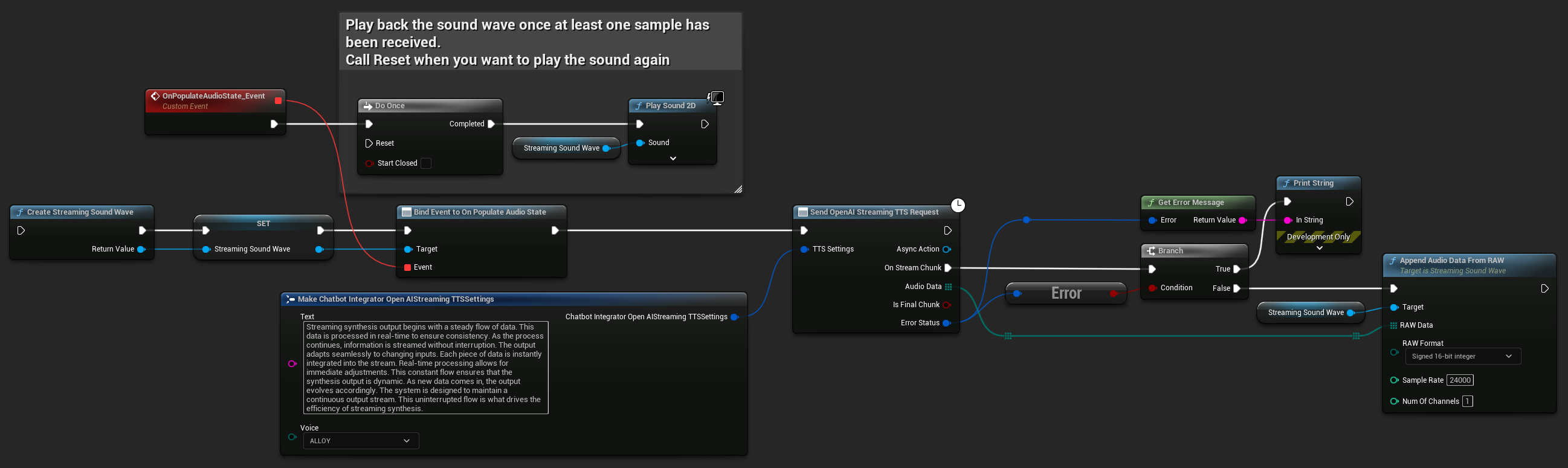
UPROPERTY()
UStreamingSoundWave* StreamingSoundWave;

UPROPERTY()
bool bIsPlaying = false;

UFUNCTION(BlueprintCallable)
void StartStreamingTTS()
{
    // Create a sound wave for streaming if not already created
    if (!StreamingSoundWave)
    {
        StreamingSoundWave = UStreamingSoundWave::CreateStreamingSoundWave();
        StreamingSoundWave->OnPopulateAudioStateNative.AddWeakLambda(this, [this]()
        {
            if (!bIsPlaying)
            {
                bIsPlaying = true;
                UGameplayStatics::PlaySound2D(GetWorld(), StreamingSoundWave);
            }
        });
    }

    FChatbotIntegrator_OpenAIStreamingTTSSettings TTSSettings;
    TTSSettings.Text = TEXT("Streaming synthesis output begins with a steady flow of data. This data is processed in real-time to ensure consistency.");
    TTSSettings.Voice = EChatbotIntegrator_OpenAIStreamingTTSVoice::ALLOY;

    UAIChatbotIntegratorOpenAIStreamTTS::SendStreamingTTSRequestNative(TTSSettings, FOnOpenAIStreamingTTSNative::CreateWeakLambda(this, [this](const TArray<uint8>& AudioData, bool IsFinalChunk, const FChatbotIntegratorErrorStatus& ErrorStatus)
    {
        if (!ErrorStatus.bIsError)
        {
            UE_LOG(LogTemp, Log, TEXT("Received TTS audio chunk: %d bytes"), AudioData.Num());
            StreamingSoundWave->AppendAudioDataFromRAW(AudioData, ERuntimeRAWAudioFormat::Int16, 24000, 1);
        }
    }));
}
ElevenLabs Streaming TTS hỗ trợ cả chế độ streaming tiêu chuẩn và chế độ streaming chunked nâng cao, mang lại sự linh hoạt cho các trường hợp sử dụng khác nhau.
Chế độ Streaming Tiêu chuẩn
Chế độ streaming tiêu chuẩn xử lý văn bản được xác định trước và phân phối các đoạn âm thanh khi chúng được tạo ra.
- Blueprint
- C++
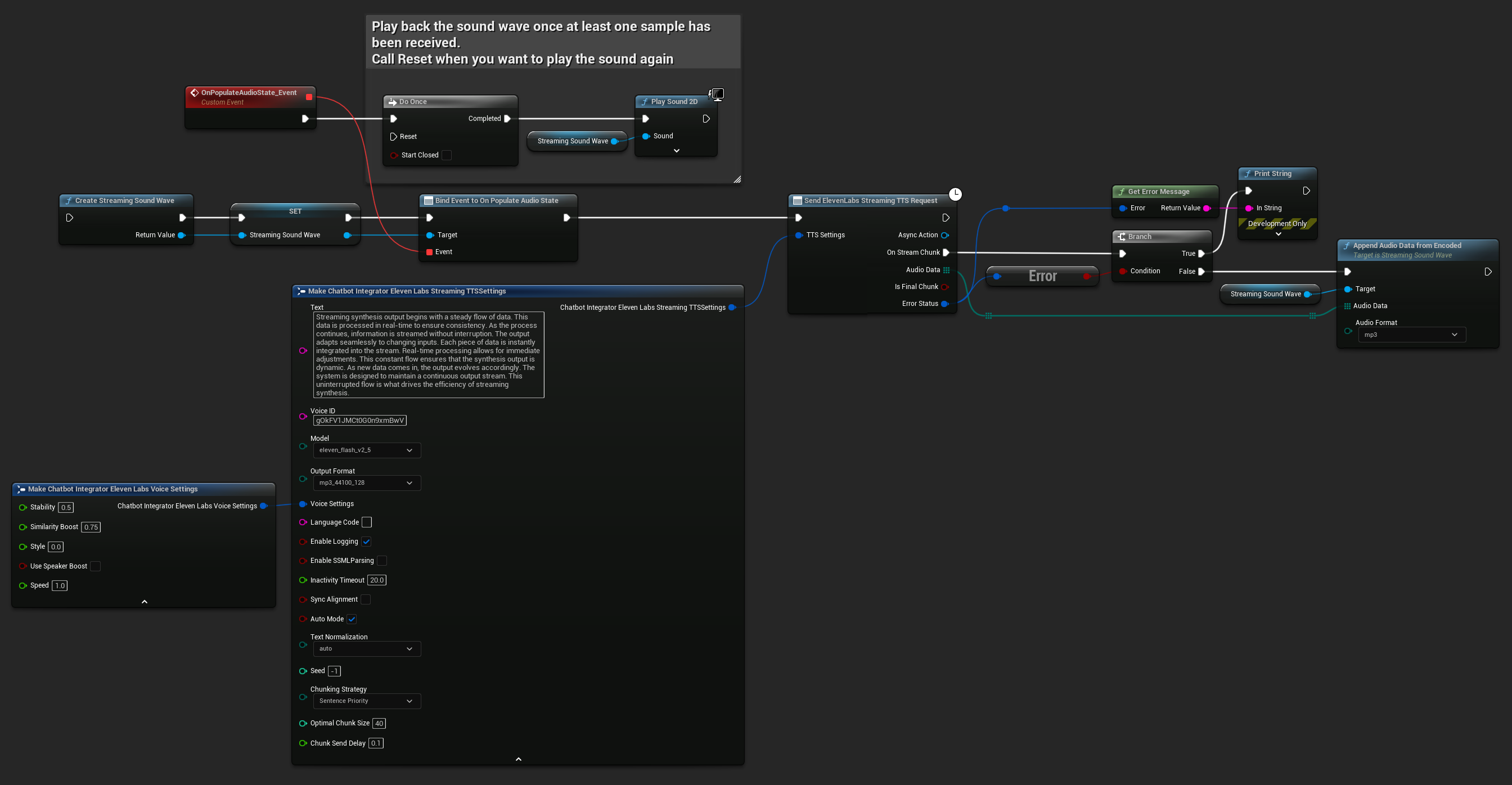
UPROPERTY()
UStreamingSoundWave* StreamingSoundWave;

UPROPERTY()
bool bIsPlaying = false;

UFUNCTION(BlueprintCallable)
void StartStreamingTTS()
{
    // Create a sound wave for streaming if not already created
    if (!StreamingSoundWave)
    {
        StreamingSoundWave = UStreamingSoundWave::CreateStreamingSoundWave();
        StreamingSoundWave->OnPopulateAudioStateNative.AddWeakLambda(this, [this]()
        {
            if (!bIsPlaying)
            {
                bIsPlaying = true;
                UGameplayStatics::PlaySound2D(GetWorld(), StreamingSoundWave);
            }
        });
    }

    FChatbotIntegrator_ElevenLabsStreamingTTSSettings TTSSettings;
    TTSSettings.Text = TEXT("Streaming synthesis output begins with a steady flow of data. This data is processed in real-time to ensure consistency.");
    TTSSettings.Model = EChatbotIntegrator_ElevenLabsTTSModel::ELEVEN_TURBO_V2_5;
    TTSSettings.OutputFormat = EChatbotIntegrator_ElevenLabsTTSFormat::MP3_22050_32;
    TTSSettings.VoiceID = TEXT("YOUR_VOICE_ID");
    TTSSettings.bEnableChunkedStreaming = false; // Standard streaming mode

    UAIChatbotIntegratorElevenLabsStreamTTS::SendStreamingTTSRequestNative(GetWorld(), TTSSettings, FOnElevenLabsStreamingTTSNative::CreateWeakLambda(this, [this](const TArray<uint8>& AudioData, bool IsFinalChunk, const FChatbotIntegratorErrorStatus& ErrorStatus)
    {
        if (!ErrorStatus.bIsError)
        {
            UE_LOG(LogTemp, Log, TEXT("Received TTS audio chunk: %d bytes"), AudioData.Num());
            StreamingSoundWave->AppendAudioDataFromEncoded(AudioData, ERuntimeAudioFormat::Mp3);
        }
    }));
}
Chế độ Streaming theo Khối
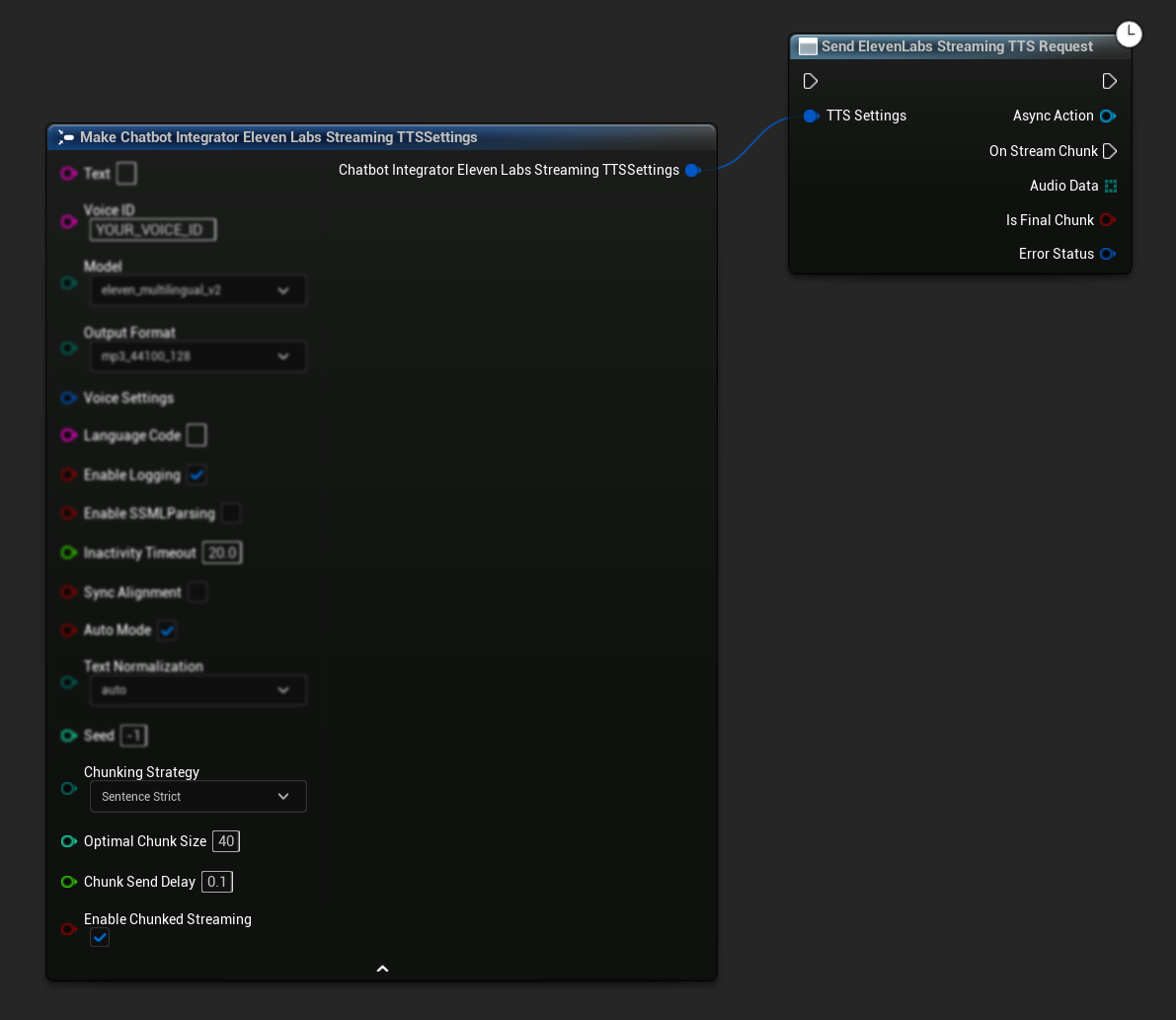
Chế độ streaming theo khối cho phép bạn thêm văn bản một cách linh hoạt trong quá trình tổng hợp, hoàn hảo cho các ứng dụng thời gian thực nơi văn bản được tạo ra theo từng bước (ví dụ: phản hồi trò chuyện AI được tổng hợp khi chúng được tạo ra). Để kích hoạt chế độ này, hãy đặt bEnableChunkedStreaming thành true trong cài đặt TTS của bạn.
- Blueprint
- C++
Thiết lập Ban đầu: Thiết lập streaming theo khối bằng cách kích hoạt chế độ streaming theo khối trong cài đặt TTS của bạn và tạo yêu cầu ban đầu. Hàm yêu cầu trả về một đối tượng hành động bất đồng bộ cung cấp các phương thức để quản lý phiên streaming theo khối:
Thêm Văn bản để Tổng hợp:
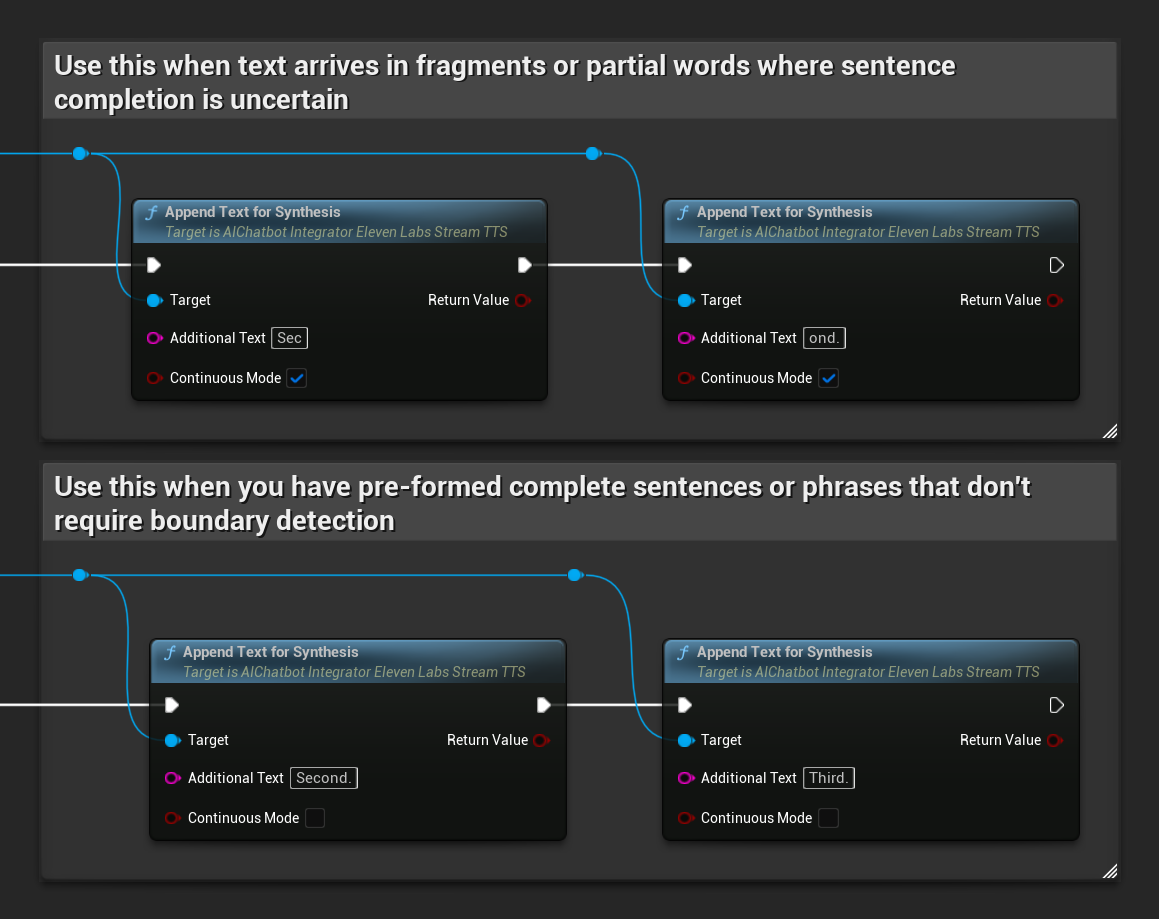
Sử dụng hàm này trên đối tượng hành động bất đồng bộ đã trả về để thêm văn bản một cách linh hoạt trong một phiên streaming theo khối đang hoạt động. Tham số bContinuousMode kiểm soát cách văn bản được xử lý:
- Khi
bContinuousModelàtrue: Văn bản được lưu vào bộ đệm nội bộ cho đến khi phát hiện ranh giới câu hoàn chỉnh (dấu chấm, dấu chấm than, dấu chấm hỏi). Hệ thống tự động trích xuất các câu hoàn chỉnh để tổng hợp trong khi giữ văn bản chưa hoàn chỉnh trong bộ đệm. Sử dụng chế độ này khi văn bản đến dưới dạng các đoạn hoặc từ một phần mà việc hoàn thành câu chưa chắc chắn. - Khi
bContinuousModelàfalse: Văn bản được xử lý ngay lập tức mà không cần lưu vào bộ đệm hoặc phân tích ranh giới câu. Mỗi lần gọi dẫn đến xử lý khối và tổng hợp ngay lập tức. Sử dụng chế độ này khi bạn có các câu hoặc cụm từ hoàn chỉnh được tạo sẵn mà không yêu cầu phát hiện ranh giới.
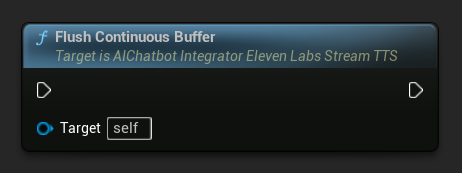
Xóa Bộ đệm Liên tục: Buộc xử lý bất kỳ văn bản liên tục nào đang được lưu trong bộ đệm trên đối tượng hành động bất đồng bộ, ngay cả khi không phát hiện ranh giới câu. Hữu ích khi bạn biết sẽ không có thêm văn bản nào đến trong một khoảng thời gian:
Đặt Thời gian chờ Xóa Bộ đệm Liên tục: Cấu hình việc tự động xóa bộ đệm liên tục trên đối tượng hành động bất đồng bộ khi không có văn bản mới nào đến trong thời gian chờ đã chỉ định:
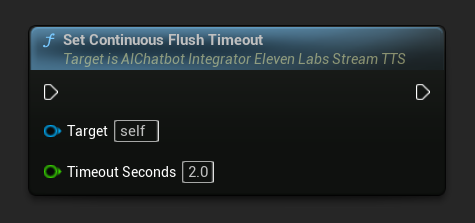
Đặt thành 0 để tắt tính năng tự động xóa. Giá trị được khuyến nghị là 1-3 giây cho các ứng dụng thời gian thực.
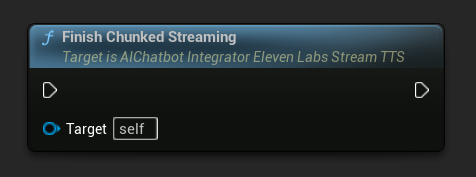
Kết thúc Streaming theo Khối: Đóng phiên streaming theo khối trên đối tượng hành động bất đồng bộ và đánh dấu quá trình tổng hợp hiện tại là cuối cùng. Luôn gọi hàm này khi bạn đã hoàn tất việc thêm văn bản:
UPROPERTY()
UAIChatbotIntegratorElevenLabsStreamTTS* ChunkedTTSRequest;

UPROPERTY()
UStreamingSoundWave* StreamingSoundWave;

UPROPERTY()
bool bIsPlaying = false;

UFUNCTION(BlueprintCallable)
void StartChunkedStreamingTTS()
{
    // Create a sound wave for streaming if not already created
    if (!StreamingSoundWave)
    {
        StreamingSoundWave = UStreamingSoundWave::CreateStreamingSoundWave();
        StreamingSoundWave->OnPopulateAudioStateNative.AddWeakLambda(this, [this]()
        {
            if (!bIsPlaying)
            {
                bIsPlaying = true;
                UGameplayStatics::PlaySound2D(GetWorld(), StreamingSoundWave);
            }
        });
    }

    FChatbotIntegrator_ElevenLabsStreamingTTSSettings TTSSettings;
    TTSSettings.Text = TEXT(""); // Start with empty text in chunked mode
    TTSSettings.Model = EChatbotIntegrator_ElevenLabsTTSModel::ELEVEN_TURBO_V2_5;
    TTSSettings.OutputFormat = EChatbotIntegrator_ElevenLabsTTSFormat::MP3_22050_32;
    TTSSettings.VoiceID = TEXT("YOUR_VOICE_ID");
    TTSSettings.bEnableChunkedStreaming = true; // Enable chunked streaming mode

    // Store the returned async action object to call chunked streaming functions on it
    ChunkedTTSRequest = UAIChatbotIntegratorElevenLabsStreamTTS::SendStreamingTTSRequestNative(
        GetWorld(),
        TTSSettings,
        FOnElevenLabsStreamingTTSNative::CreateWeakLambda(this, [this](const TArray<uint8>& AudioData, bool IsFinalChunk, const FChatbotIntegratorErrorStatus& ErrorStatus)
        {
            if (!ErrorStatus.bIsError && AudioData.Num() > 0)
            {
                UE_LOG(LogTemp, Log, TEXT("Received TTS audio chunk: %d bytes"), AudioData.Num());
                StreamingSoundWave->AppendAudioDataFromEncoded(AudioData, ERuntimeAudioFormat::Mp3);
            }

            if (IsFinalChunk)
            {
                UE_LOG(LogTemp, Log, TEXT("Chunked streaming session completed"));
                ChunkedTTSRequest = nullptr;
            }
        })
    );

    // Now you can append text dynamically as it becomes available
    // For example, from an AI chat response stream:
    AppendTextToTTS(TEXT("Hello, this is the first part of the message. "));
}

UFUNCTION(BlueprintCallable)
void AppendTextToTTS(const FString& AdditionalText)
{
    // Call AppendTextForSynthesis on the returned async action object
    if (ChunkedTTSRequest)
    {
        // Use continuous mode (true) when text is being generated word-by-word
        // and you want to wait for complete sentences before processing
        bool bContinuousMode = true;

        bool bSuccess = ChunkedTTSRequest->AppendTextForSynthesis(AdditionalText, bContinuousMode);
        if (bSuccess)
        {
            UE_LOG(LogTemp, Log, TEXT("Successfully appended text: %s"), *AdditionalText);
        }
    }
}

// Configure continuous text buffering with custom timeout
UFUNCTION(BlueprintCallable)
void SetupAdvancedChunkedStreaming()
{
    // Call SetContinuousFlushTimeout on the async action object
    if (ChunkedTTSRequest)
    {
        // Set automatic flush timeout to 1.5 seconds
        // Text will be automatically processed if no new text arrives within this timeframe
        ChunkedTTSRequest->SetContinuousFlushTimeout(1.5f);
    }
}

// Example of handling real-time AI chat response synthesis
UFUNCTION(BlueprintCallable)
void HandleAIChatResponseForTTS(const FString& ChatChunk, bool IsStreamFinalChunk)
{
    if (ChunkedTTSRequest)
    {
        if (!IsStreamFinalChunk)
        {
            // Append each chat chunk in continuous mode
            // The system will automatically extract complete sentences for synthesis
            ChunkedTTSRequest->AppendTextForSynthesis(ChatChunk, true);
        }
        else
        {
            // Add the final chunk
            ChunkedTTSRequest->AppendTextForSynthesis(ChatChunk, true);

            // Flush any remaining buffered text and finish the session
            ChunkedTTSRequest->FlushContinuousBuffer();
            ChunkedTTSRequest->FinishChunkedStreaming();
        }
    }
}

// Example of immediate chunk processing (bypassing sentence boundary detection)
UFUNCTION(BlueprintCallable)
void AppendImmediateText(const FString& Text)
{
    // Call AppendTextForSynthesis with continuous mode = false on the async action object
    if (ChunkedTTSRequest)
    {
        // Use continuous mode = false for immediate processing
        // Useful when you have complete sentences or phrases ready
        ChunkedTTSRequest->AppendTextForSynthesis(Text, false);
    }
}

UFUNCTION(BlueprintCallable)
void FinishChunkedTTS()
{
    // Call FlushContinuousBuffer and FinishChunkedStreaming on the async action object
    if (ChunkedTTSRequest)
    {
        // Flush any remaining buffered text
        ChunkedTTSRequest->FlushContinuousBuffer();

        // Mark the session as finished
        ChunkedTTSRequest->FinishChunkedStreaming();
    }
}
Các Tính Năng Chính của ElevenLabs Chunked Streaming:
- Chế Độ Liên Tục: Khi
bContinuousModelàtrue, văn bản được lưu vào bộ đệm cho đến khi phát hiện ranh giới câu hoàn chỉnh, sau đó được xử lý để tổng hợp - Chế Độ Tức Thì: Khi
bContinuousModelàfalse, văn bản được xử lý ngay lập tức dưới dạng các khối riêng biệt mà không cần lưu vào bộ đệm - Tự Động Xả: Thời gian chờ có thể cấu hình để xử lý văn bản trong bộ đệm khi không có đầu vào mới nào đến trong khung thời gian đã chỉ định
- Phát Hiện Ranh Giới Câu: Phát hiện kết thúc câu (., !, ?) và trích xuất các câu hoàn chỉnh từ văn bản trong bộ đệm
- Tích Hợp Thời Gian Thực: Hỗ trợ nhập văn bản gia tăng khi nội dung đến dưới dạng các đoạn nhỏ theo thời gian
- Chunking Văn Bản Linh Hoạt: Nhiều chiến lược có sẵn (Ưu Tiên Câu, Câu Nghiêm Ngặt, Dựa Trên Kích Thước) để tối ưu hóa quá trình xử lý tổng hợp
Lấy Danh Sách Giọng Nói Có Sẵn
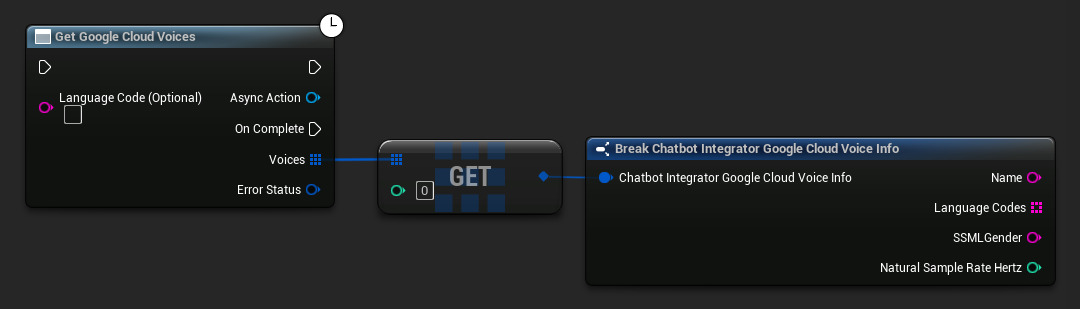
Một số nhà cung cấp TTS cung cấp API liệt kê giọng nói để khám phá các giọng nói có sẵn theo cách lập trình.
- Google Cloud Voices
- Azure Voices
- Blueprint
- C++
// Example of getting available voices from Google Cloud
UAIChatbotIntegratorGoogleCloudVoices::GetVoicesNative(
    TEXT("en-US"), // Optional language filter
    FOnGoogleCloudVoicesResponseNative::CreateWeakLambda(
        this,
        [this](const TArray<FChatbotIntegrator_GoogleCloudVoiceInfo>& Voices, const FChatbotIntegratorErrorStatus& ErrorStatus)
        {
            if (!ErrorStatus.bIsError)
            {
                for (const auto& Voice : Voices)
                {
                    UE_LOG(LogTemp, Log, TEXT("Voice: %s (%s)"), *Voice.Name, *Voice.SSMLGender);
                }
            }
        }
    )
);
- Blueprint
- C++
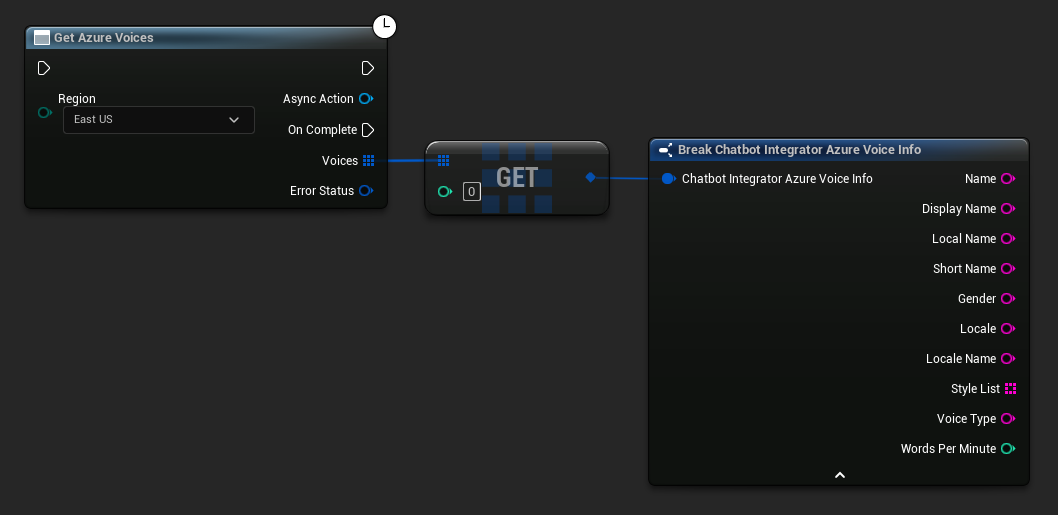
// Example of getting available voices from Azure
UAIChatbotIntegratorAzureGetVoices::GetVoicesNative(
    EChatbotIntegrator_AzureRegion::EAST_US,
    FOnAzureVoiceListResponseNative::CreateWeakLambda(
        this,
        [this](const TArray<FChatbotIntegrator_AzureVoiceInfo>& Voices, const FChatbotIntegratorErrorStatus& ErrorStatus)
        {
            if (!ErrorStatus.bIsError)
            {
                for (const auto& Voice : Voices)
                {
                    UE_LOG(LogTemp, Log, TEXT("Voice: %s (%s)"), *Voice.DisplayName, *Voice.Gender);
                }
            }
        }
    )
);
Liệt kê các mô hình Ollama
Bạn có thể truy vấn phiên bản Ollama cục bộ của mình để lấy tất cả các mô hình có sẵn bằng cách sử dụng hàm ListOllamaModels. Điều này có thể hữu ích, chẳng hạn như để tự động điền vào bộ chọn mô hình trong giao diện người dùng của bạn. Hàm trợ giúp GetModelNames sẽ trích xuất các chuỗi tên từ kết quả để thuận tiện.
- Blueprint
- C++
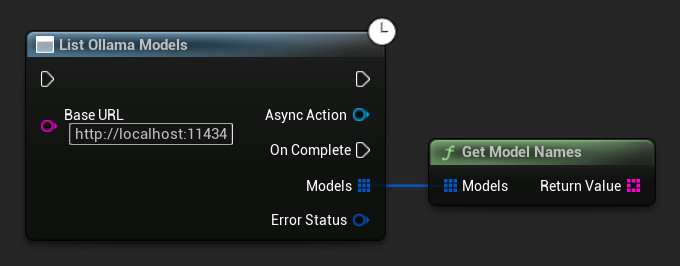
// Example of listing locally available Ollama models
UAIChatbotIntegratorOllamaModelList::ListModelsNative(
    TEXT("http://localhost:11434"),
    FOnOllamaListModelsResponseNative::CreateWeakLambda(
        this,
        [this](const TArray<FOllamaModelInfo>& Models, const FChatbotIntegratorErrorStatus& ErrorStatus)
        {
            if (!ErrorStatus.bIsError)
            {
                for (const FOllamaModelInfo& Model : Models)
                {
                    UE_LOG(LogTemp, Log, TEXT("Model: %s | Family: %s | Parameters: %s | Quantization: %s | Size: %lld bytes"),
                        *Model.Name, *Model.Family, *Model.ParameterSize, *Model.QuantizationLevel, Model.Size);
                }

                // Convenience helper to get just the name strings, e.g. for a UI dropdown
                TArray<FString> ModelNames = UAIChatbotIntegratorOllamaModelList::GetModelNames(Models);
            }
            else
            {
                UE_LOG(LogTemp, Error, TEXT("Failed to list Ollama models: %s"), *ErrorStatus.ErrorMessage);
            }
        }
    )
);
Xử lý Lỗi
Khi gửi bất kỳ yêu cầu nào, điều quan trọng là phải xử lý các lỗi tiềm ẩn bằng cách kiểm tra ErrorStatus trong callback của bạn. ErrorStatus cung cấp thông tin về bất kỳ vấn đề nào có thể xảy ra trong quá trình yêu cầu.
- Blueprint
- C++
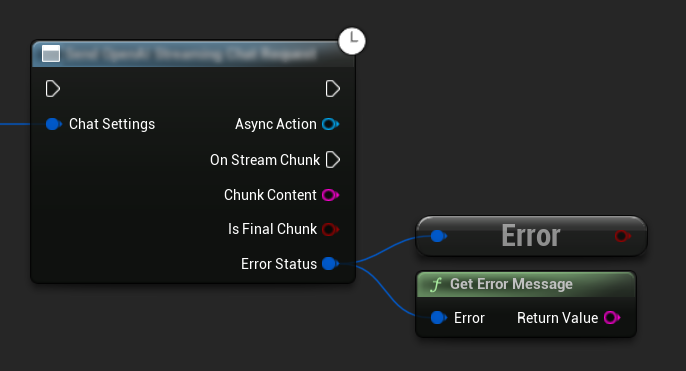
// Example of error handling in a request
UAIChatbotIntegratorOpenAI::SendChatRequestNative(
    Settings,
    FOnOpenAIChatCompletionResponseNative::CreateWeakLambda(
        this,
        [this](const FString& Response, const FChatbotIntegratorErrorStatus& ErrorStatus)
        {
            if (ErrorStatus.bIsError)
            {
                // Handle the error
                UE_LOG(LogTemp, Error, TEXT("Chat request failed: %s"), *ErrorStatus.ErrorMessage);
            }
            else
            {
                // Process the successful response
                UE_LOG(LogTemp, Log, TEXT("Received response: %s"), *Response);
            }
        }
    )
);
Hủy Yêu Cầu
Plugin cho phép bạn hủy cả yêu cầu văn bản-với-văn bản và TTS khi chúng đang được xử lý. Điều này có thể hữu ích khi bạn muốn ngắt một yêu cầu đang chạy lâu hoặc thay đổi luồng hội thoại một cách linh hoạt.
- Blueprint
- C++
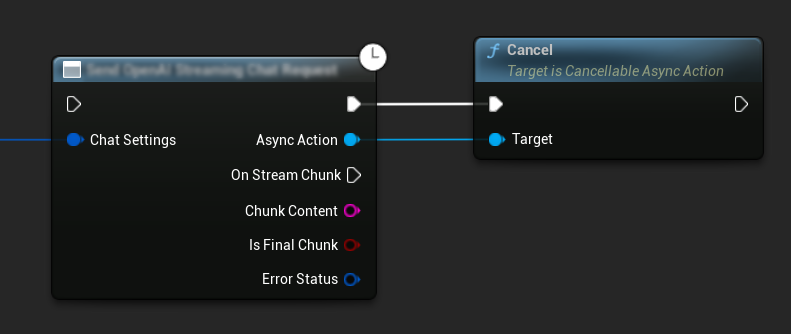
// Example of cancelling requests
UAIChatbotIntegratorOpenAI* ChatRequest = UAIChatbotIntegratorOpenAI::SendChatRequestNative(
    ChatSettings,
    ChatResponseCallback
);

// Cancel the chat request at any time
ChatRequest->Cancel();

// TTS requests can be cancelled similarly
UAIChatbotIntegratorOpenAITTS* TTSRequest = UAIChatbotIntegratorOpenAITTS::SendTTSRequestNative(
    TTSSettings,
    TTSResponseCallback
);

// Cancel the TTS request
TTSRequest->Cancel();
Các phương pháp tốt nhất
- Luôn xử lý các lỗi tiềm ẩn bằng cách kiểm tra
ErrorStatustrong callback của bạn - Lưu ý đến giới hạn tốc độ API và chi phí cho từng nhà cung cấp
- Sử dụng chế độ streaming cho các cuộc hội thoại dài hoặc tương tác
- Cân nhắc hủy các yêu cầu không còn cần thiết để quản lý tài nguyên hiệu quả
- Sử dụng TTS streaming cho các văn bản dài hơn để giảm độ trễ cảm nhận
- Đối với xử lý âm thanh, plugin Runtime Audio Importer cung cấp một giải pháp tiện lợi, nhưng bạn có thể triển khai xử lý tùy chỉnh dựa trên nhu cầu dự án của mình
- Khi sử dụng các mô hình suy luận (DeepSeek Reasoner, Grok), hãy xử lý cả đầu ra suy luận và nội dung một cách phù hợp
- Khám phá các giọng nói có sẵn bằng cách sử dụng API liệt kê giọng nói trước khi triển khai các tính năng TTS
- Đối với ElevenLabs chunked streaming: Sử dụng chế độ liên tục khi văn bản được tạo ra theo từng phần (như phản hồi AI) và chế độ tức thời cho các khối văn bản đã được định hình sẵn
- Cấu hình thời gian chờ xả phù hợp cho chế độ liên tục để cân bằng giữa khả năng phản hồi và luồng giọng nói tự nhiên
- Chọn kích thước khối và độ trễ gửi tối ưu dựa trên yêu cầu thời gian thực của ứng dụng của bạn
- Đối với Ollama: Sử dụng
ListOllamaModelsđể khám phá động các mô hình có sẵn thay vì mã hóa cứng tên mô hình
Xử lý sự cố
- Xác minh thông tin đăng nhập API của bạn là chính xác cho từng nhà cung cấp
- Kiểm tra kết nối internet của bạn
- Đảm bảo bất kỳ thư viện xử lý âm thanh nào bạn sử dụng (như Runtime Audio Importer) đã được cài đặt đúng cách khi làm việc với các tính năng TTS
- Xác minh bạn đang sử dụng định dạng âm thanh chính xác khi xử lý dữ liệu phản hồi TTS
- Đối với TTS streaming, hãy đảm bảo bạn đang xử lý các khối âm thanh một cách chính xác
- Đối với các mô hình suy luận, hãy đảm bảo bạn đang xử lý cả đầu ra suy luận và nội dung
- Kiểm tra tài liệu dành riêng cho nhà cung cấp về tính khả dụng và khả năng của mô hình
- Đối với ElevenLabs chunked streaming: Đảm bảo bạn gọi
FinishChunkedStreamingkhi hoàn tất để đóng phiên đúng cách - Đối với các vấn đề về chế độ liên tục: Kiểm tra xem ranh giới câu có được phát hiện đúng trong văn bản của bạn hay không
- Đối với các ứng dụng thời gian thực: Điều chỉnh độ trễ gửi khối và thời gian chờ xả dựa trên yêu cầu về độ trễ của bạn
- Đối với Ollama: Đảm bảo máy chủ Ollama đang chạy và có thể truy cập được tại
BaseUrlđã được cấu hình trước khi gửi yêu cầu