Import Audio
Tổng quan
Quy trình nhập audio tại thời điểm chạy có thể được chia thành nhiều bước:
- Tạo một Runtime Audio Importer
- Liên kết với các delegate cần thiết (OnProgress và OnResult)
- Nhập audio từ một file hoặc bộ đệm
- Phát sound wave đã nhập được lấy từ delegate OnResult (thông tin thêm tại đây)
Đảm bảo rằng cả hai instance Runtime Audio Importer và Sound Wave không bị garbage collection thu hồi sớm bằng cách duy trì một tham chiếu cứng tới chúng, việc này có thể được thực hiện bằng cách gán chúng vào các biến riêng biệt sử dụng UPROPERTY(), TStrongObjectPtr, hoặc bất kỳ phương pháp nào khác ngăn đối tượng bị hủy.
Các Định dạng Audio Được Hỗ trợ
Runtime Audio Importer hỗ trợ nhập các định dạng audio sau:
| Định dạng | Mô tả |
|---|---|
| MP3 | MPEG-1/2/2.5 Audio Layer I/II/III |
| WAV | Định dạng File Audio Waveform |
| FLAC | Bộ giải mã âm thanh không mất dữ liệu miễn phí |
| OGG VORBIS | Vùng chứa Ogg với audio Vorbis |
| OGG OPUS | Vùng chứa Ogg với audio Opus |
| BINK | Bink Audio |
| RAW (PCM) | Dữ liệu audio Điều chế Xung Mã không nén (Int8, UInt8, Int16, UInt16, Int32, UInt32, Float32) |
Khi nhập audio, bạn có thể chỉ định định dạng một cách rõ ràng hoặc sử dụng tính năng phát hiện định dạng tự động dựa trên phần mở rộng file hoặc nội dung.
Nhập Audio Streaming
Đối với các tình huống streaming nơi dữ liệu audio được nhận dần dần (ví dụ: từ máy chủ, thu âm thời gian thực, hoặc luồng mạng), hãy cân nhắc sử dụng Streaming Sound Waves.
Phương pháp này cung cấp một cách liên tục để nối thêm dữ liệu audio vào cùng một bộ đệm sound wave, làm cho nó phù hợp với các luồng trực tiếp hoặc các file lớn được xử lý theo từng khối. Xem tài liệu Streaming Sound Wave để biết thêm chi tiết.
Các Bước Triển khai Cơ bản
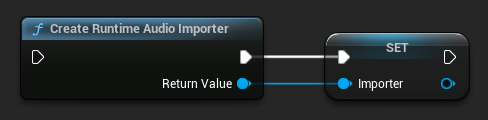
1. Tạo Runtime Audio Importer
Đầu tiên, bạn cần tạo một đối tượng Runtime Audio Importer. Bạn nên đảm bảo nó được garbage collector coi là một tham chiếu mạnh.
- Blueprint
- C++
// UPROPERTY() is used here to prevent the object from being prematurely garbage collected
UPROPERTY()
class URuntimeAudioImporterLibrary* Importer;
Importer = URuntimeAudioImporterLibrary::CreateRuntimeAudioImporter();
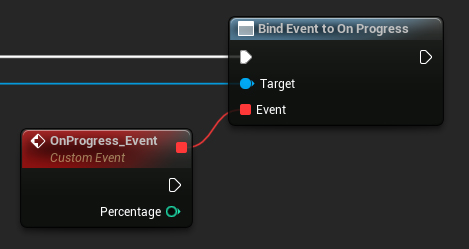
2. Liên kết với Delegate OnProgress
Để theo dõi tiến trình nhập dữ liệu âm thanh, bạn có thể liên kết với delegate OnProgress (Blueprints) / OnProgressNative (C++).
- Blueprint
- C++
// Assuming Importer is a UE reference to a URuntimeAudioImporterLibrary object
// AddWeakLambda is used just as an example. You can use any other method to bind the delegate, such as AddUObject, AddUFunction, etc.
Importer->OnProgressNative.AddWeakLambda(this, [](int32 Percentage)
{
	UE_LOG(LogTemp, Log, TEXT("Import progress: %d"), Percentage);
});
Điều này sẽ cho phép bạn theo dõi tiến trình và, ví dụ, triển khai một màn hình tải.
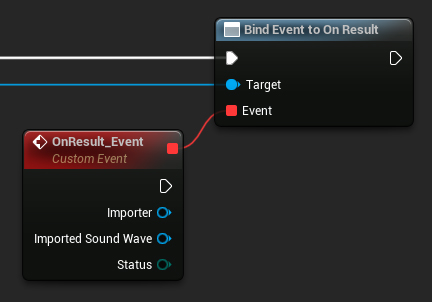
3. Liên kết với Delegate OnResult
Để được thông báo khi quá trình nhập dữ liệu âm thanh hoàn tất và để truy cập tham chiếu của sóng âm thanh kết quả, bạn phải liên kết với delegate OnResult (Blueprints) / OnResultNative (C++).
- Blueprint
- C++
// Assuming Importer is a UE reference to a URuntimeAudioImporterLibrary object
// AddWeakLambda is used just as an example. You can use any other method to bind the delegate, such as AddUObject, AddUFunction, etc.
Importer->OnResultNative.AddWeakLambda(this, [](URuntimeAudioImporterLibrary* Importer, UImportedSoundWave* ImportedSoundWave, ERuntimeImportStatus Status)
{
	UE_LOG(LogTemp, Log, TEXT("Import result: %s"), *UEnum::GetValueAsString(Status));
});
Đảm bảo sóng âm thanh đã nhập được coi là một tham chiếu mạnh bởi bộ thu gom rác để ngăn chặn việc thu gom rác sớm không mong muốn. Điều này có thể được thực hiện bằng cách đặt nó như một biến riêng biệt trong Blueprints.
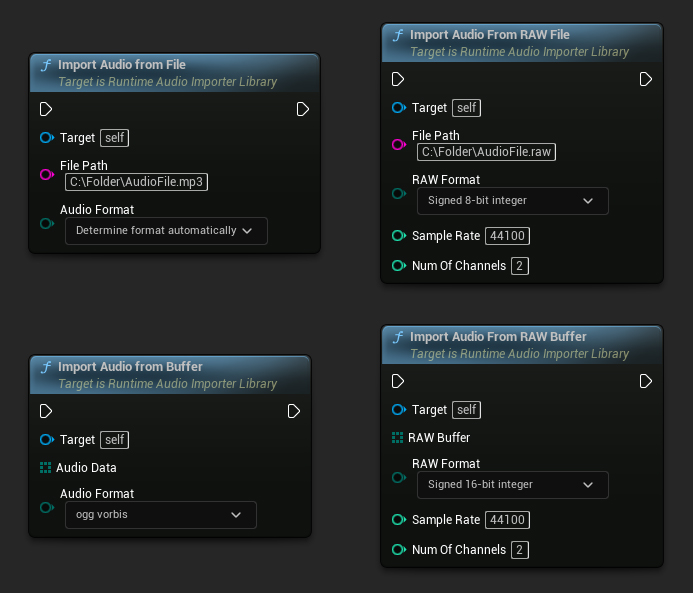
4. Bắt đầu Nhập Âm thanh
Bắt đầu quá trình nhập âm thanh bằng cách gọi hàm liên quan, hàm này có thể xử lý cả định dạng dữ liệu âm thanh nén và không nén.
- Blueprint
- C++
// Assuming Importer is a UE reference to a URuntimeAudioImporterLibrary object

// Import audio from a file
Importer->ImportAudioFromFile(TEXT("C:/Folder/AudioFile.mp3"), ERuntimeAudioFormat::Auto);

// Import audio from a buffer
TArray<uint8> AudioData = ...; // Fill the array with your audio data
Importer->ImportAudioFromBuffer(MoveTemp(AudioData), ERuntimeAudioFormat::OggVorbis);

// Import audio from a RAW file
Importer->ImportAudioFromRAWFile(TEXT("C:/Folder/AudioFile.raw"), ERuntimeRAWAudioFormat::Int8, 44100, 2);

// Import audio from a RAW buffer
TArray<uint8> RAWBuffer = ...; // Fill the array with your PCM int 16-bit audio data
Importer->ImportAudioFromRAWBuffer(MoveTemp(RAWBuffer), ERuntimeRAWAudioFormat::Int16, 44100, 2);
Hàm Tiện Ích
Tìm Kiếm Tệp Âm Thanh
Bạn có thể quét một thư mục để tìm các tệp âm thanh được hỗ trợ:
- Blueprint
- C++
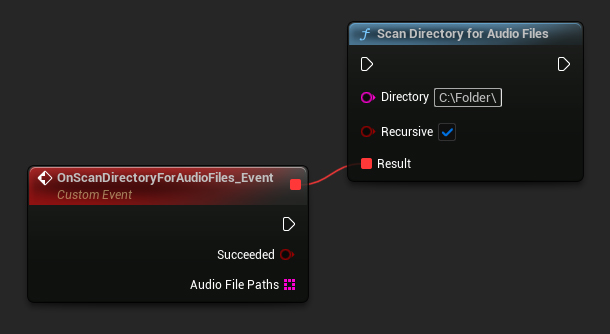
URuntimeAudioUtilities::ScanDirectoryForAudioFiles(TEXT("C:/Folder/"), true,
	FOnScanDirectoryForAudioFilesResultNative::CreateWeakLambda(this, [this](bool bSucceeded, const TArray<FString>& AudioFilePaths)
	{
		// Handle the result
	}));
Ví dụ Hoàn chỉnh
Dưới đây là một ví dụ triển khai đầy đủ cho việc nhập âm thanh:
- Blueprint
- C++
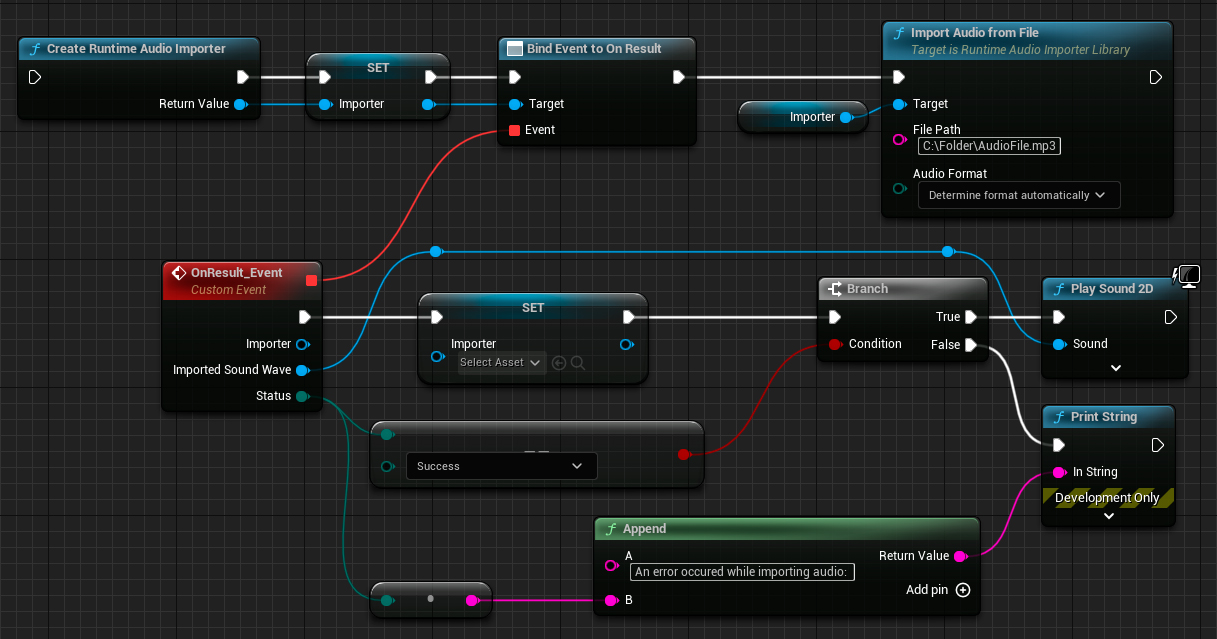
Đây là một ví dụ mã cơ bản để nhập âm thanh từ một tệp tin.
Ví dụ sử dụng hàm ImportAudioExample nằm trong lớp UImportAudioClassExample thuộc module EXAMPLEMODULE.
Để chạy thành công ví dụ này, hãy đảm bảo thêm module RuntimeAudioImporter vào PublicDependencyModuleNames hoặc PrivateDependencyModuleNames trong tệp .Build.cs, cũng như vào tệp .uproject của dự án của bạn.
#pragma once

#include "CoreMinimal.h"
#include "UObject/Object.h"
#include "ImportAudioClassExample.generated.h"

UCLASS(BlueprintType)
class EXAMPLEMODULE_API UImportAudioClassExample : public UObject
{
	GENERATED_BODY()

public:
	UFUNCTION(BlueprintCallable)
	void ImportAudioExample();

private:
	// Please pay attention to making the RuntimeAudioImporter a hard reference, such as using UPROPERTY(), to prevent it from being prematurely garbage collected
	UPROPERTY()
	class URuntimeAudioImporterLibrary* RuntimeAudioImporter;
};
#include "ImportAudioClassExample.h"
#include "RuntimeAudioImporterLibrary.h"

void UImportAudioClassExample::ImportAudioExample()
{
	RuntimeAudioImporter = URuntimeAudioImporterLibrary::CreateRuntimeAudioImporter();

	if (!IsValid(RuntimeAudioImporter))
	{
		UE_LOG(LogTemp, Error, TEXT("Failed to create audio importer"));
		return;
	}

	RuntimeAudioImporter->OnProgressNative.AddWeakLambda(this, [](int32 Percentage)
	{
		UE_LOG(LogTemp, Log, TEXT("Audio importing percentage: %d"), Percentage);
	});

	RuntimeAudioImporter->OnResultNative.AddWeakLambda(this, [this](URuntimeAudioImporterLibrary* Importer, UImportedSoundWave* ImportedSoundWave, ERuntimeImportStatus Status)
	{
		if (Status == ERuntimeImportStatus::SuccessfulImport)
		{
			UE_LOG(LogTemp, Warning, TEXT("Successfully imported audio with sound wave %s"), *ImportedSoundWave->GetName());
			// Here you can handle ImportedSoundWave playback, like "UGameplayStatics::PlaySound2D(GetWorld(), ImportedSoundWave);"
		}
		else
		{
			UE_LOG(LogTemp, Error, TEXT("Failed to import audio"));
		}

		RuntimeAudioImporter = nullptr;
	});

	RuntimeAudioImporter->ImportAudioFromFile(TEXT("C:/Folder/Example.mp3"), ERuntimeAudioFormat::Auto);
}