Pixel Streaming Thu Âm
Pixel Streaming là một plugin cho Unreal Engine truyền phát các khung hình đã kết xuất và đồng bộ hóa đầu vào/đầu ra thông qua WebRTC. Ứng dụng chạy trên phía máy chủ, trong khi phía máy khách xử lý kết xuất và tương tác người dùng. Để biết thêm chi tiết về Pixel Streaming và thiết lập, hãy tham khảo Tài liệu Pixel Streaming.
Pixel Streaming so với Pixel Streaming 2
Plugin này hỗ trợ cả hai phiên bản Pixel Streaming có sẵn trong Unreal Engine:
- Pixel Streaming - Plugin gốc, có sẵn từ UE 5.2 và vẫn được sử dụng tích cực trong các phiên bản engine hiện tại
- Pixel Streaming 2 - Được giới thiệu trong UE 5.5 dưới dạng thế hệ tiếp theo với kiến trúc nội bộ cải tiến. Tìm hiểu thêm về Pixel Streaming 2
Cả hai phiên bản đều được hỗ trợ đầy đủ và có sẵn trong các bản phát hành mới nhất của Unreal Engine. Chọn phiên bản phù hợp với thiết lập Pixel Streaming của dự án của bạn.
API cho cả hai phiên bản là giống hệt nhau, điểm khác biệt duy nhất là các lớp và hàm của Pixel Streaming 2 bao gồm "2" trong tên của chúng (ví dụ: UPixelStreamingCapturableSoundWave so với UPixelStreaming2CapturableSoundWave).
Tương thích
Giải pháp này hoạt động với:
- Cơ sở hạ tầng Pixel Streaming chính thức (Triển khai tham chiếu của Epic Games)
- Nhà cung cấp Pixel Streaming bên thứ ba bao gồm:
- Vagon.io
- Eagle 3D Streaming
- Các giải pháp streaming dựa trên WebRTC khác
- Hệ điều hành: Máy chủ Windows và Linux
Việc triển khai đã được kiểm tra trên các môi trường này và hoạt động chính xác bất kể giải pháp lưu trữ Pixel Streaming nào được sử dụng.
Cài đặt Plugin Mở rộng
Tính năng này được cung cấp dưới dạng tiện ích mở rộng cho plugin Runtime Audio Importer. Để sử dụng nó, bạn cần:
- Đảm bảo plugin Runtime Audio Importer đã được cài đặt trong dự án của bạn
- Tải xuống plugin mở rộng cho phiên bản Pixel Streaming của bạn:
- Giải nén thư mục từ kho lưu trữ đã tải xuống vào thư mục
Pluginscủa dự án của bạn (tạo thư mục này nếu nó chưa tồn tại) - Biên dịch lại dự án của bạn (tiện ích mở rộng này yêu cầu dự án C++)
- Các tiện ích mở rộng này được cung cấp dưới dạng mã nguồn và yêu cầu dự án C++ để sử dụng
- Tiện ích mở rộng Pixel Streaming: Được hỗ trợ trong UE 5.2 trở lên
- Tiện ích mở rộng Pixel Streaming 2: Được hỗ trợ trong UE 5.5 trở lên
- Để biết thêm thông tin về cách xây dựng plugin thủ công, hãy xem Hướng dẫn Xây dựng Plugin
Tổng quan
Pixel Streaming Capturable Sound Wave mở rộng Capturable Sound Wave tiêu chuẩn để cho phép thu âm thanh trực tiếp từ micro của các máy khách Pixel Streaming. Tính năng này cho phép bạn:
- Thu âm thanh từ các trình duyệt được kết nối qua Pixel Streaming
- Xử lý âm thanh từ những người chơi/đồng đẳng cụ thể
- Triển khai trò chuyện thoại, lệnh thoại hoặc ghi âm từ người dùng từ xa
Sử dụng Cơ bản
Tạo Pixel Streaming Capturable Sound Wave
Đầu tiên, bạn cần tạo một đối tượng Pixel Streaming Capturable Sound Wave:
- Pixel Streaming
- Pixel Streaming 2
- Blueprint
- C++

PixelStreamingSoundWave = UPixelStreamingCapturableSoundWave::CreatePixelStreamingCapturableSoundWave();
- Blueprint
- C++
Sử dụng nút Create Pixel Streaming 2 Capturable Sound Wave (tương tự như Pixel Streaming nhưng có "2" trong tên)
PixelStreamingSoundWave = UPixelStreaming2CapturableSoundWave::CreatePixelStreaming2CapturableSoundWave();
Bạn nên coi Pixel Streaming Capturable Sound Wave như một tham chiếu mạnh để tránh bị hủy sớm (ví dụ: bằng cách gán nó vào một biến riêng biệt trong Blueprints hoặc sử dụng UPROPERTY() trong C++).
Bắt đầu và Dừng thu
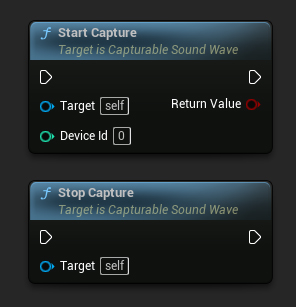
Bạn có thể bắt đầu và dừng việc thu âm bằng các lệnh gọi hàm đơn giản:
- Pixel Streaming
- Pixel Streaming 2
- Blueprint
- C++
// Assuming PixelStreamingSoundWave is a reference to a UPixelStreamingCapturableSoundWave object

// Start capturing audio (the device ID parameter is ignored for Pixel Streaming)
PixelStreamingSoundWave->StartCapture(0);

// Stop capturing audio
PixelStreamingSoundWave->StopCapture();
- Blueprint
- C++
Sử dụng cùng các nút Start Capture và Stop Capture với Pixel Streaming 2 Capturable Sound Wave của bạn
// Assuming PixelStreamingSoundWave is a reference to a UPixelStreaming2CapturableSoundWave object

// Start capturing audio (the device ID parameter is ignored for Pixel Streaming 2)
PixelStreamingSoundWave->StartCapture(0);

// Stop capturing audio
PixelStreamingSoundWave->StopCapture();
Tham số DeviceId trong StartCapture bị bỏ qua đối với Pixel Streaming Capturable Sound Waves, vì nguồn thu được xác định tự động hoặc bởi thông tin người chơi bạn đặt.
Kiểm tra Trạng thái Thu
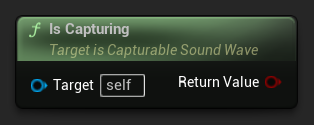
Bạn có thể kiểm tra xem sóng âm thanh có đang thu âm không:
- Pixel Streaming
- Pixel Streaming 2
- Blueprint
- C++
// Assuming PixelStreamingSoundWave is a reference to a UPixelStreamingCapturableSoundWave object
bool bIsCapturing = PixelStreamingSoundWave->IsCapturing();
- Blueprint
- C++
Sử dụng cùng nút Is Capturing với Pixel Streaming 2 Capturable Sound Wave của bạn.
// Assuming PixelStreamingSoundWave is a reference to a UPixelStreaming2CapturableSoundWave object
bool bIsCapturing = PixelStreamingSoundWave->IsCapturing();
Ví dụ hoàn chỉnh
Đây là một ví dụ hoàn chỉnh về cách thiết lập thu âm thanh Pixel Streaming:
- Pixel Streaming
- Pixel Streaming 2
- Blueprint
- C++
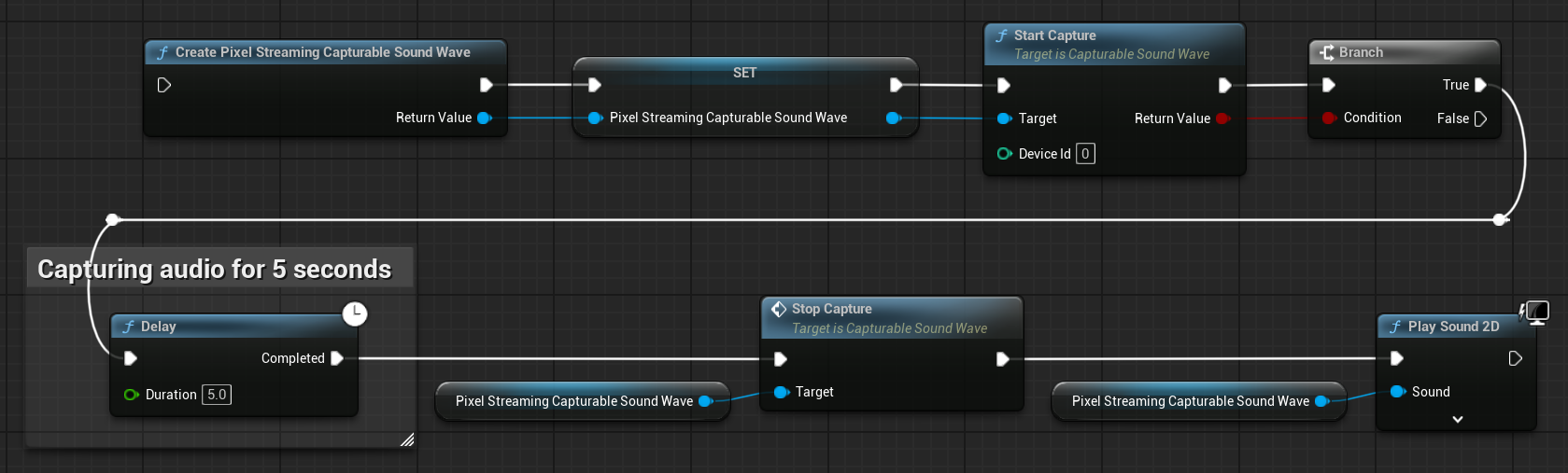
Đây là một ví dụ mã cơ bản để thu dữ liệu âm thanh từ một máy khách Pixel Streaming.
Ví dụ này sử dụng hàm CapturePixelStreamingAudioExample nằm trong lớp UPixelStreamingAudioExample thuộc module EXAMPLEMODULE.
Để chạy thành công ví dụ, hãy đảm bảo thêm cả hai module RuntimeAudioImporter và PixelStreaming vào PublicDependencyModuleNames hoặc PrivateDependencyModuleNames trong tệp .Build.cs, cũng như vào tệp .uproject của dự án của bạn.
#pragma once

#include "CoreMinimal.h"
#include "UObject/Object.h"
#include "PixelStreamingAudioExample.generated.h"

UCLASS(BlueprintType)
class EXAMPLEMODULE_API UPixelStreamingAudioExample : public UObject
{
	GENERATED_BODY()

public:
	UFUNCTION(BlueprintCallable)
	void CapturePixelStreamingAudioExample();

private:
	// Keep a strong reference to prevent garbage collection
	UPROPERTY()
	class UPixelStreamingCapturableSoundWave* PixelStreamingSoundWave;
};
#include "PixelStreamingAudioExample.h"
#include "Sound/PixelStreamingCapturableSoundWave.h"
#include "Kismet/GameplayStatics.h"

void UPixelStreamingAudioExample::CapturePixelStreamingAudioExample()
{
	// Create a Pixel Streaming Capturable Sound Wave
	PixelStreamingSoundWave = UPixelStreamingCapturableSoundWave::CreatePixelStreamingCapturableSoundWave();

	// Start capturing audio
	PixelStreamingSoundWave->StartCapture(0);

	// Play the sound wave to hear the captured audio
	UGameplayStatics::PlaySound2D(GetWorld(), PixelStreamingSoundWave);

	// Set up a timer to stop capture after 30 seconds (just for demonstration)
	FTimerHandle TimerHandle;
	GetWorld()->GetTimerManager().SetTimer(TimerHandle, [this]()
	{
		PixelStreamingSoundWave->StopCapture();
	}, 30.0f, false);
}
- Blueprint
- C++
Cấu hình Blueprint giống hệt như Pixel Streaming, nhưng sử dụng nút Create Pixel Streaming 2 Capturable Sound Wave thay thế
Đây là một ví dụ mã nguồn cơ bản để capture dữ liệu âm thanh từ một máy khách Pixel Streaming 2.
Ví dụ này sử dụng hàm CapturePixelStreaming2AudioExample nằm trong lớp UPixelStreaming2AudioExample thuộc module EXAMPLEMODULE.
Để chạy thành công ví dụ, hãy đảm bảo thêm cả hai module RuntimeAudioImporter và PixelStreaming2 vào PublicDependencyModuleNames hoặc PrivateDependencyModuleNames trong tệp .Build.cs, cũng như vào tệp .uproject của dự án.
#pragma once

#include "CoreMinimal.h"
#include "UObject/Object.h"
#include "PixelStreaming2AudioExample.generated.h"

UCLASS(BlueprintType)
class EXAMPLEMODULE_API UPixelStreaming2AudioExample : public UObject
{
	GENERATED_BODY()

public:
	UFUNCTION(BlueprintCallable)
	void CapturePixelStreaming2AudioExample();

private:
	// Keep a strong reference to prevent garbage collection
	UPROPERTY()
	class UPixelStreaming2CapturableSoundWave* PixelStreamingSoundWave;
};
#include "PixelStreaming2AudioExample.h"
#include "Sound/PixelStreaming2CapturableSoundWave.h"
#include "Kismet/GameplayStatics.h"

void UPixelStreaming2AudioExample::CapturePixelStreaming2AudioExample()
{
	// Create a Pixel Streaming 2 Capturable Sound Wave
	PixelStreamingSoundWave = UPixelStreaming2CapturableSoundWave::CreatePixelStreaming2CapturableSoundWave();

	// Start capturing audio
	PixelStreamingSoundWave->StartCapture(0);

	// Play the sound wave to hear the captured audio
	UGameplayStatics::PlaySound2D(GetWorld(), PixelStreamingSoundWave);

	// Set up a timer to stop capture after 30 seconds (just for demonstration)
	FTimerHandle TimerHandle;
	GetWorld()->GetTimerManager().SetTimer(TimerHandle, [this]()
	{
		PixelStreamingSoundWave->StopCapture();
	}, 30.0f, false);
}
Làm việc với Nhiều Người chơi Pixel Streaming
Trong các tình huống có nhiều máy khách Pixel Streaming kết nối đồng thời, bạn có thể cần thu âm thanh từ các người chơi cụ thể. Các tính năng sau giúp bạn quản lý việc này.
Lấy Danh sách Người chơi Pixel Streaming Khả dụng
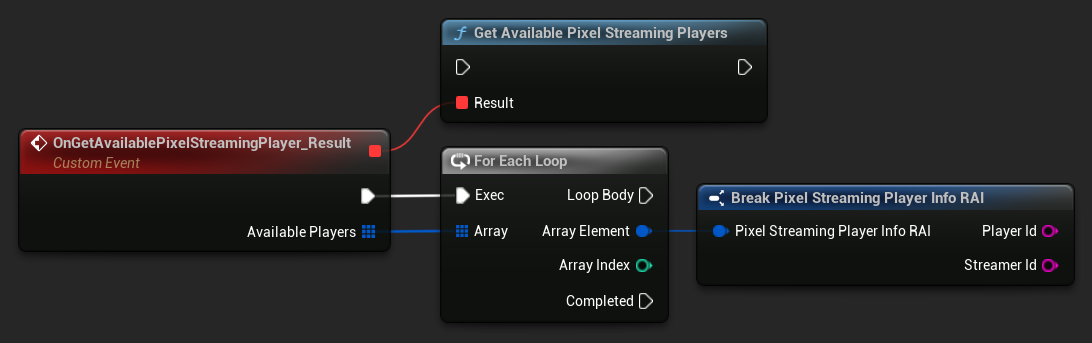
Để xác định những người chơi Pixel Streaming nào đang kết nối:
- Pixel Streaming
- Pixel Streaming 2
- Blueprint
- C++
UPixelStreamingCapturableSoundWave::GetAvailablePixelStreamingPlayers(FOnGetAvailablePixelStreamingPlayersResultNative::CreateWeakLambda(this, [](const TArray<FPixelStreamingPlayerInfo_RAI>& AvailablePlayers)
{
    // Handle the list of available players
    for (const FPixelStreamingPlayerInfo_RAI& PlayerInfo : AvailablePlayers)
    {
        UE_LOG(LogTemp, Log, TEXT("Available player: %s on streamer: %s"), *PlayerInfo.PlayerId, *PlayerInfo.StreamerId);
    }
}));
- Blueprint
- C++
Sử dụng node Get Available Pixel Streaming 2 Players
UPixelStreaming2CapturableSoundWave::GetAvailablePixelStreaming2Players(FOnGetAvailablePixelStreaming2PlayersResultNative::CreateWeakLambda(this, [](const TArray<FPixelStreaming2PlayerInfo_RAI>& AvailablePlayers)
{
    // Handle the list of available players
    for (const FPixelStreaming2PlayerInfo_RAI& PlayerInfo : AvailablePlayers)
    {
        UE_LOG(LogTemp, Log, TEXT("Available player: %s on streamer: %s"), *PlayerInfo.PlayerId, *PlayerInfo.StreamerId);
    }
}));
Thiết lập Người chơi cần thu từ
Khi bạn cần thu từ một người chơi cụ thể:
- Pixel Streaming
- Pixel Streaming 2
- Blueprint
- C++
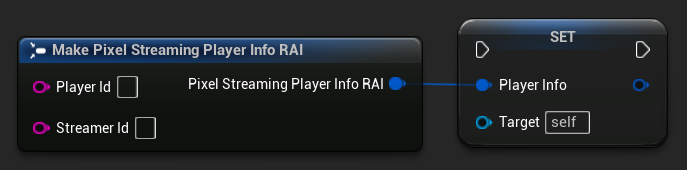
// Assuming PixelStreamingSoundWave is a reference to a UPixelStreamingCapturableSoundWave object
// and PlayerInfo is a FPixelStreamingPlayerInfo_RAI object from GetAvailablePixelStreamingPlayers

PixelStreamingSoundWave->PlayerInfo = PlayerInfo;
- Blueprint
- C++
Sử dụng node Set Player To Capture From với Pixel Streaming 2 Capturable Sound Wave của bạn
// Assuming PixelStreamingSoundWave is a reference to a UPixelStreaming2CapturableSoundWave object
// and PlayerInfo is a FPixelStreaming2PlayerInfo_RAI object from GetAvailablePixelStreaming2Players

PixelStreamingSoundWave->PlayerInfo = PlayerInfo;
Nếu bạn để trống Player ID, sound wave sẽ tự động lắng nghe người chơi đầu tiên kết nối. Đây là hành vi mặc định và hoạt động tốt trong các tình huống một người chơi.
Trường hợp sử dụng phổ biến
Triển khai trò chuyện thoại
Bạn có thể sử dụng Pixel Streaming Capturable Sound Waves để triển khai trò chuyện thoại giữa người dùng từ xa và người chơi cục bộ:
- Tạo một Pixel Streaming Capturable Sound Wave cho mỗi người chơi đã kết nối
- Thiết lập một hệ thống để quản lý những người chơi đang nói
- Sử dụng hệ thống Phát hiện hoạt động giọng nói để phát hiện khi nào người dùng đang nói
- Không gian hóa âm thanh bằng hệ thống âm thanh của Unreal Engine nếu cần
Lệnh thoại với nhận dạng giọng nói
Bạn có thể triển khai nhận dạng lệnh thoại cho người dùng từ xa bằng cách kết hợp tính năng này với plugin Runtime Speech Recognizer:
- Thu âm thanh từ các máy khách Pixel Streaming bằng Pixel Streaming Capturable Sound Wave
- Đưa âm thanh đã thu trực tiếp vào Runtime Speech Recognizer
- Xử lý văn bản đã nhận dạng trong logic trò chơi của bạn
Chỉ cần thay thế Capturable Sound Wave tiêu chuẩn bằng một Pixel Streaming Capturable Sound Wave (hoặc Pixel Streaming 2 Capturable Sound Wave) trong các ví dụ của Runtime Speech Recognizer, và nó sẽ hoạt động trơn tru với đầu vào âm thanh từ Pixel Streaming.
Ghi âm thanh của người dùng từ xa
Bạn có thể ghi âm thanh từ người dùng từ xa để phát lại sau:
- Thu âm thanh bằng Pixel Streaming Capturable Sound Wave
- Xuất âm thanh đã thu ra tệp bằng Xuất âm thanh
- Lưu tệp để sử dụng hoặc phân tích sau