匯出音訊
匯入音波後,您可能希望將其匯出到記憶體或檔案。此插件提供以各種格式匯出音訊的功能,並可選擇覆寫取樣率(重新取樣)和聲道數(混音)。
支援的音訊格式
此插件支援匯出為以下音訊格式:
- WAV - 波形音訊檔案格式
- OGG VORBIS - 使用 Vorbis 音訊的 Ogg 容器
- OGG OPUS - 使用 Opus 音訊的 Ogg 容器
- BINK - Bink Audio(僅限 Windows x64、Mac 和 UE >= 5.0 的 Linux)
- RAW (PCM) - 未壓縮的脈衝編碼調變音訊資料(Int8、UInt8、Int16、UInt16、Int32、UInt32、Float32)
範例
- Blueprint
- C++
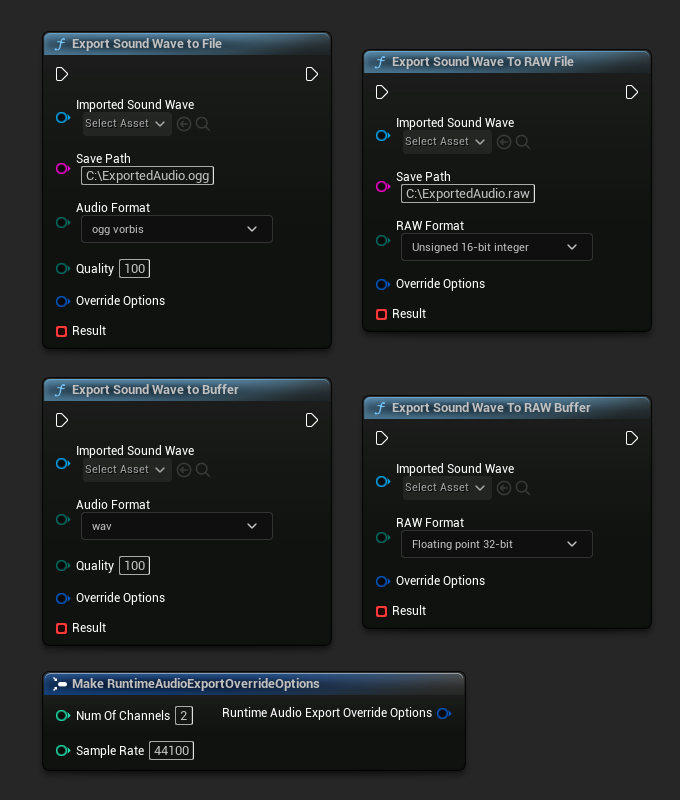
// Assuming ImportedSoundWave is a UE reference to a UImportedSoundWave object (or its derived type, such as UStreamingSoundWave, UCapturableSoundWave, etc.)

// Export the sound wave to a file
URuntimeAudioExporter::ExportSoundWaveToFile(ImportedSoundWave, TEXT("C:/ExportedAudio.ogg"), ERuntimeAudioFormat::OggVorbis, 100,
    FRuntimeAudioExportOverrideOptions(),
    FOnAudioExportToFileResultNative::CreateWeakLambda(this, [this](bool bSucceeded)
    {
	    // Handle the result
    }));

// Export the sound wave to a RAW file
URuntimeAudioExporter::ExportSoundWaveToRAWFile(ImportedSoundWave, TEXT("C:/ExportedAudio.raw"), ERuntimeRAWAudioFormat::UInt16,
    FRuntimeAudioExportOverrideOptions(),
    FOnAudioExportToFileResultNative::CreateWeakLambda(this, [this](bool bSucceeded)
    {
	    // Handle the result
    }));

// Export the sound wave to a buffer
URuntimeAudioExporter::ExportSoundWaveToBuffer(ImportedSoundWave, ERuntimeAudioFormat::Wav, 100,
    FRuntimeAudioExportOverrideOptions(),
    FOnAudioExportToBufferResultNative::CreateWeakLambda(this, [this](bool bSucceeded, const TArray64<uint8>& AudioData)
    {
	    // Handle the result
    }));

// Export the sound wave to a RAW buffer
URuntimeAudioExporter::ExportSoundWaveToRAWBuffer(ImportedSoundWave, ERuntimeRAWAudioFormat::Float32,
    FRuntimeAudioExportOverrideOptions(),
    FOnAudioExportToBufferResultNative::CreateWeakLambda(this, [this](bool bSucceeded, const TArray64<uint8>& AudioData)
    {
	    // Handle the result
    }));