Pixel Streaming 音頻擷取
Pixel Streaming 是一個 Unreal Engine 的插件,用於串流渲染的幀並透過 WebRTC 同步輸入/輸出。應用程式在伺服器端執行,而客戶端則處理渲染和使用者互動。如需更多關於 Pixel Streaming 和設定的詳細資訊,請參閱 Pixel Streaming 文件。
Pixel Streaming 對比 Pixel Streaming 2
此插件支援 Unreal Engine 中可用的兩種 Pixel Streaming 版本:
- Pixel Streaming - 原始插件,自 UE 5.2 起可用,並仍在目前的引擎版本中積極使用
- Pixel Streaming 2 - 在 UE 5.5 中引入,作為具有改進內部架構的下一代實作。 了解更多關於 Pixel Streaming 2 的資訊
兩個版本都完全支援,並在最新的 Unreal Engine 版本中可用。選擇符合您專案 Pixel Streaming 設定的版本。
兩個版本的 API 相同,唯一的差異在於 Pixel Streaming 2 的類別和函式名稱中包含 "2"(例如 UPixelStreamingCapturableSoundWave 與 UPixelStreaming2CapturableSoundWave)。
兼容性
此解決方案適用於:
- 官方 Pixel Streaming 基礎架構(Epic Games 參考實作)
- 第三方 Pixel Streaming 提供者,包括:
- Vagon.io
- Eagle 3D Streaming
- 其他基於 WebRTC 的串流解決方案
- 作業系統:Windows 和 Linux 伺服器
此實作已在這些環境中進行測試,無論使用何種 Pixel Streaming 託管解決方案,都能正確運作。
擴展插件安裝
此功能作為 Runtime Audio Importer 插件的擴展提供。若要使用它,您需要:
- 確保您的專案中已安裝 Runtime Audio Importer 插件
- 下載適用於您 Pixel Streaming 版本的擴展插件:
- 將下載的壓縮檔中的資料夾解壓縮到您專案的
Plugins資料夾中(如果該資料夾不存在,請建立它) - 重新編譯您的專案(此擴展需要 C++ 專案)
- 這些擴展以原始碼形式提供,需要 C++ 專案才能使用
- Pixel Streaming 擴展:支援 UE 5.2 及更新版本
- Pixel Streaming 2 擴展:支援 UE 5.5 及更新版本
- 如需更多關於手動建置插件的資訊,請參閱 建置插件教學
概述
Pixel Streaming Capturable Sound Wave 擴展了標準的 Capturable Sound Wave,允許直接從 Pixel Streaming 客戶端的麥克風擷取音頻。此功能讓您能夠:
- 從透過 Pixel Streaming 連接的瀏覽器擷取音頻
- 處理來自特定玩家/對等端的音頻
- 實現語音聊天、語音命令或來自遠端使用者的音頻錄製
基本用法
建立 Pixel Streaming Capturable Sound Wave
首先,您需要建立一個 Pixel Streaming Capturable Sound Wave 物件:
- Pixel Streaming
- Pixel Streaming 2
- Blueprint
- C++

PixelStreamingSoundWave = UPixelStreamingCapturableSoundWave::CreatePixelStreamingCapturableSoundWave();
- Blueprint
- C++
使用 Create Pixel Streaming 2 Capturable Sound Wave 節點(與 Pixel Streaming 相同,但名稱中有「2」)
PixelStreamingSoundWave = UPixelStreaming2CapturableSoundWave::CreatePixelStreaming2CapturableSoundWave();
您應該將 Pixel Streaming Capturable Sound Wave 視為一個強參考,以防止其被提前銷毀(例如,在 Blueprint 中將其指派給一個單獨的變數,或在 C++ 中使用 UPROPERTY())。
開始和停止擷取
您可以透過簡單的函式呼叫來開始和停止音訊擷取:
- Pixel Streaming
- Pixel Streaming 2
- Blueprint
- C++
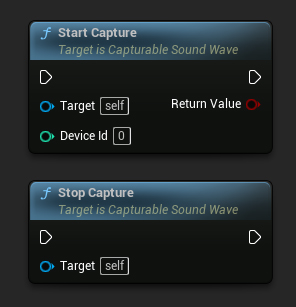
// Assuming PixelStreamingSoundWave is a reference to a UPixelStreamingCapturableSoundWave object

// Start capturing audio (the device ID parameter is ignored for Pixel Streaming)
PixelStreamingSoundWave->StartCapture(0);

// Stop capturing audio
PixelStreamingSoundWave->StopCapture();
- Blueprint
- C++
使用相同的 Start Capture 和 Stop Capture 節點與您的 Pixel Streaming 2 Capturable Sound Wave
// Assuming PixelStreamingSoundWave is a reference to a UPixelStreaming2CapturableSoundWave object

// Start capturing audio (the device ID parameter is ignored for Pixel Streaming 2)
PixelStreamingSoundWave->StartCapture(0);

// Stop capturing audio
PixelStreamingSoundWave->StopCapture();
在 Pixel Streaming Capturable Sound Waves 中,`StartCapture` 的 `DeviceId` 參數會被忽略,因為擷取來源是自動決定的,或由您設定的玩家資訊決定。
檢查擷取狀態
您可以檢查該聲波是否正在擷取音訊:
- Pixel Streaming
- Pixel Streaming 2
- Blueprint
- C++
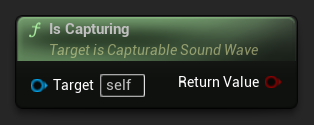
// Assuming PixelStreamingSoundWave is a reference to a UPixelStreamingCapturableSoundWave object
bool bIsCapturing = PixelStreamingSoundWave->IsCapturing();
- Blueprint
- C++
使用相同的 Is Capturing 節點與您的 Pixel Streaming 2 Capturable Sound Wave
// Assuming PixelStreamingSoundWave is a reference to a UPixelStreaming2CapturableSoundWave object
bool bIsCapturing = PixelStreamingSoundWave->IsCapturing();
完整範例
以下是如何設定 Pixel Streaming 音訊擷取的完整範例:
- Pixel Streaming
- Pixel Streaming 2
- Blueprint
- C++
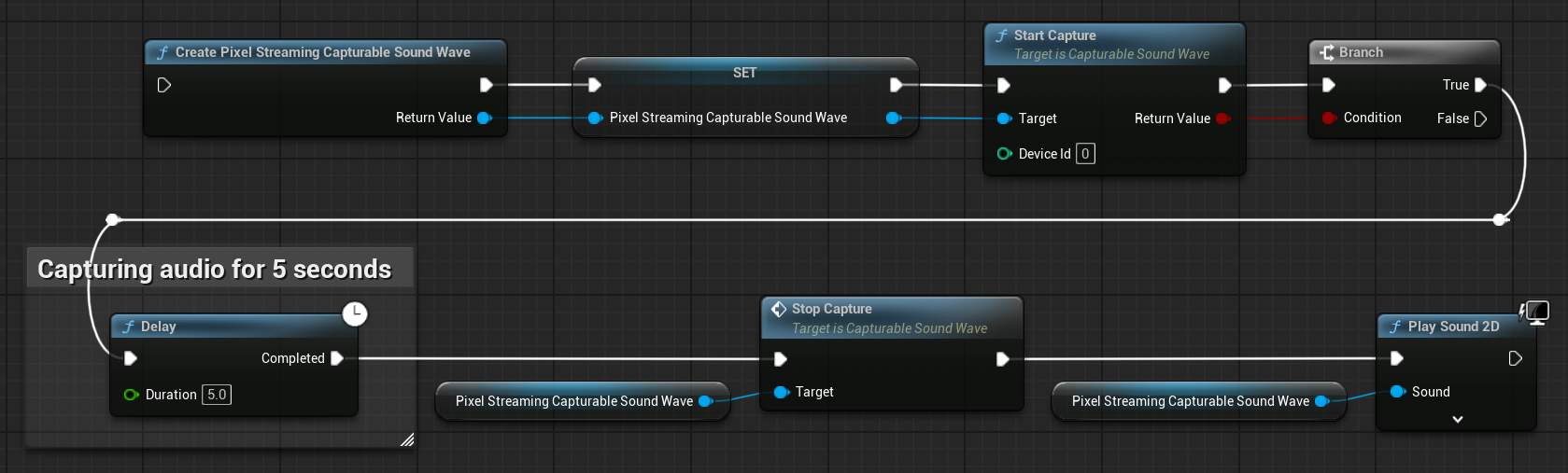
這是一個從 Pixel Streaming 客戶端擷取音訊資料的基本程式碼範例。
此範例使用了位於 EXAMPLEMODULE 模組中 UPixelStreamingAudioExample 類別內的 CapturePixelStreamingAudioExample 函式。
要成功執行此範例,請確保將 RuntimeAudioImporter 和 PixelStreaming 這兩個模組新增到 .Build.cs 檔案中的 PublicDependencyModuleNames 或 PrivateDependencyModuleNames,以及您專案的 .uproject 檔案中。
#pragma once

#include "CoreMinimal.h"
#include "UObject/Object.h"
#include "PixelStreamingAudioExample.generated.h"

UCLASS(BlueprintType)
class EXAMPLEMODULE_API UPixelStreamingAudioExample : public UObject
{
	GENERATED_BODY()

public:
	UFUNCTION(BlueprintCallable)
	void CapturePixelStreamingAudioExample();

private:
	// Keep a strong reference to prevent garbage collection
	UPROPERTY()
	class UPixelStreamingCapturableSoundWave* PixelStreamingSoundWave;
};
#include "PixelStreamingAudioExample.h"
#include "Sound/PixelStreamingCapturableSoundWave.h"
#include "Kismet/GameplayStatics.h"

void UPixelStreamingAudioExample::CapturePixelStreamingAudioExample()
{
	// Create a Pixel Streaming Capturable Sound Wave
	PixelStreamingSoundWave = UPixelStreamingCapturableSoundWave::CreatePixelStreamingCapturableSoundWave();

	// Start capturing audio
	PixelStreamingSoundWave->StartCapture(0);

	// Play the sound wave to hear the captured audio
	UGameplayStatics::PlaySound2D(GetWorld(), PixelStreamingSoundWave);

	// Set up a timer to stop capture after 30 seconds (just for demonstration)
	FTimerHandle TimerHandle;
	GetWorld()->GetTimerManager().SetTimer(TimerHandle, [this]()
	{
		PixelStreamingSoundWave->StopCapture();
	}, 30.0f, false);
}
- Blueprint
- C++
Blueprint 設定與 Pixel Streaming 完全相同,但改為使用 Create Pixel Streaming 2 Capturable Sound Wave 節點。
這是一個從 Pixel Streaming 2 用戶端擷取音訊資料的基本程式碼範例。
此範例使用位於 EXAMPLEMODULE 模組中 UPixelStreaming2AudioExample 類別內的 CapturePixelStreaming2AudioExample 函式。
要成功執行此範例,請確保將 RuntimeAudioImporter 和 PixelStreaming2 模組都加入到 .Build.cs 檔案中的 PublicDependencyModuleNames 或 PrivateDependencyModuleNames,以及您專案的 .uproject 檔案中。
#pragma once

#include "CoreMinimal.h"
#include "UObject/Object.h"
#include "PixelStreaming2AudioExample.generated.h"

UCLASS(BlueprintType)
class EXAMPLEMODULE_API UPixelStreaming2AudioExample : public UObject
{
	GENERATED_BODY()

public:
	UFUNCTION(BlueprintCallable)
	void CapturePixelStreaming2AudioExample();

private:
	// Keep a strong reference to prevent garbage collection
	UPROPERTY()
	class UPixelStreaming2CapturableSoundWave* PixelStreamingSoundWave;
};
#include "PixelStreaming2AudioExample.h"
#include "Sound/PixelStreaming2CapturableSoundWave.h"
#include "Kismet/GameplayStatics.h"

void UPixelStreaming2AudioExample::CapturePixelStreaming2AudioExample()
{
	// Create a Pixel Streaming 2 Capturable Sound Wave
	PixelStreamingSoundWave = UPixelStreaming2CapturableSoundWave::CreatePixelStreaming2CapturableSoundWave();

	// Start capturing audio
	PixelStreamingSoundWave->StartCapture(0);

	// Play the sound wave to hear the captured audio
	UGameplayStatics::PlaySound2D(GetWorld(), PixelStreamingSoundWave);

	// Set up a timer to stop capture after 30 seconds (just for demonstration)
	FTimerHandle TimerHandle;
	GetWorld()->GetTimerManager().SetTimer(TimerHandle, [this]()
	{
		PixelStreamingSoundWave->StopCapture();
	}, 30.0f, false);
}
與多個 Pixel Streaming 玩家共同工作
在您有多個 Pixel Streaming 用戶端同時連線的情況下,您可能需要從特定玩家擷取音訊。以下功能可協助您管理這項操作。
取得可用的 Pixel Streaming 玩家
若要識別哪些 Pixel Streaming 玩家已連線:
- Pixel Streaming
- Pixel Streaming 2
- Blueprint
- C++
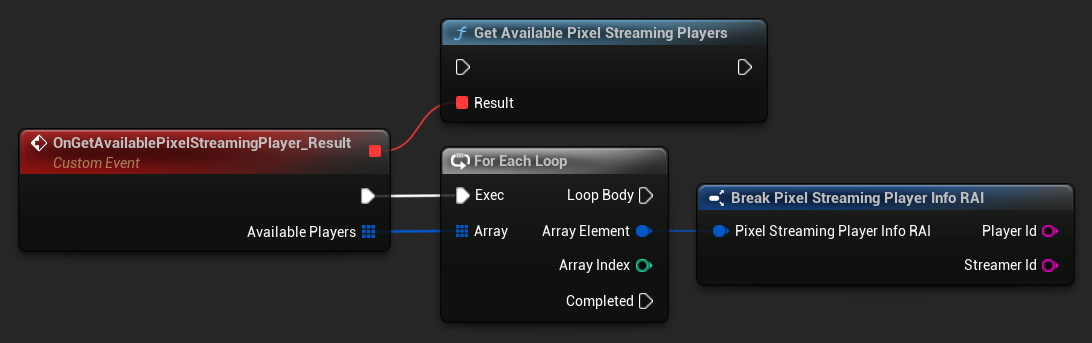
UPixelStreamingCapturableSoundWave::GetAvailablePixelStreamingPlayers(FOnGetAvailablePixelStreamingPlayersResultNative::CreateWeakLambda(this, [](const TArray<FPixelStreamingPlayerInfo_RAI>& AvailablePlayers)
{
    // Handle the list of available players
    for (const FPixelStreamingPlayerInfo_RAI& PlayerInfo : AvailablePlayers)
    {
        UE_LOG(LogTemp, Log, TEXT("Available player: %s on streamer: %s"), *PlayerInfo.PlayerId, *PlayerInfo.StreamerId);
    }
}));
- Blueprint
- C++
使用 Get Available Pixel Streaming 2 Players 節點
UPixelStreaming2CapturableSoundWave::GetAvailablePixelStreaming2Players(FOnGetAvailablePixelStreaming2PlayersResultNative::CreateWeakLambda(this, [](const TArray<FPixelStreaming2PlayerInfo_RAI>& AvailablePlayers)
{
    // Handle the list of available players
    for (const FPixelStreaming2PlayerInfo_RAI& PlayerInfo : AvailablePlayers)
    {
        UE_LOG(LogTemp, Log, TEXT("Available player: %s on streamer: %s"), *PlayerInfo.PlayerId, *PlayerInfo.StreamerId);
    }
}));
設定要從其擷取的玩家
當您需要從特定玩家擷取時:
- Pixel Streaming
- Pixel Streaming 2
- Blueprint
- C++
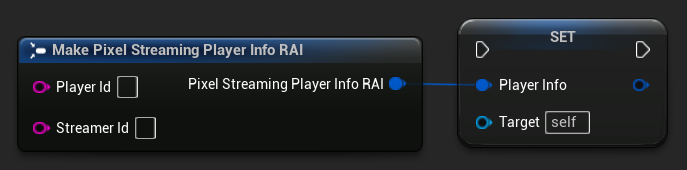
// Assuming PixelStreamingSoundWave is a reference to a UPixelStreamingCapturableSoundWave object
// and PlayerInfo is a FPixelStreamingPlayerInfo_RAI object from GetAvailablePixelStreamingPlayers

PixelStreamingSoundWave->PlayerInfo = PlayerInfo;
- Blueprint
- C++
使用 Set Player To Capture From 節點與您的 Pixel Streaming 2 Capturable Sound Wave
// Assuming PixelStreamingSoundWave is a reference to a UPixelStreaming2CapturableSoundWave object
// and PlayerInfo is a FPixelStreaming2PlayerInfo_RAI object from GetAvailablePixelStreaming2Players

PixelStreamingSoundWave->PlayerInfo = PlayerInfo;
如果您將 Player ID 保留空白,該 sound wave 將會自動監聽第一個連線的可用玩家。這是預設行為,且適用於單人場景。
常見使用案例
語音聊天實作
您可以使用 Pixel Streaming Capturable Sound Waves 來實作遠端使用者與本機玩家之間的語音聊天:
- 為每個連線的玩家創建一個 Pixel Streaming Capturable Sound Wave
- 設定一個系統來管理哪些玩家目前正在說話
- 使用 Voice Activity Detection 系統來偵測使用者何時正在說話
- 如有需要,使用 Unreal Engine 的音訊系統來空間化音訊
使用語音辨識的語音指令
您可以透過將此功能與 Runtime Speech Recognizer 外掛結合,來為遠端使用者實作語音指令辨識:
- 使用 Pixel Streaming Capturable Sound Wave 從 Pixel Streaming 用戶端擷取音訊
- 將擷取到的音訊直接饋送至 Runtime Speech Recognizer
- 在您的遊戲邏輯中處理辨識到的文字
只需在 Runtime Speech Recognizer 的範例中,將標準的 Capturable Sound Wave 替換為 Pixel Streaming Capturable Sound Wave(或 Pixel Streaming 2 Capturable Sound Wave),它就會與 Pixel Streaming 音訊輸入無縫運作。
錄製遠端使用者的音訊
您可以錄製來自遠端使用者的音訊,以便稍後播放:
- 使用 Pixel Streaming Capturable Sound Wave 擷取音訊
- 使用 Export Audio 將擷取到的音訊匯出為檔案
- 儲存檔案以供稍後使用或分析