キャプチャ可能サウンドウェーブ
概要
キャプチャ可能サウンドウェーブは、ストリーミングサウンドウェーブから派生したものです。マイクなどの入力デバイスからオーディオデータをキャプチャし、再生することをサポートします。インポートされたサウンドウェーブと同じ機能(巻き戻し、SoundCueでの使用など)を備えています。キャプチャと再生を同時に制限なく行うことも可能です。
音声アクティビティ検出(VAD)については、このページを参照してください。
キャプチャ可能サウンドウェーブは、キャプチャが開始されるとiOSおよびAndroidで自動的にマイクの権限を要求します。
基本的な使い方
キャプチャ可能サウンドウェーブの作成
まず、キャプチャ可能サウンドウェーブを作成する必要があります。
- Blueprint
- C++
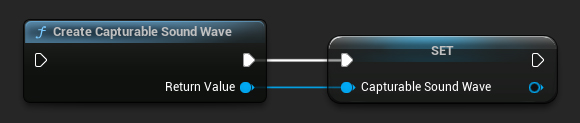
UCapturableSoundWave* CapturableSoundWave = UCapturableSoundWave::CreateCapturableSoundWave();
您應將可捕獲的聲音波視為強引用,以防止其過早銷毀(例如,在藍圖中將其分配給單獨的變量,或在 C++ 中使用 UPROPERTY())。
獲取可用輸入設備
要使用此功能,您需要先獲取所有可用於捕獲的音頻輸入設備。
- 藍圖
- C++
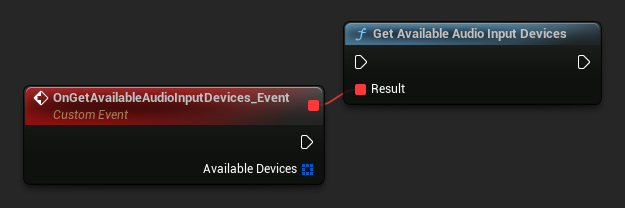
UCapturableSoundWave::GetAvailableAudioInputDevices(FOnGetAvailableAudioInputDevicesResultNative::CreateWeakLambda(this, [](const TArray<FRuntimeAudioInputDeviceInfo>& AvailableDevices)
{
	// Handle the result
}));
開始與停止擷取
取得可用裝置後,您可以開始從輸入裝置擷取音訊資料,並在需要時停止。
- Blueprint
- C++
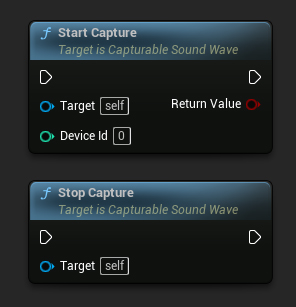
// Assuming CapturableSoundWave is a UE reference to a UCapturableSoundWave object (or its derived type)

// Start capturing audio data from the input device with the specified device ID (0 in this case)
CapturableSoundWave->StartCapture(0);

// Stop capturing audio data
CapturableSoundWave->StopCapture();
DeviceId 是從上一步獲取的可使用裝置陣列中的裝置索引。若要使用預設音訊輸入裝置,請在 Blueprints 中傳遞 -1,或在 C++ 中傳遞 Audio::DefaultDeviceIndex(等於 INDEX_NONE),因為零索引有時並非預設裝置。
檢查擷取狀態
您可以檢查音波是否正在擷取音訊:
- Blueprint
- C++
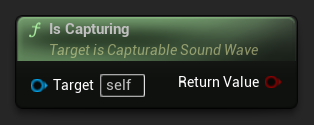
// Assuming CapturableSoundWave is a reference to a UCapturableSoundWave object
bool bIsCapturing = CapturableSoundWave->IsCapturing();
進階功能
靜音與取消靜音擷取
您可以選擇靜音或取消靜音音訊擷取,以防止音訊資料累積,同時不中斷擷取過程。
- 藍圖
- C++
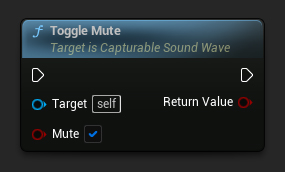
// Assuming CapturableSoundWave is a UE reference to a UCapturableSoundWave object (or its derived type)
CapturableSoundWave->ToggleMute(true);
UE 5.3 及更新版本: 開始和停止擷取不再造成卡頓,因此 ToggleMute 與 StartCapture/StopCapture 效果相同。您可能完全不需要為了效能最佳化而使用 ToggleMute。
UE 5.2 及更早版本: 透過 StartCapture 開始擷取可能會造成輕微卡頓。在這些版本中,建議在頻繁切換擷取開關時使用 ToggleMute。您應先在較不關鍵的時間(例如載入畫面)啟動擷取本身,然後使用靜音/取消靜音來控制何時實際累積音訊資料。
如果您使用的是 UE 5.2 或更早版本,並希望消除輕微的凍結,請考慮在該凍結可能影響較小的時間點開始擷取。例如,您可以在遊戲的載入畫面期間開始擷取,之後立即將可擷取音波靜音,然後在需要擷取音訊資料時再取消靜音,如此即可無卡頓地進行。
完整範例
以下是使用可擷取音波的完整實作範例:
- 藍圖
- C++
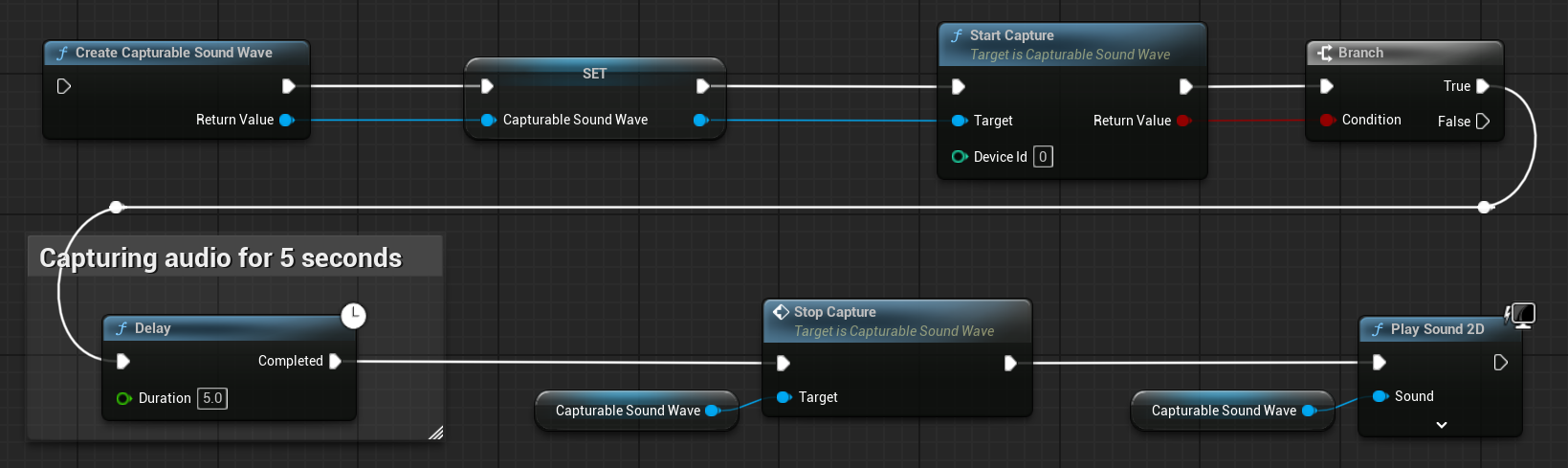
這是一個使用可擷取音波從輸入裝置(麥克風)擷取音訊資料的基本程式碼範例。
該範例使用了位於 EXAMPLEMODULE 模組中 UCaptureAudioClassExample 類別內的 CaptureAudioExample 函式。
要成功執行此範例,請確保將 RuntimeAudioImporter 模組新增至 .Build.cs 檔案中的 PublicDependencyModuleNames 或 PrivateDependencyModuleNames,以及您專案的 .uproject 檔案中。
#pragma once

#include "CoreMinimal.h"
#include "UObject/Object.h"
#include "CaptureAudioClassExample.generated.h"

UCLASS(BlueprintType)
class EXAMPLEMODULE_API UCaptureAudioClassExample : public UObject
{
	GENERATED_BODY()

public:
	UFUNCTION(BlueprintCallable)
	void CaptureAudioExample();

private:
	// Please pay attention to making the StreamingSoundWave a hard reference, such as using UPROPERTY(), to prevent it from being prematurely garbage collected
	UPROPERTY()
	class UCapturableSoundWave* CapturableSoundWave;
};
#include "CaptureAudioClassExample.h"
#include "Sound/StreamingSoundWave.h"
#include "AudioCaptureDeviceInterface.h"

void UCaptureAudioClassExample::CaptureAudioExample()
{
	// Create a capturable sound wave
	CapturableSoundWave = UCapturableSoundWave::CreateCapturableSoundWave();

	// Capture audio data from the default input device
	CapturableSoundWave->StartCapture(Audio::DefaultDeviceIndex);

	// Delay for 5 seconds, just for demonstration purposes
	FTimerHandle TimerHandle;
	GetWorld()->GetTimerManager().SetTimer(TimerHandle, [this]()
	{
		// Stop capturing audio data
		CapturableSoundWave->StopCapture();

		// Play the sound wave
		UGameplayStatics::PlaySound2D(GetWorld(), CapturableSoundWave);
	}, 5, false);
}