語音活動偵測
串流音波,及其衍生類型如可擷取音波,支援語音活動偵測(VAD)。VAD會過濾傳入的音訊資料,僅在偵測到語音時才填充內部緩衝區。
該插件提供兩種VAD實作方式:
- 預設 VAD
- Silero VAD
預設實作使用 libfvad,一個輕量的語音活動偵測庫,可在 Runtime Audio Importer 支援的所有平台和引擎版本上高效運作。
作為一個擴展插件提供,Silero VAD 是一個基於神經網絡的語音活動檢測器,能提供更高的準確性,尤其是在嘈雜環境中。它使用機器學習來更可靠地區分語音和背景噪音。
基本用法
在创建声波后启用 VAD,请使用 ToggleVAD 函数:
- Blueprint
- C++
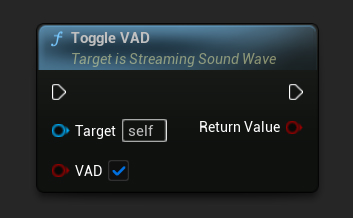
// Assuming StreamingSoundWave is a UE reference to a UStreamingSoundWave object (or its derived type, such as UCapturableSoundWave)
StreamingSoundWave->ToggleVAD(true);
啟用 VAD 後,您可以隨時重設它:
- Blueprint
- C++
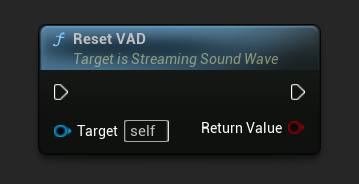
// Reset the VAD
StreamingSoundWave->ResetVAD();
預設 VAD 設定
當使用預設的 VAD 提供者時,您可以透過更改 VAD 模式來調整其激進程度:
- Blueprint
- C++
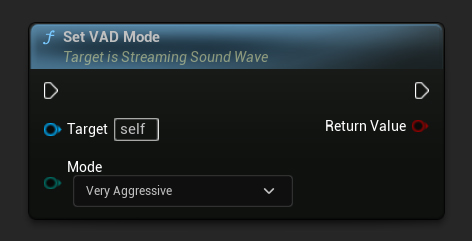
// Set the VAD mode (only works with the default VAD provider)
StreamingSoundWave->SetVADMode(ERuntimeVADMode::VeryAggressive);
模式參數控制 VAD 過濾音訊的積極程度。較高的數值更具限制性,意味著較不容易出現誤判,但可能會遺漏部分語音。
VAD 提供者
在使用 ToggleVAD 函式啟用 VAD 後,您可以根據需求選擇不同的語音活動檢測提供者。預設的提供者是內建的,而其他提供者(例如 Silero VAD)則可透過擴展插件取得。
- 藍圖
- C++
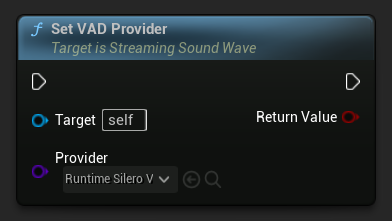
// Assuming StreamingSoundWave is a UE reference to a UStreamingSoundWave object (or its derived type, such as UCapturableSoundWave)
// Make sure to call ToggleVAD(true) before setting the provider

// Set the VAD provider to Silero VAD
StreamingSoundWave->SetVADProvider(URuntimeSileroVADProvider::StaticClass());
取得目前的 VAD 提供者
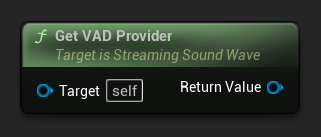
您可以使用 GetVADProvider 函式來取得目前指派給串流音波的 VAD 提供者。當您需要存取提供者特定的功能時,例如 Silero VAD 的語音閾值設定,這非常有用,無需保留獨立的參考。
- Blueprint
- C++
// Assuming StreamingSoundWave is a UE reference to a UStreamingSoundWave object (or its derived type, such as UCapturableSoundWave)

// Get the currently assigned VAD provider
URuntimeVADProviderBase* VADProvider = StreamingSoundWave->GetVADProvider();
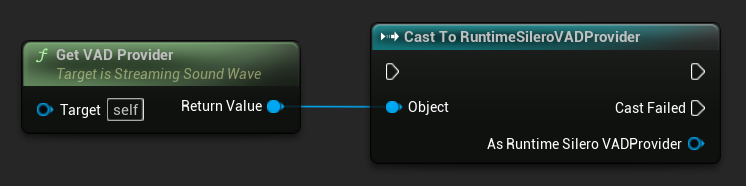
要存取供應商特定的功能,將返回的供應商轉型為所需類型。例如,要存取 Silero VAD 特定功能:
- Blueprint
- C++
// Assuming StreamingSoundWave is a UE reference to a UStreamingSoundWave object (or its derived type, such as UCapturableSoundWave)

// Get the currently assigned VAD provider and cast it to the Silero VAD provider
if (URuntimeSileroVADProvider* SileroVADProvider = Cast<URuntimeSileroVADProvider>(StreamingSoundWave->GetVADProvider()))
{
 // Use Silero VAD-specific functionality, such as SetSpeechThreshold
}
Silero VAD 擴展
Silero VAD 使用神經網路提供更準確的語音活動偵測。使用方式:
-
確保 Runtime Audio Importer 外掛程式已安裝在您的專案中
-
UE 5.5 及更早版本: 在下載 Silero VAD 擴展插件之前,請確保您的專案中已停用 NNERuntimeORT。在這些引擎版本上使用 Silero VAD 時,若啟用 NNERuntimeORT,可能因衝突而導致崩潰。
-
從此處下載 Silero VAD 擴充外掛
-
將下載的壓縮檔中的資料夾解壓縮到您專案的
Plugins資料夾(若該資料夾不存在,請建立)。 -
**對於 UE 5.6 及更新版本:**編輯
RuntimeAudioImporterSileroVAD.uplugin檔案,新增 NNERuntimeORT 依賴。在「Plugins」欄位中,於 RuntimeAudioImporter 包含之後新增:,{"Name": "NNERuntimeORT","Enabled": true} -
重新建置您的專案(此擴展需要 C++ 專案)
-
預設的 VAD 適用於 Runtime Audio Importer 支援的所有引擎版本(UE 4.24、4.25、4.26、4.27、5.0、5.1、5.2、5.3、5.4、5.5、5.6、5.7 和 5.8)
-
Silero VAD 支援 Unreal Engine 4.27 以及所有 UE5 版本(4.27、5.0、5.1、5.2、5.3、5.4、5.5、5.6、5.7、5.8)
-
UE 5.5 及更早版本: 使用 Silero VAD 之前必須停用 NNERuntimeORT,以避免因外掛衝突造成崩潰。特別是在 UE 5.3 中,還必須停用 NNERuntimeORTCpu 和 NNERuntimeORTGpu。
-
UE 5.6+ 要求: 從 Unreal Engine 5.6 開始,Silero VAD 擴充功能需要手動將 NNERuntimeORT 外掛相依性新增至
.uplugin檔案中 -
Silero VAD 可用於 Windows、Linux、Mac、Android (包含 Meta Quest) 和 iOS
-
此擴充功能是以原始碼形式提供,需要 C++ 專案才能使用。
-
如需更多關於如何手動建置外掛程式的資訊,請參閱建置外掛程式教學
一旦安裝完成,您可以使用 SetVADProvider 函式搭配 Silero 類別提供者,將它選為您的 VAD 提供者。
語音閾值
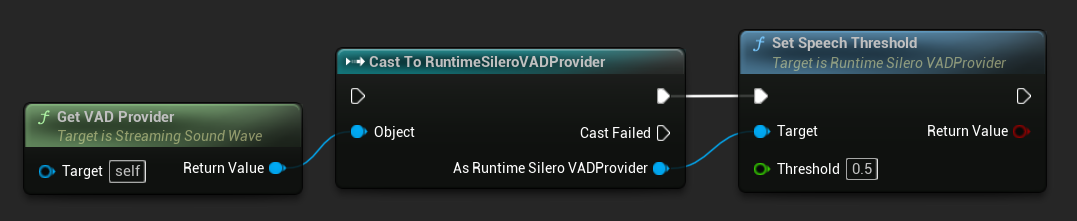
Silero VAD 提供者公開了一個 語音閾值 參數,此參數控制將音訊片段視為語音所需的最低信心分數(來自神經網路的語音機率輸出)。您可以使用 SetSpeechThreshold 函式來設定它,此函式可在使用 GetVADProvider 取得提供者並將其轉型為 Silero VAD 提供者類型後使用。
- 藍圖
- C++
// Assuming StreamingSoundWave is a UE reference to a UStreamingSoundWave object (or its derived type, such as UCapturableSoundWave)
// Make sure the VAD provider has already been set to Silero VAD via SetVADProvider

// Get the VAD provider and cast it to the Silero VAD provider
if (URuntimeSileroVADProvider* SileroVADProvider = Cast<URuntimeSileroVADProvider>(StreamingSoundWave->GetVADProvider()))
{
 // Set the speech threshold
 bool bSuccess = SileroVADProvider->SetSpeechThreshold(0.5f);
}
SetSpeechThreshold 如果閾值應用成功,則返回 true,否則返回 false(例如,如果數值超出有效範圍)。
較高的閾值會讓偵測更保守:它能減少來自背景雜訊的偽陽性,但也可能漏掉較小聲或不清楚的語音。較低的閾值會讓偵測更靈敏:它能捕捉到更多語音,但偽陽性的風險也隨之提高。預設值為 0.5。
語音開始與結束偵測
語音活動偵測不僅能偵測語音的存在,同時也能偵測語音活動的開始與結束。這對於在播放或擷取期間,語音開始或結束時觸發事件非常有用。
您可以透過調整像是最短語音時長和靜音時長等參數,自訂語音開始與結束偵測的敏感度。這些參數有助於微調偵測以避免誤判,例如捕捉到短暫的雜音或語音之間過短的停頓。
最短語音持續時間
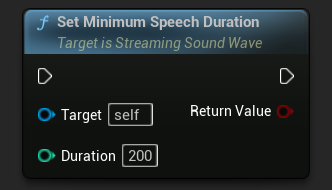
Minimum Speech Duration 參數設定了觸發語音開始事件所需的最小連續語音活動量。這有助於過濾掉不應被視為語音的短暫噪音,確保只有持續的語音活動才會被識別。Minimum Speech Duration 的預設值為 300 毫秒。
- Blueprint
- C++
// Assuming StreamingSoundWave is a UE reference to a UStreamingSoundWave object (or its derived type, such as UCapturableSoundWave)

// Set the minimum speech duration
StreamingSoundWave->SetMinimumSpeechDuration(200);
靜音持續時間
靜默持續時間 參數設定了觸發語音結束事件所需的靜默持續時間。這可以防止語音偵測在詞語或句子間的自然停頓中提前終止。靜默持續時間 的預設值為 500 毫秒。
- Blueprint
- C++
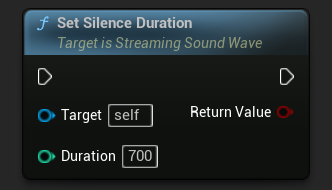
// Assuming StreamingSoundWave is a UE reference to a UStreamingSoundWave object (or its derived type, such as UCapturableSoundWave)

// Set the silence duration
StreamingSoundWave->SetSilenceDuration(700);
綁定到語音委派
當語音開始或結束時,您可以綁定到特定的 delegates。這對於根據語音活動觸發自定義行為非常有用,例如啟動或停止文字識別,或調整其他音訊源的音量。
- Blueprint
- C++
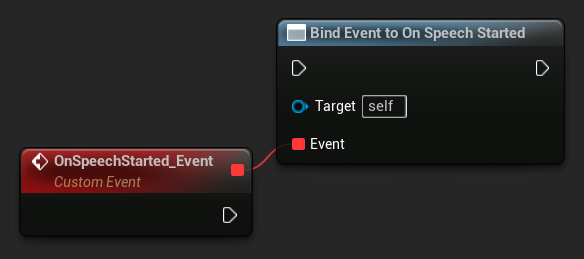
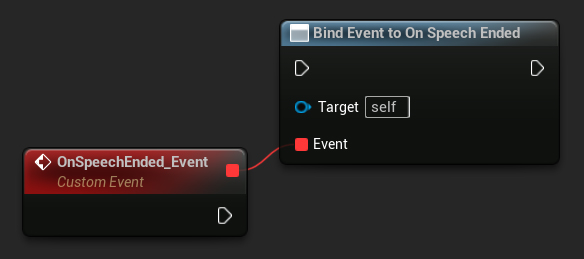
// Assuming StreamingSoundWave is a UE reference to a UStreamingSoundWave object (or its derived type, such as UCapturableSoundWave)

// Bind to the OnSpeechStartedNative delegate
StreamingSoundWave->OnSpeechStartedNative.AddWeakLambda(this, [this]()
{
 // Handle the result when speech starts
});

// Bind to the OnSpeechEndedNative delegate
StreamingSoundWave->OnSpeechEndedNative.AddWeakLambda(this, [this]()
{
 // Handle the result when speech ends
});