概述

Runtime Files Downloader 是一個用於在執行時透過 HTTP / HTTPS 下載檔案的外掛程式。
使用方式
如果您需要將檔案儲存到儲存空間,則需要呼叫 DownloadFileToStorage 函式。
- 蓝图
- C++
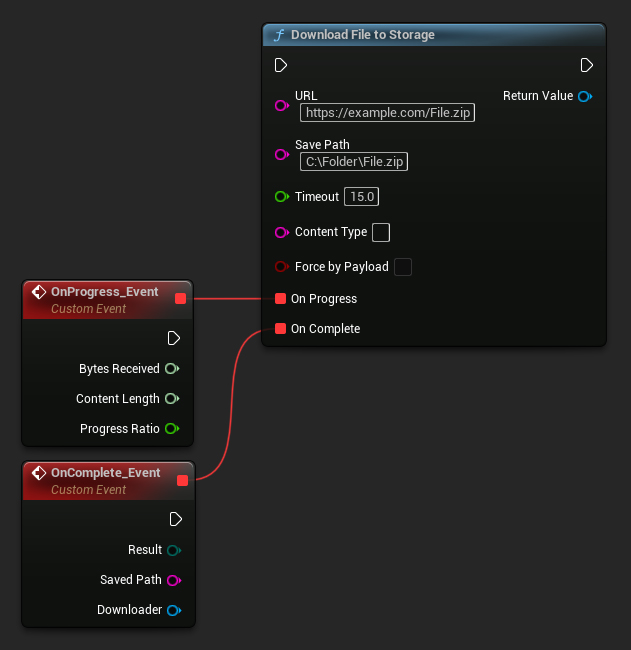
UFileToStorageDownloader::DownloadFileToStorage(TEXT("https://example.com/File.zip"), TEXT("C:/Folder/File.zip"), 15.0f, TEXT(""), false,
   FOnDownloadProgressNative::CreateLambda([](int64 BytesReceived, int64 ContentSize, float ProgressRatio)
   {
       UE_LOG(LogTemp, Log, TEXT("Download progress: %f"), ProgressRatio);
   }), FOnFileToStorageDownloadCompleteNative::CreateLambda([](EDownloadToStorageResult Result, const FString& SavedPath, UFileToStorageDownloader* Downloader)
   {
       UE_LOG(LogTemp, Log, TEXT("Download complete, result: %s, saved path: %s"), *UEnum::GetValueAsString(Result), *SavedPath);
   }));
如果您不需要儲存檔案,而只是想存取下載的內容,那麼您需要調用 DownloadFileToMemory 函式。
- 藍圖
- C++
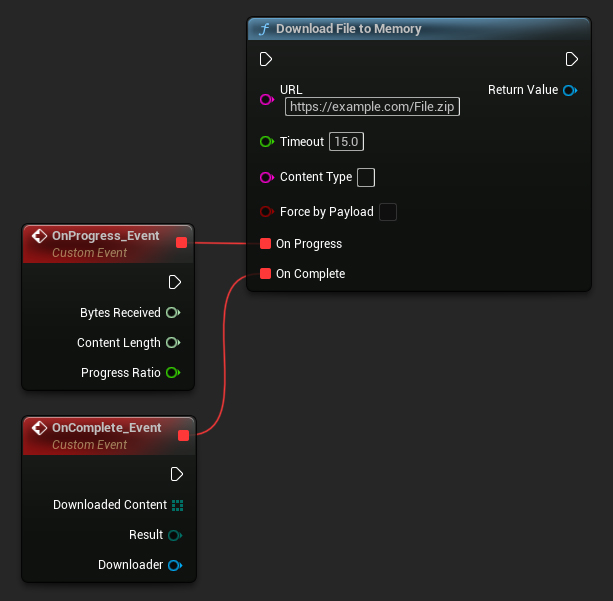
UFileToMemoryDownloader::DownloadFileToMemory(TEXT("https://example.com/File.zip"), 15.0f, TEXT(""), false,
   FOnDownloadProgressNative::CreateLambda([](int64 BytesReceived, int64 ContentSize, float ProgressRatio)
   {
       UE_LOG(LogTemp, Log, TEXT("Download progress: %f"), ProgressRatio);
   }), FOnFileToMemoryDownloadCompleteNative::CreateLambda([](const TArray64<uint8>& DownloadedContent, EDownloadToMemoryResult Result, UFileToMemoryDownloader* Downloader)
   {
       UE_LOG(LogTemp, Log, TEXT("Download complete, result: %s, DownloadedContent size: %d"), *UEnum::GetValueAsString(Result), DownloadedContent.Num());
   }));
或者,您可以選擇在「內容類型」欄位中輸入 MIME 類型來指定要下載的檔案類型。
在下載開始後,您可以使用 CancelDownload 函數取消它。
- Blueprint
- C++
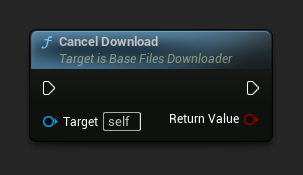
// Assuming Downloader is a UE reference to a UFileToStorageDownloader or UFileToMemoryDownloader object
Downloader->CancelDownload();
請注意,從 UE 5.4 開始,Timeout 參數的行為會在下載過程中,若下載所需總時間超過 Timeout 設定值時直接取消請求,這在某種程度上是 UE 的一個 bug。建議您設定一個較大的數值(例如 3600 秒,即 1 小時),或者將其設為 0 以完全停用 Timeout。
其他資源
- 在 Fab 上獲取
- 插件支援與客製化開發:[email protected](為團隊與組織提供的量身解決方案)
Join our Discord
online · support