平台特定設定
本指南涵蓋 Runtime MetaHuman Lip Sync 外掛程式的平台專屬設定需求與配置。
Android / Meta Quest 設定
如果您目標平台是 Android 或 Meta Quest,並在使用此外掛時遇到建置錯誤,您需要在專案設定中停用 x86_64 (x64) Android 架構:
- 前往 Edit > Project Settings
- 導覽至 Platforms > Android
- 在 Platforms - Android 下的 Build 區段中,找到 Support x86_64 [aka x64] 並確保其已停用,如下所示
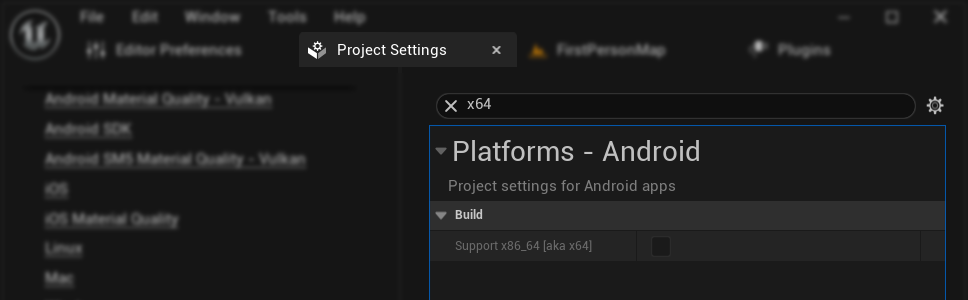
這是因為此外掛目前僅支援 Android / Meta Quest 平台的 arm64-v8a 與 armeabi-v7a 架構。
Android 與 iOS 當機
在某些情況下,於 Android 和 iOS 上可能會在執行階段發生崩潰(例如在 TestFlight 測試期間)。這是因為底層的 ONNX Runtime 函式庫的記憶體配置需求與 Unreal Engine 在這些平台上的預設配置器發生衝突所致。
為了解決此問題,您需要在專案的 Target.cs 檔案中強制使用 ANSI 配置器:
適用於 Unreal Engine 5.5 及更早版本:
- 你的專案必須使用自行建置的引擎(而非預先編譯的二進位檔)
- 將以下這行加入你的
Target.cs檔案:
GlobalDefinitions.Add("FORCE_ANSI_ALLOCATOR=1");
適用於 Unreal Engine 5.6 及更新版本:
- 可同時搭配原始碼建置與預先編譯的引擎版本使用
- 將以下兩行加入你的
Target.cs檔案:
bOverrideBuildEnvironment = true;
StaticAllocator = StaticAllocatorType.Ansi;
這會強制 Unreal Engine 在 Android 和 iOS 上使用 ANSI 配置器,與 ONNX Runtime 所使用的配置器相符。