如何使用插件
Runtime Text To Speech 插件使用可下載的語音模型將文字合成為語音。這些模型在編輯器的插件設置中管理、下載,並打包供執行階段使用。按照下列步驟開始。
編輯器端
按照 此處 的描述,下載適合您項目的語音模型。您可以同時下載多個語音模型。
執行階段端
使用 CreateRuntimeTextToSpeech 函數創建合成器。確保保持對它的引用(例如,在 Blueprints 中作為單獨的變數或在 C++ 中使用 UPROPERTY),以防止它被垃圾回收。
- Blueprint
- C++
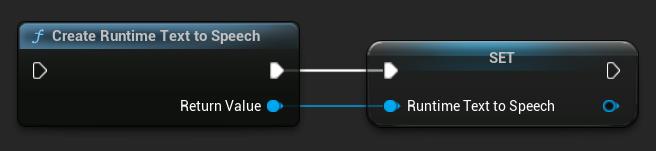
// Create the Runtime Text To Speech synthesizer in C++
URuntimeTextToSpeech* Synthesizer = URuntimeTextToSpeech::CreateRuntimeTextToSpeech();
// Ensure the synthesizer is referenced correctly to prevent garbage collection (e.g. as a UPROPERTY)
合成語音
該外掛提供兩種文字轉語音合成模式:
- 一般文字轉語音:合成整個文字並在完成時返回完整音訊
- 串流文字轉語音:在生成音訊時逐塊提供音訊區塊,允許即時處理
每種模式支援兩種選擇語音模型的方法:
- 依名稱:根據名稱選擇語音模型(建議用於 UE 5.4+)
- 依物件:透過直接引用選擇語音模型(建議用於 UE 5.3 及更早版本)
一般文字轉語音
依名稱
- Blueprint
- C++
Text To Speech (By Name) 函式在從 UE 5.4 開始的 Blueprints 中更加方便。它允許您從已下載模型的清單中選取語音模型。在 低於 5.3 的 UE 版本 中,此下拉清單不會出現,因此如果您使用的是更舊的版本,您需要手動遍歷 GetDownloadedVoiceModels 返回的語音模型陣列來選取所需的模型。
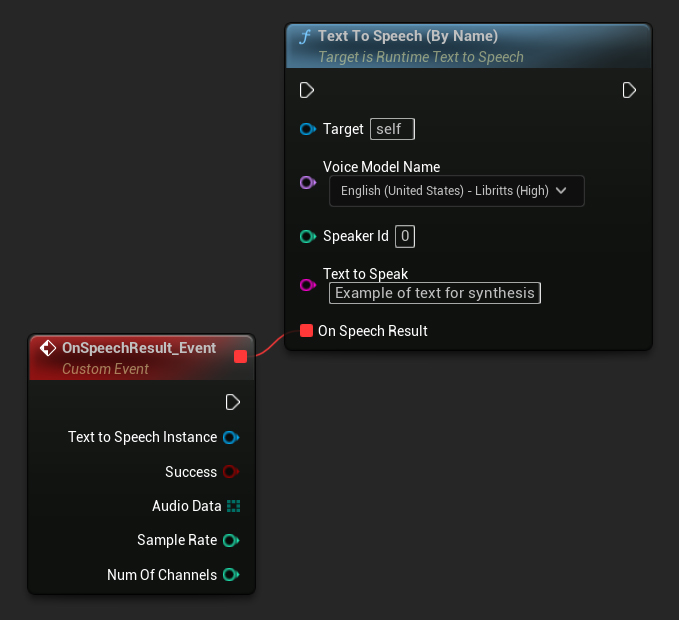
在 C++ 中,由於缺乏下拉清單,語音模型的選擇可能會稍微複雜一些。您可以使用 GetDownloadedVoiceModelNames 函式來擷取已下載語音模型的名稱,並選取所需的模型。之後,您可以呼叫 TextToSpeechByName 函式,使用選取的語音模型名稱來合成文字。
    // Assuming "Synthesizer" is a valid and referenced URuntimeTextToSpeech object (ensure it is not eligible for garbage collection during the callback)

    TArray<FName> DownloadedVoiceNames = URuntimeTTSLibrary::GetDownloadedVoiceModelNames();

    // If there are downloaded voice models, use the first one to synthesize text, just as an example
    if (DownloadedVoiceNames.Num() > 0)
    {
    	const FName& VoiceName = DownloadedVoiceNames[0]; // Select the first available voice model
    	Synthesizer->TextToSpeechByName(VoiceName, 0, TEXT("Text example 123"), FOnTTSResultDelegateFast::CreateLambda([](URuntimeTextToSpeech* TextToSpeechInstance, bool bSuccess, const TArray<uint8>& AudioData, int32 SampleRate, int32 NumChannels)
    	{
    		UE_LOG(LogTemp, Log, TEXT("TextToSpeech result: %s, AudioData size: %d, SampleRate: %d, NumChannels: %d"), bSuccess ? TEXT("Success") : TEXT("Failed"), AudioData.Num(), SampleRate, NumChannels);
    	}));
    	return;
    }
使用物件方式
- Blueprint
- C++
Text To Speech (By Object) 函式適用於所有版本的 Unreal Engine,但它將語音模型顯示為資產參考的下拉選單,這較不直覺。此方法適合 UE 5.3 及更早版本,或者若您的專案因任何原因需要直接參考語音模型資產。
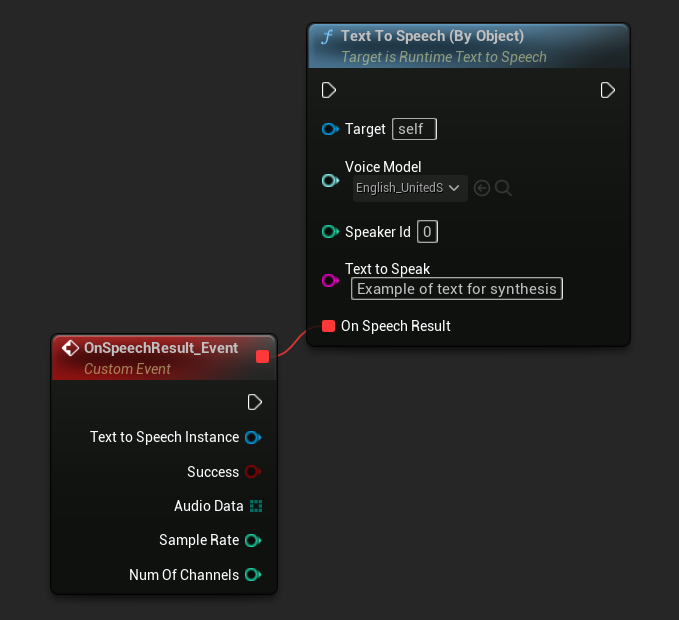
如果您已下載模型但看不到它們,請開啟 Voice Model 下拉選單,點擊設定(齒輪圖示),然後啟用 Show Plugin Content 和 Show Engine Content,讓模型可見。
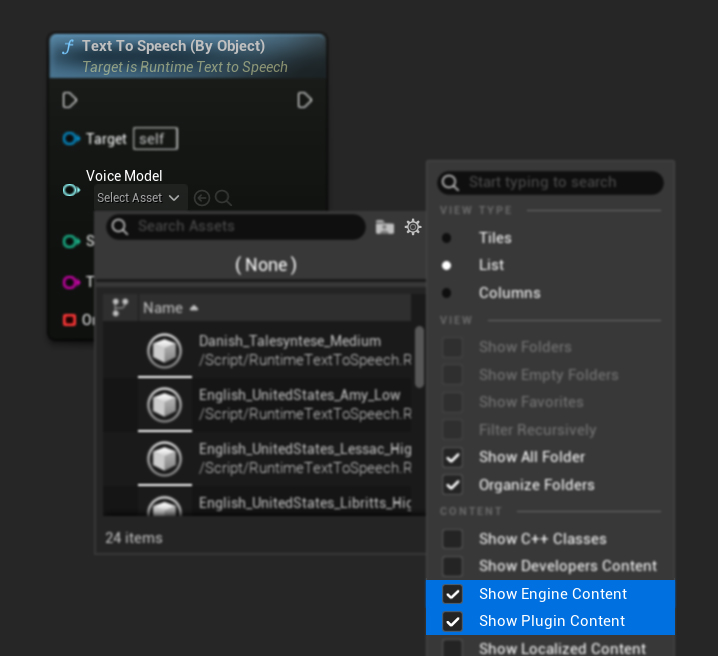
在 C++ 中,由於缺少下拉選單,語音模型的選擇可能會稍微複雜一些。您可以使用 GetDownloadedVoiceModelNames 函式來取得已下載語音模型的名稱,並選擇您需要的。然後,您可以呼叫 GetVoiceModelFromName 函式取得語音模型物件,並將其傳遞給 TextToSpeechByObject 函式以合成文字。
    // Assuming "Synthesizer" is a valid and referenced URuntimeTextToSpeech object (ensure it is not eligible for garbage collection during the callback)

    TArray<FName> DownloadedVoiceNames = URuntimeTTSLibrary::GetDownloadedVoiceModelNames();

	// If there are downloaded voice models, use the first one to synthesize text, for example
	if (DownloadedVoiceNames.Num() > 0)
	{
		const FName& VoiceName = DownloadedVoiceNames[0]; // Select the first available voice model
		TSoftObjectPtr<URuntimeTTSModel> VoiceModel;
		if (!URuntimeTTSLibrary::GetVoiceModelFromName(VoiceName, VoiceModel))
		{
			UE_LOG(LogTemp, Error, TEXT("Failed to get voice model from name: %s"), *VoiceName.ToString());
			return;
		}
		Synthesizer->TextToSpeechByObject(VoiceModel, 0, TEXT("Text example 123"), FOnTTSResultDelegateFast::CreateLambda([](URuntimeTextToSpeech* TextToSpeechInstance, bool bSuccess, const TArray<uint8>& AudioData, int32 SampleRate, int32 NumChannels)
		{
			UE_LOG(LogTemp, Log, TEXT("TextToSpeech result: %s, AudioData size: %d, SampleRate: %d, NumChannels: %d"), bSuccess ? TEXT("Success") : TEXT("Failed"), AudioData.Num(), SampleRate, NumChannels);
		}));
		return;
	}
串流文字轉語音
針對較長的文字或您想要在音訊生成時即時處理資料的情況,可以使用文字轉語音功能的串流版本:
Streaming Text To Speech (By Name)(StreamingTextToSpeechByNamein C++)Streaming Text To Speech (By Object)(StreamingTextToSpeechByObjectin C++)
這些函數會在音訊生成時以區塊形式提供音訊資料,讓您無需等待整個合成完成即可立即處理。這對於即時音訊播放、即時視覺化等各種應用,或任何需要逐步處理語音資料的情境都非常實用。
依照名稱串流
- Blueprint
- C++
Streaming Text To Speech (By Name) 函數的運作方式與一般版本類似,但會透過 On Speech Chunk 委派以區塊形式提供音訊。
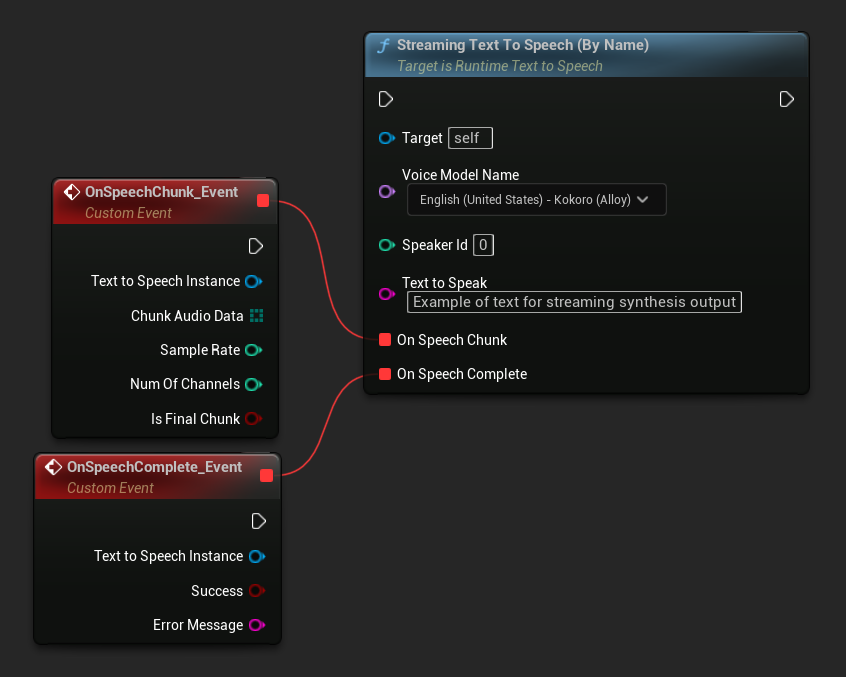
    // Assuming "Synthesizer" is a valid and referenced URuntimeTextToSpeech object

    TArray<FName> DownloadedVoiceNames = URuntimeTTSLibrary::GetDownloadedVoiceModelNames();

    if (DownloadedVoiceNames.Num() > 0)
    {
        const FName& VoiceName = DownloadedVoiceNames[0]; // Select the first available voice model

        Synthesizer->StreamingTextToSpeechByName(
            VoiceName,
            0,
            TEXT("This is a long text that will be synthesized in chunks."),
            FOnTTSStreamingChunkDelegateFast::CreateLambda([](URuntimeTextToSpeech* TextToSpeechInstance, const TArray<uint8>& ChunkAudioData, int32 SampleRate, int32 NumOfChannels, bool bIsFinalChunk)
            {
                // Process each chunk of audio data as it becomes available
                UE_LOG(LogTemp, Log, TEXT("Received chunk %d with %d bytes of audio data. Sample rate: %d, Channels: %d, Is Final: %s"),
                    ChunkIndex, ChunkAudioData.Num(), SampleRate, NumOfChannels, bIsFinalChunk ? TEXT("Yes") : TEXT("No"));

                // You can start processing/playing this chunk immediately
            }),
            FOnTTSStreamingCompleteDelegateFast::CreateLambda([](URuntimeTextToSpeech* TextToSpeechInstance, bool bSuccess, const FString& ErrorMessage)
            {
                // Called when the entire synthesis is complete or if it fails
                if (bSuccess)
                {
                    UE_LOG(LogTemp, Log, TEXT("Streaming synthesis completed successfully"));
                }
                else
                {
                    UE_LOG(LogTemp, Error, TEXT("Streaming synthesis failed: %s"), *ErrorMessage);
                }
            })
        );
    }
按物件串流
- Blueprint
- C++
Streaming Text To Speech (By Object) 函式提供相同的串流功能,但改為接受語音模型物件參考。
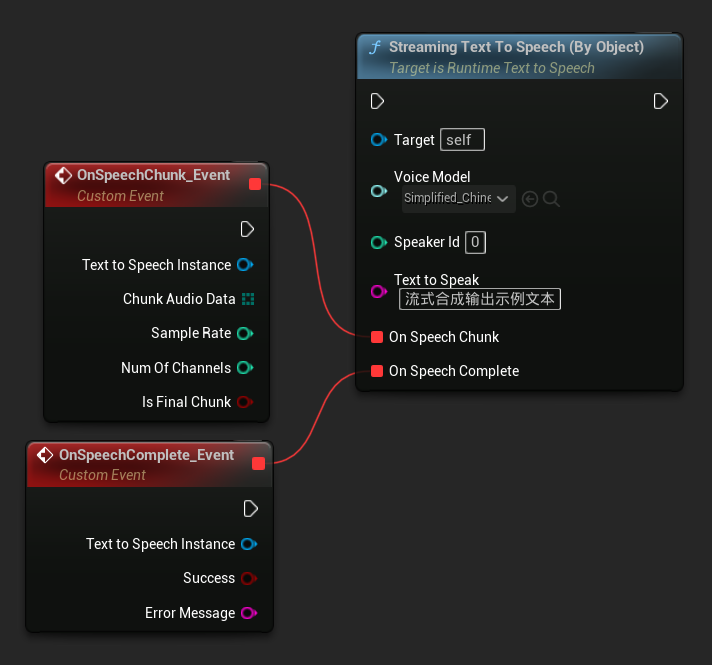
    // Assuming "Synthesizer" is a valid and referenced URuntimeTextToSpeech object

    TArray<FName> DownloadedVoiceNames = URuntimeTTSLibrary::GetDownloadedVoiceModelNames();

    if (DownloadedVoiceNames.Num() > 0)
    {
        const FName& VoiceName = DownloadedVoiceNames[0]; // Select the first available voice model
        TSoftObjectPtr<URuntimeTTSModel> VoiceModel;

        if (!URuntimeTTSLibrary::GetVoiceModelFromName(VoiceName, VoiceModel))
        {
            UE_LOG(LogTemp, Error, TEXT("Failed to get voice model from name: %s"), *VoiceName.ToString());
            return;
        }

        Synthesizer->StreamingTextToSpeechByObject(
            VoiceModel,
            0,
            TEXT("This is a long text that will be synthesized in chunks."),
            FOnTTSStreamingChunkDelegateFast::CreateLambda([](URuntimeTextToSpeech* TextToSpeechInstance, const TArray<uint8>& ChunkAudioData, int32 SampleRate, int32 NumOfChannels, bool bIsFinalChunk)
            {
                // Process each chunk of audio data as it becomes available
                UE_LOG(LogTemp, Log, TEXT("Received chunk %d with %d bytes of audio data. Sample rate: %d, Channels: %d, Is Final: %s"),
                    ChunkIndex, ChunkAudioData.Num(), SampleRate, NumOfChannels, bIsFinalChunk ? TEXT("Yes") : TEXT("No"));

                // You can start processing/playing this chunk immediately
            }),
            FOnTTSStreamingCompleteDelegateFast::CreateLambda([](URuntimeTextToSpeech* TextToSpeechInstance, bool bSuccess, const FString& ErrorMessage)
            {
                // Called when the entire synthesis is complete or if it fails
                if (bSuccess)
                {
                    UE_LOG(LogTemp, Log, TEXT("Streaming synthesis completed successfully"));
                }
                else
                {
                    UE_LOG(LogTemp, Error, TEXT("Streaming synthesis failed: %s"), *ErrorMessage);
                }
            })
        );
    }
音訊播放
- 常規播放
- 串流播放
對於常規(非串流)的文字轉語音,On Speech Result 委派會提供合成音訊作為浮點格式的 PCM 資料(在 Blueprints 中為位元組陣列,在 C++ 中為 TArray<uint8>),以及 Sample Rate 和 Num Of Channels。
對於播放,建議使用 Runtime Audio Importer 外掛程式將原始音訊資料轉換為可播放的聲音波形。
- Blueprint
- C++
以下是如何合成文字與播放音訊的 Blueprint 節點可能的外觀範例(可複製節點):
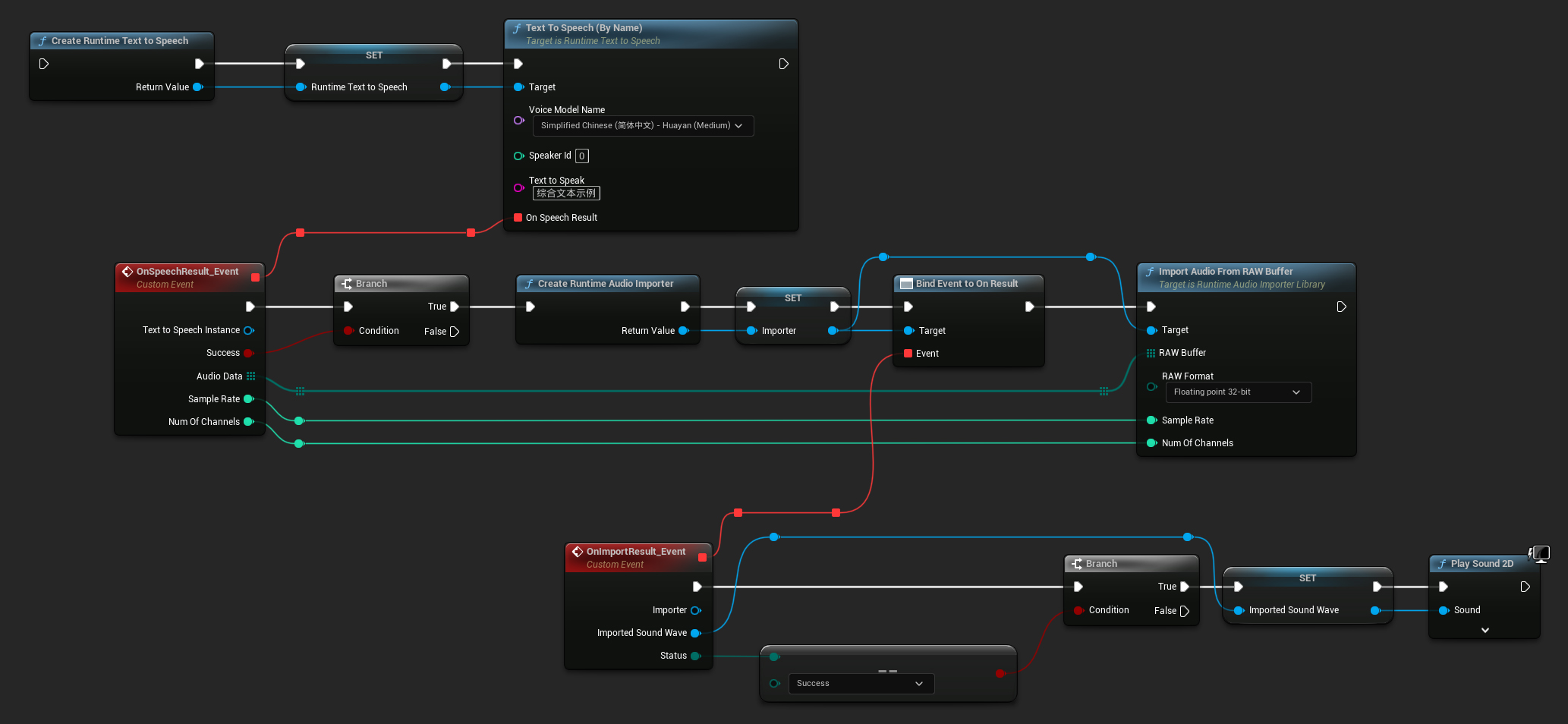
以下是在 C++ 中合成文字與播放音訊的範例:
        // Assuming "Synthesizer" is a valid and referenced URuntimeTextToSpeech object (ensure it is not eligible for garbage collection during the callback)
        // Ensure "this" is a valid and referenced UObject (must not be eligible for garbage collection during the callback)

        TArray<FName> DownloadedVoiceNames = URuntimeTTSLibrary::GetDownloadedVoiceModelNames();

        // If there are downloaded voice models, use the first one to synthesize text, for example
        if (DownloadedVoiceNames.Num() > 0)
        {
            const FName& VoiceName = DownloadedVoiceNames[0]; // Select the first available voice model
            Synthesizer->TextToSpeechByName(VoiceName, 0, TEXT("Text example 123"), FOnTTSResultDelegateFast::CreateLambda([this](URuntimeTextToSpeech* TextToSpeechInstance, bool bSuccess, const TArray<uint8>& AudioData, int32 SampleRate, int32 NumOfChannels)
            {
                if (!bSuccess)
                {
                    UE_LOG(LogTemp, Error, TEXT("TextToSpeech failed"));
                    return;
                }

                // Create the Runtime Audio Importer to process the audio data
                URuntimeAudioImporterLibrary* RuntimeAudioImporter = URuntimeAudioImporterLibrary::CreateRuntimeAudioImporter();

                // Prevent the RuntimeAudioImporter from being garbage collected by adding it to the root (you can also use a UPROPERTY, TStrongObjectPtr, etc.)
                RuntimeAudioImporter->AddToRoot();

                RuntimeAudioImporter->OnResultNative.AddWeakLambda(RuntimeAudioImporter, [this](URuntimeAudioImporterLibrary* Importer, UImportedSoundWave* ImportedSoundWave, ERuntimeImportStatus Status)
                {
                    // Once done, remove it from the root to allow garbage collection
                    Importer->RemoveFromRoot();

                    if (Status != ERuntimeImportStatus::SuccessfulImport)
                    {
                        UE_LOG(LogTemp, Error, TEXT("Failed to import audio, status: %s"), *UEnum::GetValueAsString(Status));
                        return;
                    }

                    // Play the imported sound wave (ensure a reference is kept to prevent garbage collection)
                    UGameplayStatics::PlaySound2D(GetWorld(), ImportedSoundWave);
                });

                RuntimeAudioImporter->ImportAudioFromRAWBuffer(AudioData, ERuntimeRAWAudioFormat::Float32, SampleRate, NumOfChannels);
            }));
            return;
        }
對於串流式文字轉語音,你將以區塊的形式接收到 PCM 浮點格式的音頻資料(在 Blueprint 中以位元組陣列呈現,在 C++ 中則為 TArray<uint8>),並附有 Sample Rate 與 Num Of Channels。每個區塊一旦可用即可立即處理。
對於實時播放,建議使用 Runtime Audio Importer 插件中的 Streaming Sound Wave,它專為串流音頻播放或實時處理而設計。
- Blueprint
- C++
這是一個展示串流式文字轉語音的 Blueprint 節點和音頻播放可能樣子的範例 (可複製的節點):
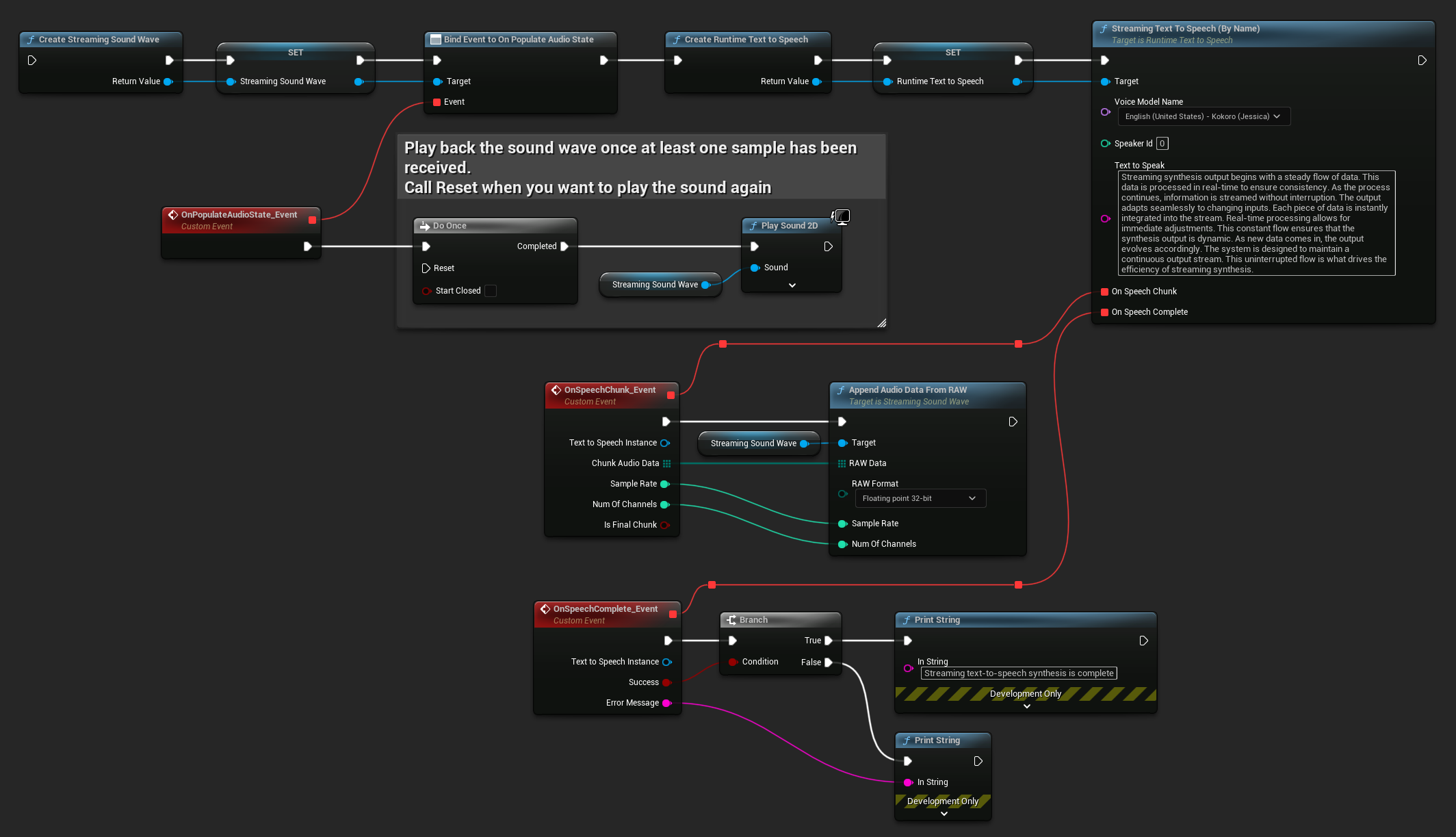
這是一個如何在 C++ 中實現串流式文字轉語音並進行實時播放的範例:
```cpp
UPROPERTY()
URuntimeTextToSpeech* Synthesizer;

UPROPERTY()
UStreamingSoundWave* StreamingSoundWave;

UPROPERTY()
bool bIsPlaying = false;

void StartStreamingTTS()
{
   // Create synthesizer if not already created
   if (!Synthesizer)
   {
       Synthesizer = URuntimeTextToSpeech::CreateRuntimeTextToSpeech();
   }

   // Create a sound wave for streaming if not already created
   if (!StreamingSoundWave)
   {
       StreamingSoundWave = UStreamingSoundWave::CreateStreamingSoundWave();
       StreamingSoundWave->OnPopulateAudioStateNative.AddWeakLambda(this, [this]()
       {
           if (!bIsPlaying)
           {
               bIsPlaying = true;
               UGameplayStatics::PlaySound2D(GetWorld(), StreamingSoundWave);
           }
       });
   }

   TArray<FName> DownloadedVoiceNames = URuntimeTTSLibrary::GetDownloadedVoiceModelNames();

   // If there are downloaded voice models, use the first one to synthesize text, for example
   if (DownloadedVoiceNames.Num() > 0)
   {
       const FName& VoiceName = DownloadedVoiceNames[0]; // Select the first available voice model

       Synthesizer->StreamingTextToSpeechByName(
           VoiceName,
           0,
           TEXT("Streaming synthesis output begins with a steady flow of data. This data is processed in real-time to ensure consistency. As the process continues, information is streamed without interruption. The output adapts seamlessly to changing inputs. Each piece of data is instantly integrated into the stream. Real-time processing allows for immediate adjustments. This constant flow ensures that the synthesis output is dynamic. As new data comes in, the output evolves accordingly. The system is designed to maintain a continuous output stream. This uninterrupted flow is what drives the efficiency of streaming synthesis."),
           FOnTTSStreamingChunkDelegateFast::CreateWeakLambda(this, [this](URuntimeTextToSpeech* TextToSpeechInstance, const TArray<uint8>& ChunkAudioData, int32 SampleRate, int32 NumOfChannels, bool bIsFinalChunk)
           {
               StreamingSoundWave->AppendAudioDataFromRAW(ChunkAudioData, ERuntimeRAWAudioFormat::Float32, SampleRate, NumOfChannels);
           }),
           FOnTTSStreamingCompleteDelegateFast::CreateWeakLambda(this, [this](URuntimeTextToSpeech* TextToSpeechInstance, bool bSuccess, const FString& ErrorMessage)
           {
               if (bSuccess)
               {
                   UE_LOG(LogTemp, Log, TEXT("Streaming text-to-speech synthesis is complete"));
               }
               else
               {
                   UE_LOG(LogTemp, Error, TEXT("Streaming synthesis failed: %s"), *ErrorMessage);
               }
           })
       );
   }
}
取消文字轉語音
您隨時可以透過在合成器實例上呼叫 CancelSpeechSynthesis 函數來取消正在進行的文字轉語音合成操作:
- Blueprint
- C++
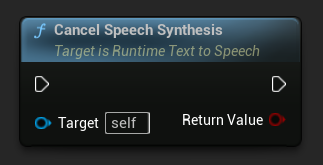
    // Assuming "Synthesizer" is a valid URuntimeTextToSpeech instance

    // Start a long synthesis operation
    Synthesizer->TextToSpeechByName(VoiceName, 0, TEXT("Very long text..."), ...);

    // Later, if you need to cancel it:
    bool bWasCancelled = Synthesizer->CancelSpeechSynthesis();

    if (bWasCancelled)
    {
        UE_LOG(LogTemp, Log, TEXT("Successfully cancelled ongoing synthesis"));
    }
    else
    {
        UE_LOG(LogTemp, Log, TEXT("No synthesis was in progress to cancel"));
    }
當合成被取消時:
- 合成過程將盡快停止
- 任何進行中的回呼都會被終止
- 完成委派(completion delegate)會以
bSuccess = false和一個指示合成已被取消的錯誤訊息來呼叫 - 所有為合成分配的資源都會被妥善清理
這對於長文本或當你需要中斷播放以開始新的合成時特別有用。
語者選擇
兩個文字轉語音功能都接受一個可選的語者 ID 參數,這在處理支援多個語者的語音模型時很有用。你可以使用 GetSpeakerCountFromVoiceModel 或 GetSpeakerCountFromModelName 功能來檢查所選的語音模型是否支援多個語者。如果有多個語者可用,只需在呼叫文字轉語音功能時指定你想要的語者 ID 即可。有些語音模型提供了豐富的多樣性——例如,English LibriTTS 包含 超過 900 種不同的語者 可供選擇。
Runtime Audio Importer 外掛還提供額外功能,例如將音訊資料匯出到檔案、傳遞給 SoundCue、MetaSound 等。更多詳細資訊,請參閱 Runtime Audio Importer 文件。